EasyManua.ls Logo

Yamaha TX7 - Attenuation; Real-Time Control Functions; Pitch Wheel Controls

Yamaha TX7
48 pages
Print Icon
To Next Page IconTo Next Page
To Previous Page IconTo Previous Page
Loading...
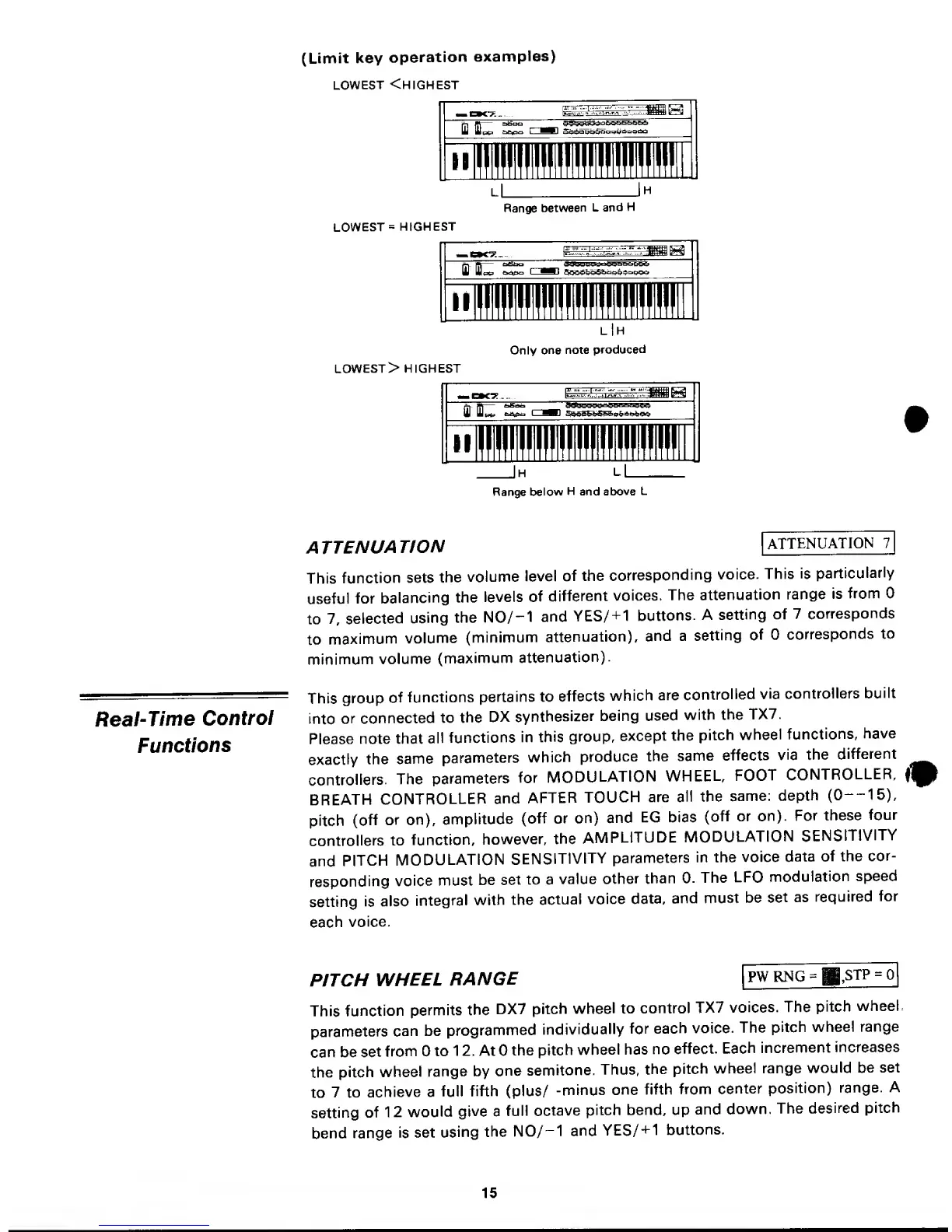
(Limit key
operation
examples)
LOWEST
<HIGHEST
lL
Range
between
L
and
H
LOWEST
=
HIGHEST
II
H
Only
one
note
produced
LOWEST
> HIGHEST
II
Range
below
H
and
above
L
Real-Time
Control
Functions
ATTENUATION
[ATTENUATION
7
This
function
sets
the
volume
level
of the
corresponding
voice.
This
is
particularly
useful
for
balancing
the
levels
of
different
voices.
The
attenuation
range
is
from
to 7,
selected
using
the
N0/-1
and
YES/
+
1
buttons.
A
setting
of
7
corresponds
to
maximum
volume
(minimum
attenuation),
and a
setting
of
corresponds
to
minimum
volume
(maximum
attenuation).
This
group
of
functions
pertains to
effects
which
are
controlled
via
controllers
built
into
or
connected
to
the
DX
synthesizer
being
used
with
the
TX7.
Please
note that
all
functions
in
this
group,
except
the
pitch
wheel
functions,
have
exactly
the
same
parameters
which
produce
the
same
effects
via
the
different
controllers.
The
parameters
for
MODULATION
WHEEL,
FOOT
CONTROLLER,
BREATH
CONTROLLER
and
AFTER
TOUCH
are
all the
same:
depth
(0
15),
pitch
(off
or on),
amplitude
(off or on)
and
EG bias
(off or
on).
For
these
four
controllers
to
function,
however,
the
AMPLITUDE
MODULATION
SENSITIVITY
and
PITCH
MODULATION
SENSITIVITY
parameters
in the
voice
data
of the
cor-
responding
voice
must
be
set
to a
value
other
than 0.
The
LFO
modulation
speed
setting
is
also
integral
with
the
actual
voice
data,
and must
be
set
as
required
for
each
voice.
PW
RNG
=
.STP
=
PITCH
WHEEL
RANGE
This
function
permits
the
DX7
pitch
wheel to
control
TX7
voices.
The
pitch
wheel,
parameters
can
be
programmed
individually
for
each
voice.
The
pitch
wheel range
can
be
set
from
to
1 2. At
the
pitch
wheel has
no
effect.
Each
increment
increases
the
pitch
wheel
range
by
one
semitone.
Thus,
the
pitch
wheel range
would be
set
to
7
to
achieve a
full
fifth (plus/
-minus
one
fifth
from
center
position)
range.
A
setting
of
1
2
would
give
a
full
octave
pitch
bend, up
and
down.
The
desired
pitch
bend
range
is
set
using
the
N0/-1
and
YES/+1
buttons.
15

Other manuals for Yamaha TX7

Related product manuals