EasyManua.ls Logo

Yamaha TX7 - Cassette Operations; Save and Verify Operations

Yamaha TX7
48 pages
Print Icon
To Next Page IconTo Next Page
To Previous Page IconTo Previous Page
Loading...
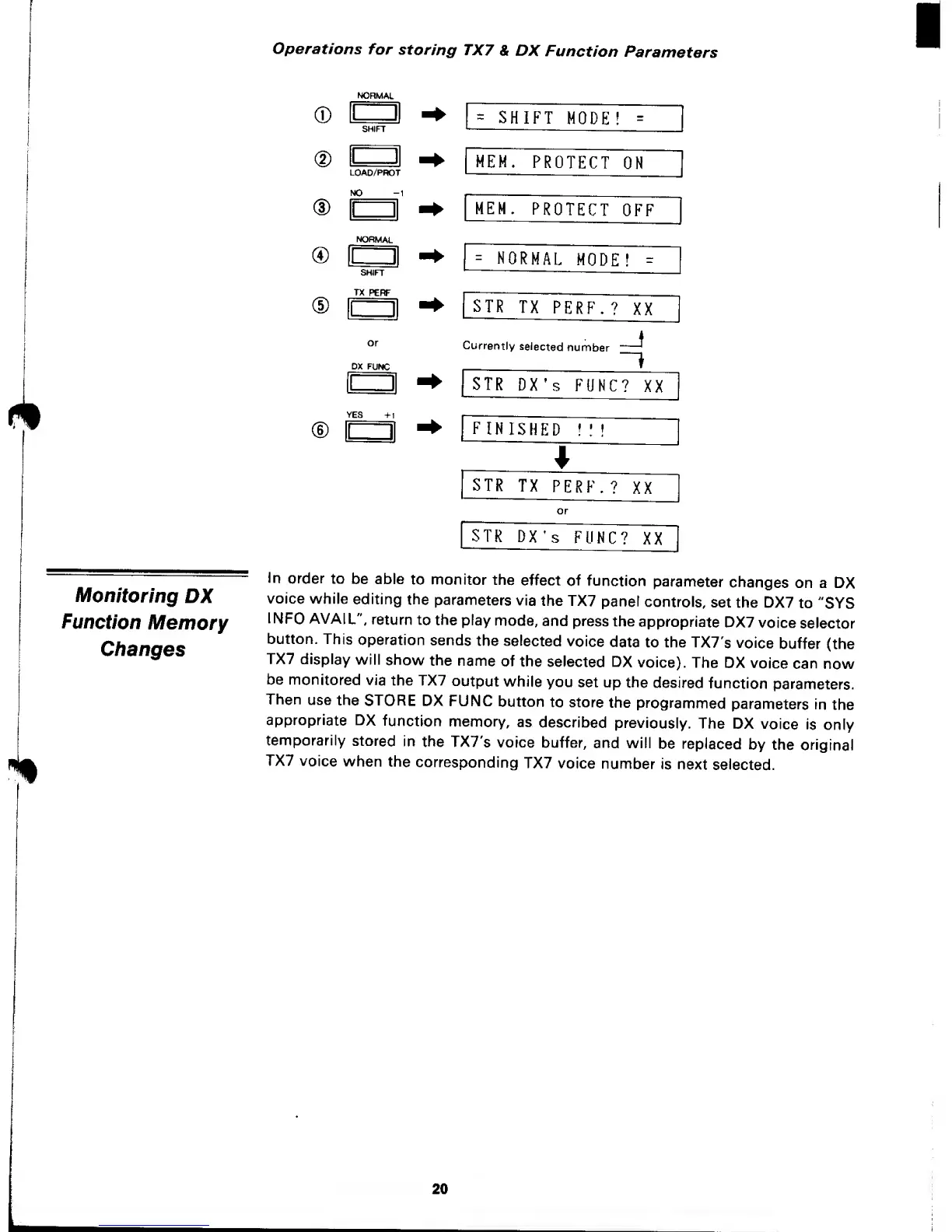
Operations
for
storing
TX7
&
DX
Function
Parameters
® E
®
NORMAL
®
LOAD/PROT
NO
-1
NORMAL
®
c
SHIFT
TX
PERF
or
DX
FUNC
=
SHIFT
MODE
!
=
MEM.
PROTECT
ON
lEM.
PROTECT
OFF
"[
=
NORMAL
MODE!
-
STR
TX
PERF.?
XX
Currently
selected
number
-J
STR
DX's
FUNC?
XX
FINISHED
!
:
!
STR
TX
PERF.?
XX
[
STR
DX's
FUNC?
XX
Monitoring
DX
Function
Memory
Clianges
In
order
to
be able
to monitor
the
effect
of
function
parameter
changes
on a
DX
voice
while
editing
the
parameters
via
the
TX7
panel
controls,
set
the DX7
to
"SYS
INFO AVAIL",
return
to the
play
mode,
and press
the
appropriate
DX7
voice
selector
button.
This
operation
sends
the
selected
voice
data
to the
TX7's
voice
buffer
(the
TX7
display
will
show
the
name
of
the
selected DX
voice).
The
DX
voice
can
now
be
monitored
via
the TX7
output
while
you
set up
the
desired
function
parameters.
Then
use
the
STORE
DX
FUNC
button
to store
the
programmed
parameters
In
the
appropriate
DX
function
memory,
as
described
previously.
The
DX
voice
is
only
temporarily
stored
in
the
TX7's
voice
buffer,
and will
be
replaced
by the
original
TX7
voice
when
the
corresponding
TX7
voice
number
is
next
selected.
20

Other manuals for Yamaha TX7

Related product manuals