EasyManua.ls Logo

Yamaha TX7 - MIDI Transmit Operation

Yamaha TX7
48 pages
Print Icon
To Next Page IconTo Next Page
To Previous Page IconTo Previous Page
Loading...
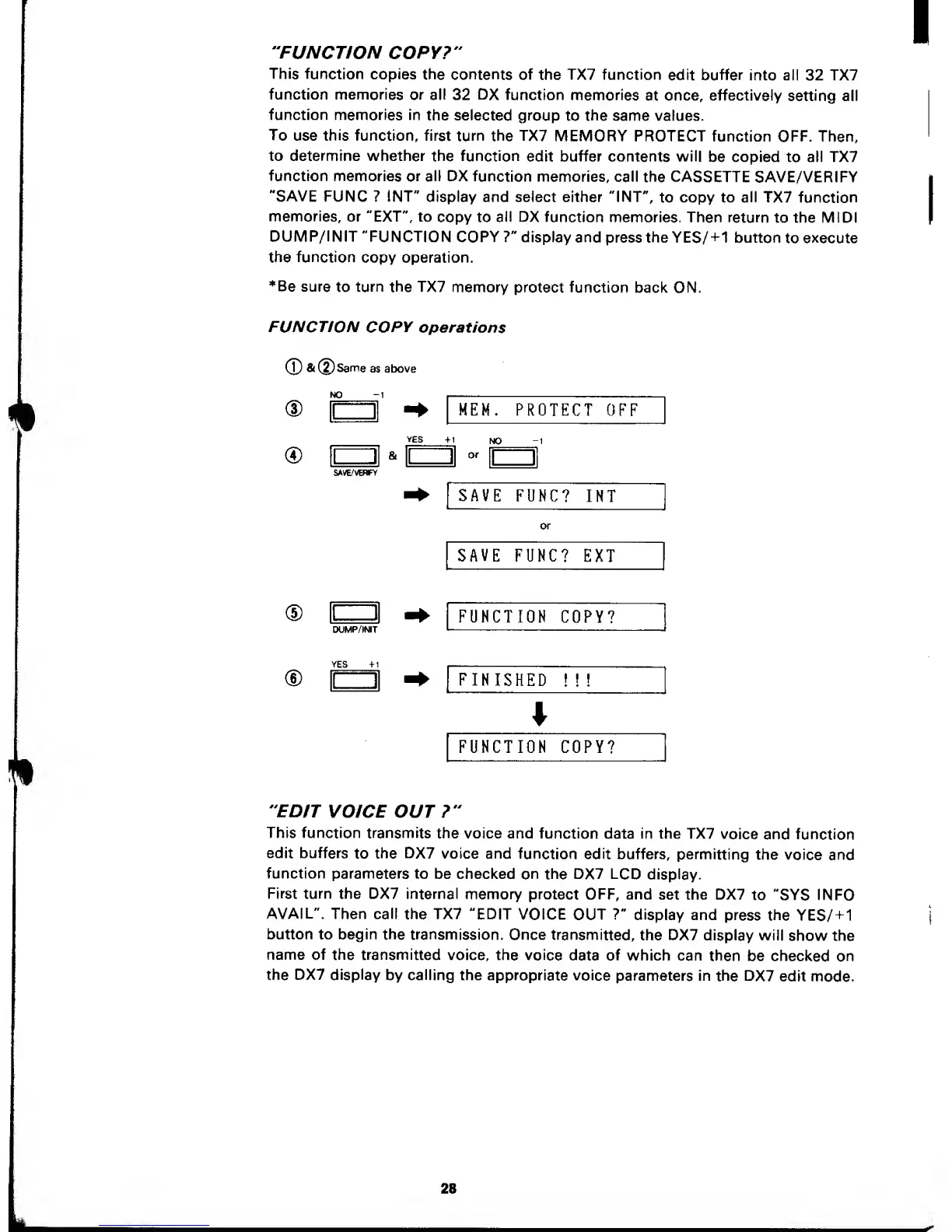
"FUNCTION COPY?"
This function
copies
the contents
of the TX7 function
edit buffer
into all 32 TX7
function memories
or all
32
DX
function
memories
at once, effectively
setting
all
function
memories in
the
selected group
to
the
same values.
To
use
this
function, first
turn the TX7
MEMORY PROTECT
function OFF. Then,
to determine whether
the function
edit buffer contents will
be copied
to
all TX7
function
memories
or
all DX
function
memories, call
the CASSETTE
SAVE/VERIFY
"SAVE FUNC ? INT" display
and select either "INT",
to copy to all TX7
function
memories,
or "EXT", to
copy to
all DX
function memories. Then
return
to the MIDI
DUMP/INIT
"FUNCTION
COPY
?"
display and
press the YES/
+
1 button
to
execute
the function
copy operation.
*Be sure
to
turn the TX7
memory
protect function
back ON.
FUNCTION
COPY
operations
®
&@Same
as above
NO
-1
(D
MEM. PROTECT
OFF
VES
+1
NO
-1
SAVE/VEMFY
SAVE
FUNC?
INT
SAVE
FUNC?
EXT
®
DUMP/INIT
FUNCTION
COPY?
®
FINISHED
!!!
FUNCTION COPY?
"EDIT
VOICE OUT?"
This function
transmits
the voice and function
data in the TX7
voice
and function
edit buffers
to the
DX7
voice and
function
edit buffers,
permitting
the
voice and
function
parameters
to be checked
on the DX7 LCD
display.
First
turn the DX7 internal
memory protect OFF,
and set the DX7
to
"SYS
INFO
AVAIL".
Then call
the
TX7
"EDIT
VOICE
OUT
?"
display
and
press the
YES/
+
1
button to
begin the transmission.
Once
transmitted,
the DX7 display
will
show the
name of the transmitted
voice, the
voice
data of which can
then
be checked
on
the
DX7
display
by
calling
the
appropriate voice
parameters in
the DX7
edit
mode.
28

Other manuals for Yamaha TX7

Related product manuals