EasyManua.ls Logo

Yamaha TX7 - Page 34

Yamaha TX7
48 pages
Print Icon
To Next Page IconTo Next Page
To Previous Page IconTo Previous Page
Loading...
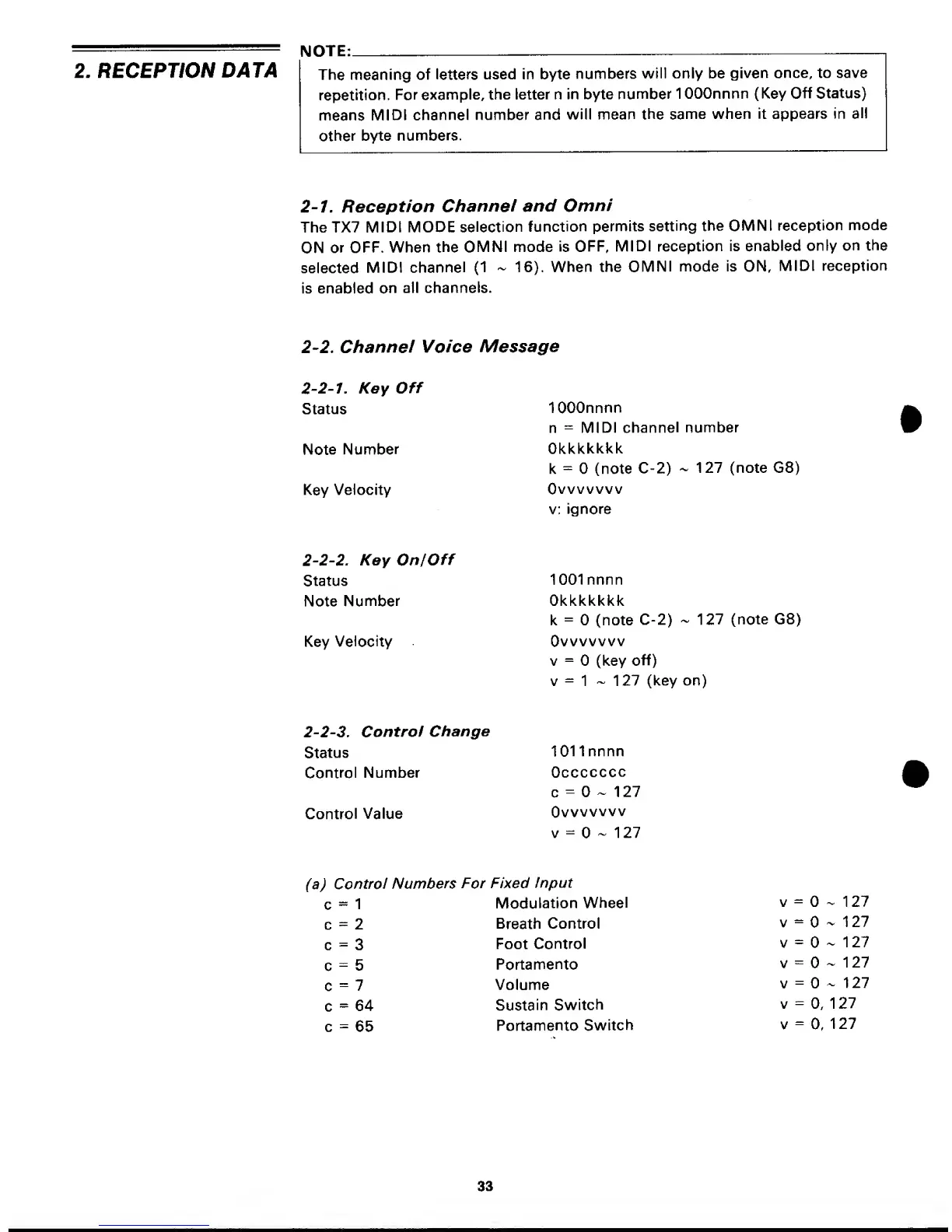
2. RECEPTION
DATA
NOTE:
The meaning of
letters
used in byte
numbers
will only be
given
once, to save
repetition.
For
example, ttie
letter n in byte
number
1 0OOnnnn (Key
Off Status)
means
MIDI
channel
number
and
will mean
the same
when
it appears in
all
other
byte
numbers.
2-7.
Reception
Channel
and
Omni
The TX7
MIDI MODE
selection
function
permits
setting
the OMNI
reception
mode
ON
or
OFF. When
the
OMNI mode
is
OFF,
MIDI reception is
enabled
only on
the
selected
MIDI
channel
(1
-
16).
When the
OMNI
mode
is
ON,
MIDI
reception
is enabled
on
all
channels.
2-2.
Channel
Voice
Message
2-2-1.
Key
Off
Status
Note
Number
Key
Velocity
lOOOnnnn
n
=
MIDI
channel number
Okkkkkkk
k
=
(note
C-2)
-
127 (note G8)
Ovvvvvvv
v;
ignore
2-2-2.
KeyOnfOff
Status
Note
Number
Key
Velocity
1001 nnnn
Okkkkkkk
k
=
(note
C-2)
-
127
(note G8)
Ovvvvvvv
V
=
(key
off)
v
=
1
-127
(key on)
2-2-3.
Control
Change
Status
1011
nnnn
Control
Number
Occccccc
c
=
^
1 27
Control
Value
Ovvvvvvv
V
=
~
1 27
(a)
Control
Numbers
For Fixed
Input
c
-
1
Modulation
Wheel
v
=
~ 127
c
=
2
Breath
Control
v
=
-
1 27
c
=
3
Foot
Control
v
=
~
1
27
c
=
5
Portamento
v
=
-
1 27
c
=
7
Volume
v
=
-
127
c
=
64
Sustain
Switch
v
=
0,
127
c
=
65
Portamento
Switch
v
=
0,
127
33

Other manuals for Yamaha TX7

Related product manuals