EasyManua.ls Logo

Yamaha TX7 - Page 35

Yamaha TX7
48 pages
Print Icon
To Next Page IconTo Next Page
To Previous Page IconTo Previous Page
Loading...
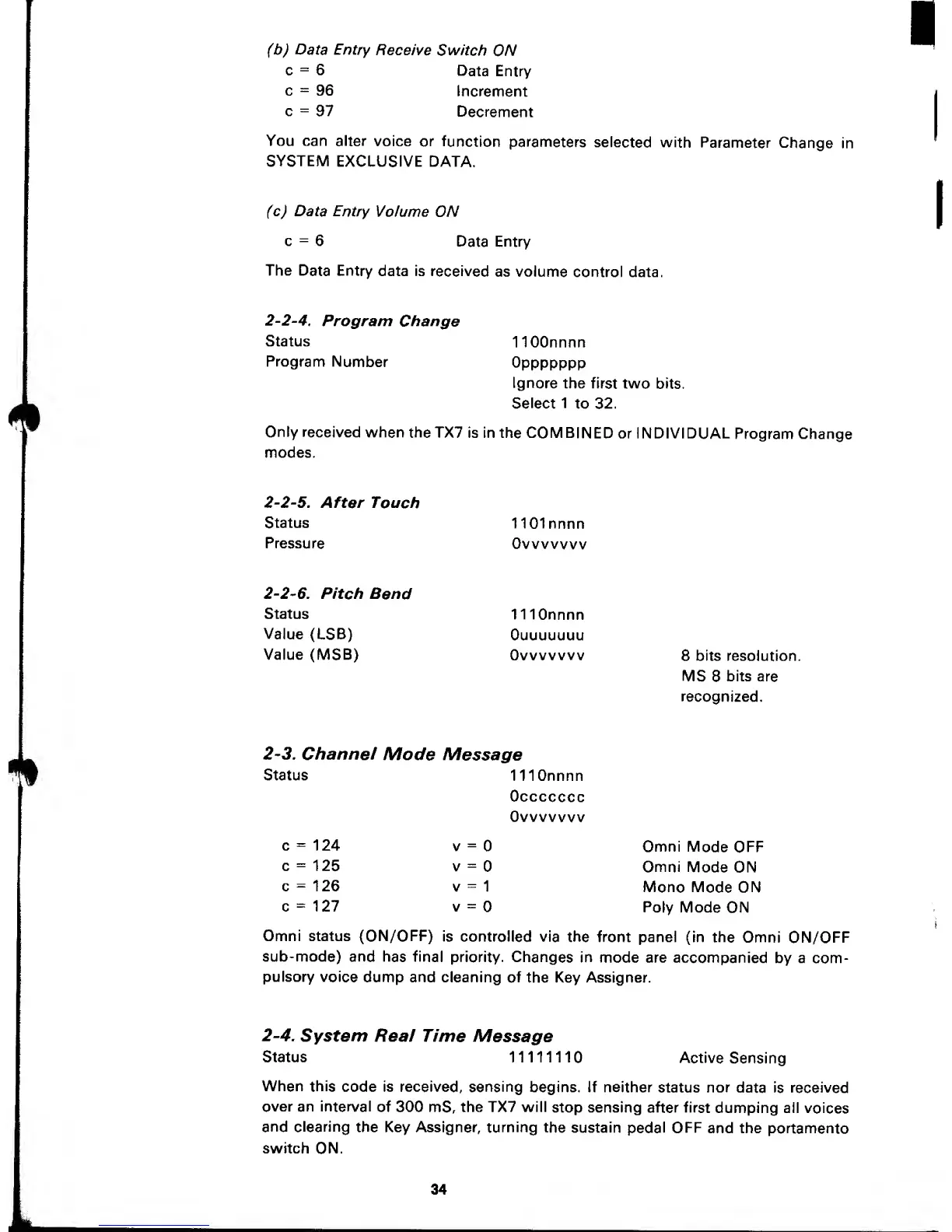
(b) Data Entry
Receive
Switch
ON
c
=
6
Data
Entry
c
=
96
Increment
c
=
97
Decrement
You can
alter
voice
or function
parameters
selected with
Parameter
Change
in
SYSTEM
EXCLUSIVE DATA.
(c) Data
Entry
Volume ON
c
=
6
Data Entry
The
Data Entry
data is
received
as volume
control data.
2-2-4.
Program
Change
Status
Program
Number
HOOnnnn
Oppppppp
Ignore
the first
two bits.
Select 1
to 32.
Only
received
when
theTX7
is in the
COMBINED
or INDIVIDUAL
Program Change
modes.
2-2-5.
After
Touch
Status
Pressure
1101 nnnn
Ovvvvvvv
2-2-6.
Pitch
Bend
Status
Value
(LSB)
Value (MSB)
1 1
lOnnnn
Ouuuuuuu
Ovvvvvvv
8 bits resolution.
MS 8
bits are
recognized.
2-3.
Channei
Mode
Message
Status
c
=
124
c
=
125
c
=
126
c
=
127
1 1 1 Onnnn
Occccccc
Ovvvvvvv
V
=
v
=
V
=
1
V
-
Omni
Mode
OFF
Omni
Mode ON
Mono Mode
ON
Poly Mode
ON
Omni status (ON/OFF)
is controlled via
the
front panel (in
the
Omni ON/OFF
sub-mode)
and has final
priority.
Changes
in mode are
accompanied
by a
com-
pulsory
voice
dump and cleaning of
the Key Assigner.
2-4.
System Real Time
Message
Status
11111110
Active
Sensing
When
this
code is received,
sensing
begins. If neither
status nor
data is received
over
an interval
of
300 mS,
the TX7 will
stop sensing
after
first
dumping all
voices
and
clearing
the Key Assigner, turning
the sustain
pedal
OFF
and the
portamento
switch
ON.
34

Other manuals for Yamaha TX7

Related product manuals