Folder/File Operations using the Open/Save Display
Basic Operations — Organizing Your Data
72
TYROS Owner’s Manual
■ Number Input type — Memorizing paths.................................................................
The location of the folders and files currently indicated on the LCD display is referred to
as a “path.” The Open/Save display for songs and styles lets you memorize the current
path to one of the panel buttons. Even if your data is scattered across the drive in a com-
plex hierarchy of folders and paths, you can instantly call up a specific file — no matter
how deeply hidden — with a single button-press.
In the example instructions below, the Open/Save display for songs is used.
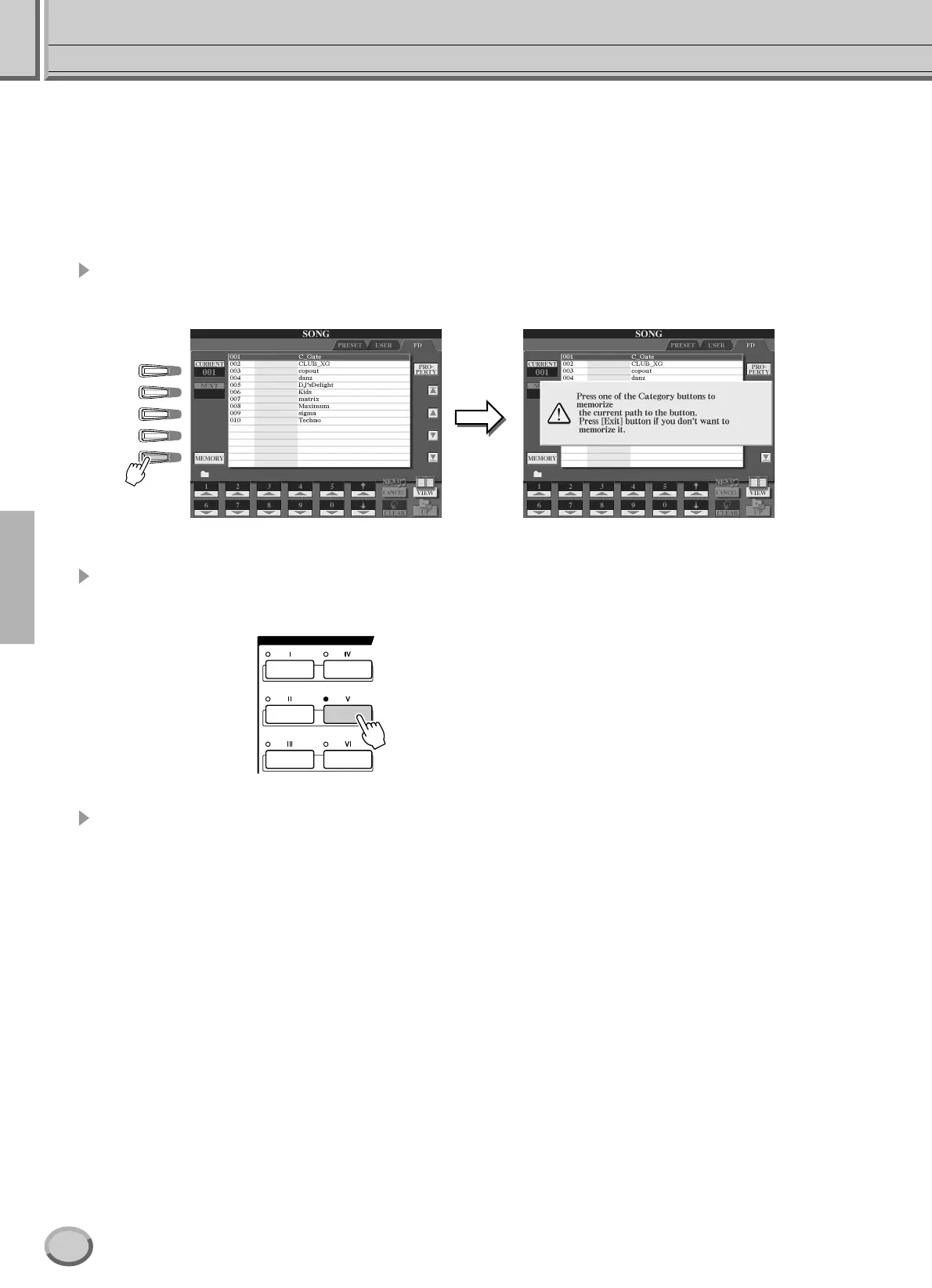
1 First, select the Number Input type, then call up the path to be memorized
to the button and press the [MEMORY] LCD button (LCD [E] button).
2 Press the desired button in the SONG section (for songs) to which the
path (selected in step #1 above) is to be memorized.
3 Call up the other path (for example, the Open/Save display for voices) and
press the same button as in step #2.
You will see the display same as shown in step #1.
Paths for style files can also be memorized, as explained above. See page 111 for details.
A
B
C
D
E
SONG
70


 To Next Page