EasyManua.ls Logo

Yamaha YAS-152 - User Manual

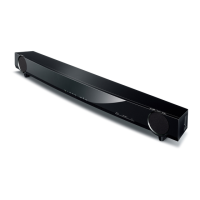
Yamaha YAS-152
22 pages
Print Icon
To Next Page IconTo Next Page
Loading...
UAB
Contents
Supplied items ...................................................................... 2
Features ................................................................................. 2
Part names and functions (sound bar) ................................ 3
Installations........................................................................... 4
Connections........................................................................... 5
Operations............................................................................. 6
Listening to the sound from a BLUETOOTH device............ 8
Listening to the sound from external devices .................. 10
Analog connection of an external device (game console) ................. 10
Analog connection of a portable device ...................................................10
Settings................................................................................ 11
Controlling the sound bar with TV remote control (TV remote control
learning function)................................................................................................. 11
Controlling the TV via the sound bar (when the TV’s remote control
sensor is blocked).................................................................................................13
Using an external subwoofer......................................................................... 13
Initializing the settings of the sound bar................................................... 14
Troubleshooting ................................................................. 15
Specifications ...................................................................... 18
Front Surround System
Owner’s Manual
PDF versions of this manual can be downloaded from the following website.
http://download.yamaha.com/
About this manual
This manual explains operations using the supplied remote control.
Marks used in this manual
NOTE
This indicates precautions for use of the product and its feature limitations.
HINT
This indicates supplementary explanations for better use.

Questions and Answers

  • J
    Jamie FloresAug 20, 2025
    What to do if my Yamaha Speaker System remote control is not working?
    • G
      genesawyerAug 20, 2025
      If your remote isn't working, first ensure you are within the operating range of the sound bar. Then, replace the batteries with new ones. Also, check if direct sunlight or strong lighting is interfering with the remote control sensor on the sound bar. If so, adjust the lighting or reposition the sound bar.
  • C
    Charlotte DuncanAug 22, 2025
    How to fix TV remote not working with Yamaha Speaker System?
    • M
      Manuel ArmstrongAug 22, 2025
      The sound bar may be blocking the TV's remote control sensor. Use the TV Remote Repeater function or remove the stands of the sound bar so that the TV remote control sensor is not blocked.
  • W
    wilsontimothyAug 25, 2025
    How to fix Yamaha YAS-152 that cannot make a Bluetooth connection?
    • S
      sextonstephanieAug 25, 2025
      The sound bar cannot maintain multiple Bluetooth connections simultaneously. Terminate the existing Bluetooth connection before attempting to connect a different device.
  • S
    Sarah CollinsAug 26, 2025
    How to fix Yamaha Speaker System that cannot pair with Bluetooth device?
    • E
      eedwardsAug 26, 2025
      Ensure that BLUETOOTH is selected as the current input source on your Yamaha Speaker System.
  • J
    John YorkAug 28, 2025
    Why is there no sound coming from my Yamaha Speaker System?
    • A
      Andre SmithAug 28, 2025
      There could be several reasons for this. Ensure that you have selected the correct input source. Also, check if the mute function is activated and deactivate it. Finally, make sure the volume isn't set too low and increase it if necessary.
  • T
    Timothy LyonsAug 30, 2025
    What to do if there is no surround effect on my Yamaha Speaker System?
    • H
      hannahjonesAug 30, 2025
      If you're not getting a surround sound effect, first check that surround playback is selected and not stereo. Also, ensure the volume isn't too low. Finally, verify that your TV or playback device is set to output multi-channel audio and not just 2-channel audio (like PCM).
  • S
    Scott ClarkSep 1, 2025
    Why is no sound coming from the subwoofer on my Yamaha YAS-152 Speaker System?
    • N
      norman03Sep 1, 2025
      If you're not hearing sound from the subwoofer, first ensure that the subwoofer volume isn't set too low. If it isn't, try adjusting the subwoofer setting. To do this, turn off the sound bar, then hold down the SUBWOOFER key (+ or -) on the remote control for more than 5 seconds to switch the subwoofer setting.
  • N
    Nicolas ZimmermanSep 3, 2025
    What to do if my Yamaha YAS-152 is not reacting?
    • B
      bhullSep 3, 2025
      If the sound bar isn't responding, try rebooting it by holding down the power button on the front panel for more than 10 seconds. If the problem continues, disconnect the power cable from the AC wall outlet, wait a few seconds, and then plug it back in.
  • M
    Monica BarrySep 5, 2025
    Why does the volume decrease when I turn on my Yamaha YAS-152 Speaker System?
    • M
      Monica JacksonSep 5, 2025
      The automatic volume adjustment function may be the cause. To prevent excessive loudness, the sound bar automatically controls its volume within a certain level when turned on. If necessary, simply turn the volume back up to your desired level.
  • F
    faustinSep 7, 2025
    How to fix noise heard from Yamaha Speaker System?
    • J
      Jason WatersSep 7, 2025
      If you're hearing noise, it could be due to interference from other devices. Try moving the sound bar away from other digital or high-frequency devices.

Summary

Features

Bluetooth connection

Play back sound from a connected Bluetooth device.

TV remote control learning function

Operate the sound bar with the TV's remote control.

Installations

Wall Mounting Guide

Steps for securely mounting the sound bar on a wall, including template and screw usage.

Connections

Optical Connection to TV

Connects the sound bar to a TV using an optical cable for audio output.

Listening to the sound from a BLUETOOTH device

Pairing and Connecting Bluetooth Devices

Steps to establish an initial wireless connection between a Bluetooth device and the sound bar.

Settings

TV Remote Control Learning

Enables the sound bar to learn TV remote control signals for operation.

Controlling the TV via the sound bar (when the TVs remote control sensor is blocked)

Using an external subwoofer

Troubleshooting

Power and System Issues

Addresses problems like unexpected power off, failure to turn on, and system unresponsiveness.

Audio Issues

Solves problems related to no sound, subwoofer issues, volume decrease, and surround effects.

Bluetooth Connection Issues

Solves problems with pairing, connecting, and interrupted audio playback via Bluetooth.

Yamaha YAS-152 Specifications

General IconGeneral
Audio decodersDolby Digital, Dolby Pro Logic II, DTS
RMS rated power120 W
Audio output channels2.1 channels
Impedance5 Ω
Woofer diameter85 mm
Crossover frequency1000 Hz
Soundbar speaker RMS power60 W
Subwoofer includedYes
Subwoofer locationBuilt-in
Subwoofer frequency range0 - 100 Hz
Receiver included-
Product colorBlack
Recommended usageTV
Quantity1
Bluetooth profilesA2DP
Apple docking compatibilityiPad, iPhone, iPod
Dimensions (W x D x H) with stand1200 x 108 x 136 mm
Speakers2
Bluetooth version2.1+EDR
HDMI ports quantity0
Power consumption (standby)0.5 W
Power consumption (typical)22 W
Weight and Dimensions IconWeight and Dimensions
Weight4800 g
Dimensions (WxDxH)1200 x 90 x 128 mm

Related product manuals