EasyManua.ls Logo

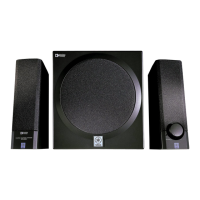
Yamaha YST-MS50 - User Manual

Yamaha YST-MS50
7 pages
Print Icon
To Next Page IconTo Next Page
Loading...
POWERED MULTIMEDIA SPEAKERS
YST-MS50
UCA
OWNER’S MANUAL
MODE D’EMPLOI
B
A
S
S
0
1
0
S
P
E
A
K
E
R
S
M
U
L
T
IM
E
D
IA
P
O
W
E
R
E
D
Y
S
T
-M
S
5
0
P
O
W
E
R
E
D
M
U
L
T
I
M
E
D
I
A
S
P
E
A
K
E
R
S
V
O
L
U
M
E
Explanation of Graphical Symbols
The lightning flash with arrowhead
symbol, within an equilateral triangle,
is intended to alert you to the
presence of uninsulated “dangerous
voltage” within the product’s
enclosure that may be of sufficient
magnitude to constitute a risk of
electric shock to persons.
The exclamation point within an
equilateral triangle is intended to alert
you to the presence of important
operating and maintenance
(servicing) instructions in the
literature accompanying the
appliance.
WARNING
TO REDUCE THE RISK OF FIRE OR ELECTRIC
SHOCK, DO NOT EXPOSE THIS APPLIANCE TO RAIN
OR MOISTURE.
CAUTION
CAUTION: TO REDUCE THE RISK OF
ELECTRIC SHOCK, DO NOT REMOVE
COVER (OR BACK). NO USER-SERVICEABLE
PARTS INSIDE. REFER SERVICING TO
QUALIFIED SERVICE PERSONNEL.
IMPORTANT
Please record the serial number of this system in the
space below.
Model:
Serial No.:
The serial number is located on the rear of the main
unit.
Retain this Owner’s Manual in a safe place for future
reference.
RISK OF ELECTRIC SHOCK
DO NOT OPEN

Other manuals for Yamaha YST-MS50

Questions and Answers

  • U
    uhillJul 30, 2025
    Why is there no sound coming from my Yamaha YST-MS50 Speakers or subwoofer?
    • R
      Ronald BradyJul 31, 2025
      Several factors could be at play. First, ensure the AC power cord is securely plugged into the wall outlet. Check that the main power switch on the subwoofer is set to 'ON' and that the (standby/on) button is activated (the indicator lights should be lit). Verify that all connections are correctly made, and consider using a different cable. Also, confirm that the speaker volume isn't set to the minimum and that the volume on the connected component is adequately high. Lastly, ensure headphones are disconnected, as they may be diverting the audio output.
  • S
    seanfrancisAug 7, 2025
    Why do my Yamaha YST-MS50 make noise?
    • A
      Ann PattonAug 7, 2025
      If your Yamaha Speakers are producing unwanted noise, it could be due to faulty or incomplete connections. Try remaking the connections firmly or using a different cable to see if that resolves the issue.
  • S
    Stacey JamesAug 15, 2025
    What to do if I hear noise when Yamaha Speakers power is turned on?
    • L
      lcollierAug 15, 2025
      If you're hearing noise when you turn on your Yamaha Speakers, the power cord might be connected to another unit’s SWITCHED AC OUTLET. Connect the power cord to an UNSWITCHED AC OUTLET instead. Make sure to use the (standby/on) button on this unit to turn it on and off.
  • R
    rhondarodriguezAug 22, 2025
    What to do if my Yamaha Speakers sound is distorted?
    • D
      Daniel BishopAug 22, 2025
      If the sound from your Yamaha Speakers is distorted, the signal being input may be too high. Try turning down the volume on the connected component to resolve this issue.

Summary

Safety and Important Information

Cautions and Warnings

Important safety warnings and precautions for operating the speakers, including shock hazards.

Model and Serial Number Recording

Section for recording system model and serial number for future reference and support.

Graphical Symbols Explanation

Explains the meaning of graphical symbols used in the manual and on the product for safety.

Safety Instructions

Comprehensive Safety Precautions

Detailed safety guidelines covering installation, operation, cleaning, and maintenance to prevent hazards.

Compliance and Listening Advice

FCC and Canadian Compliance

Details on FCC regulations and compliance for the product in the USA and Canada.

Hearing Health Advice

Recommendations to avoid prolonged exposure to excessive volume levels to prevent hearing damage.

Connection and Controls Overview

System Connection Diagram

Illustrates how to connect the subwoofer, satellite speakers, and audio sources using specified cables.

Controls and Connectors Identification

Labels and identifies all controls and input/output connectors on the subwoofer and speakers.

Operating Precautions and Detailed Controls

Important Operational Cautions

Specific precautions for using the YST-MS50, including power handling, environmental conditions, and speaker placement.

Controls and Input;Output Explanations

Detailed explanations for each control and input/output jack on the YST-MS50 system.

Specifications and Troubleshooting

Non-Skid Pad Application

Instructions on attaching the supplied pads to the bottom of satellite speakers for stability.

Technical Specifications

Detailed technical data including output power, dimensions, weight, frequency response, and power supply.

Troubleshooting Common Issues

A guide to common problems, their causes, and recommended solutions for the YST-MS50 system.

Yamaha YST-MS50 Specifications

General IconGeneral
Type2.1 speaker system
Configuration2.1
Frequency Response40Hz - 20kHz
Impedance4 ohms
WeightSatellites: 0.8kg each, Subwoofer: 5.5kg

Related product manuals