© Yanmar 2008 Page 7
Electronic Control System:
Operation Manual for SY Series Engines with GEN III Controls
Operation
Control Head Operation
The boat will start to move during the next steps. Be very cautious when rst
engaging the gears to establish that forward is truly forward and reverse is
truly reverse. A quick in-and-out of gear test is recommended. Ensure that
the boat is clear of all obstacles forward and aft before conducting this test.
WARNING
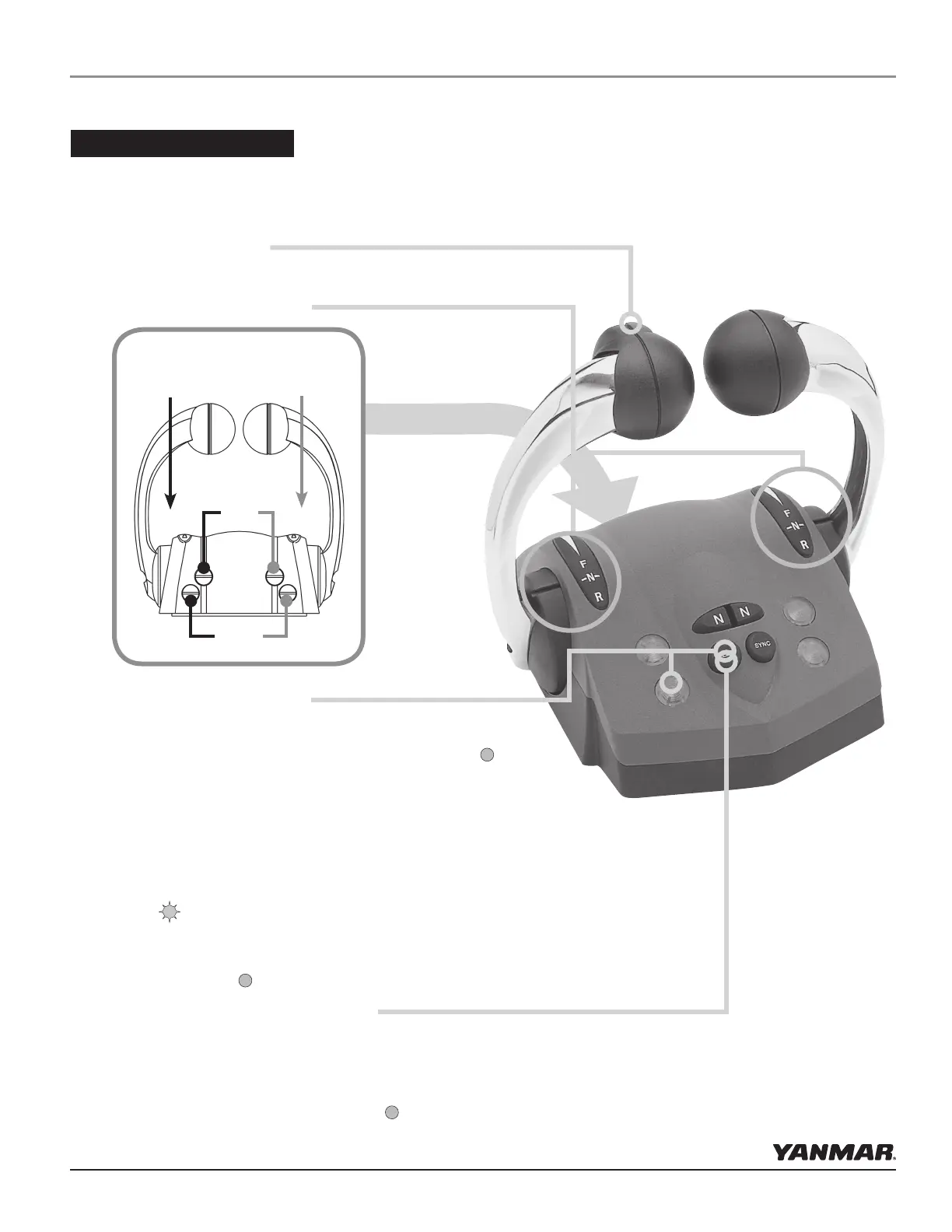
Select/change Station:
NOTE: Station Protection may be turned on, see Appendix F.
A lit green SELECT lamp indicates a station is active.
•
On single station boats, station selection is automatic.
•
For multi-station boats, choose a station and then press
SELECT button with levers in neutral.
to Change Stations:
•
Move to new station and press select button. (Green lamp
ashes.)
•
Match control handle positions with those of active station.
(Green lamp goes steady when levers match and this station
is now in control.)
Engine Trim Control:
in the handle (optional)
Lever Position Indicators:
Shift
Detent
Throttle
Friction
ADJUSTABLE LEVER FEEL
Starboard Port
Identication
Indicator Dimming Feature:
Push SELECT button and the lamps will dim. There are four
degrees of brightness from which to choose.
NOTE: Indicator Dimming is only accessible from the active
control station. (Green lamp on steady.)


 To Next Page