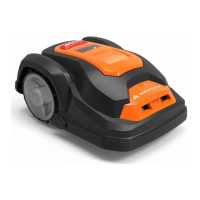
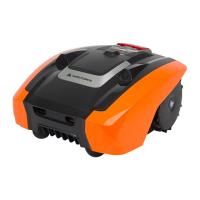
The Yard Force AMIRO 350/350i and 400/400i Robotic Mower is an intelligent lawn care device designed to autonomously maintain your lawn. It is equipped with various sensors and features to ensure efficient and safe operation within your garden.
Function Description:
The robotic mower is designed to cut grass automatically within a defined boundary. It features a STOP button for immediate halt, ultrasonic sensors for obstacle detection, a charging port, rear wheels for propulsion, a height adjustment dial for cutting height, a control panel for operation, a USB interface for updates, and an On/Off switch. It can navigate slopes up to 30% incline or decline and is protected against rain and spray water, though submersion should be avoided. The mower can be controlled via a physical control panel or through a dedicated mobile application (for 350i/400i models).
Important Technical Specifications:
- Models: AMIRO 350, 350i, 400, 400i
- Wifi: Available on 350i and 400i models.
- Max cutting area: 350 m² (350/350i), 400 m² (400/400i).
- Battery pack: 20V/2000mAh.
- Switch power supply: Input: 100-240V AC, 50/60Hz, 42W; Output: 24VDC, CC1.5A.
- Mowing time on one charge: 60 min.
- Rated voltage: 20 V.
- Rated power: 42 W.
- No load speed: 3500/min.
- Cutting width: 16 cm.
- Cutting height: Approx 20-55 mm (adjustable).
- Charging time: 100 min.
- Weight: 7.4 Kg.
- Degree of protection: Robotic Mower: IP24; Switching power supply: IP67, Plug IP44.
- Spare parts included: 3 Spare Blades, 110/120 Boundary pegs, 90m/100m Boundary wire, 3 Connectors.
Usage Features:
- Installation Guide: Comprehensive instructions are provided for setting up the robotic mower, including advice on clearing small rocks (less than 100mm high), managing trees (excluding exposed roots below 100mm), and handling paths/driveways (maintaining a 40cm safety distance).
- Docking Station Placement: The docking station requires a permanent connection to the mains and should be placed on an even, flat surface, away from ponds, pools, or stairs, preferably in a shaded location. A 2m straight wire to the front and 50cm to the side facing the cutting area is recommended for smooth return.
- Boundary Wire Installation: The lawn should be mowed to 60mm or less before laying the boundary wire. The wire can be buried or laid close to the ground to prevent tripping or damage. A ruler is provided to ensure a 20-30cm distance from obstacles. Pegs should be spaced about 80cm in straight lines and closer in curves, with the hook and wire slit facing outwards.
- Flowerbed Exclusion: Flowerbeds can be excluded by maintaining a distance of >10cm between parallel boundary wires (mower treats it as an obstacle) or <5mm (mower crosses unhindered, requiring an obstacle within a 1m x 1m flat area around the flowerbed).
- Corridor Navigation: For boundary corridors within the working area, a width of at least 2m and a maximum length of 8m is recommended.
- Signal Selection: Two signals (S1 - blue, S2 - red) are available to prevent interference with neighboring robotic mowers. A distance of at least 10m from neighbor's boundary wires and different signals are recommended.
- Operation Control Panel: Features buttons for signal selection (S1/S2), working time selection (4H, 6H, 8H, 10H), rain sensor ON/OFF, and Wifi configuration. A charging indicator flashes when charging.
- Physical Buttons:
- Unlock button: Interlocks with the STOP button to unlock the mower.
- Start button: Press and hold unlock, then press Start to begin mowing.
- Home button: Press and hold unlock, then press Home to return to the docking station.
- STOP button: Immediately halts the mower.
- Rain sensor indicator: Indicates when the mower will return to the docking station due to rain.
- Emergency Stop: The STOP button can be pressed at any time to halt the mower.
- APP Control (350i/400i): A mobile application ("Mower Aide") is available for download on App Store and Google Play. Users can register with email/phone, login, or explore as a guest. The app allows for adding the robotic mower by scanning a QR code or manually entering the serial number. After configuration, users can name their mower and remotely control it, access device settings (history, time setting, boundary set, multi-area, water sensor setting, ultrasonic settings, about device, share device, report setting, instruction), and share control with family members. Direct mode is available for use without Wifi access, requiring a PIN code (initial: 0000).
- Troubleshooting: Provides solutions for common issues such as failure to dock, running in circles, noisy operation, or not starting when pressing the START button. LED indicators on the docking station provide status feedback (e.g., battery charging faulty, boundary wire broken).
Maintenance Features:
- Regular Maintenance: Check and clean the robotic mower regularly. Use a dry brush, damp cloth, or sharpened wooden piece. Avoid flushing with water.
- Battery Life: Features a maintenance-free Li-ion battery with an estimated life of over 2 years.
- Winter Storage: Store the mower, docking station, and power supply in a dry place (shed, garage, indoors). Prepare for storage by fully recharging the battery, setting the main power switch to "OFF", thoroughly cleaning the mower, unplugging power supplies, disconnecting boundary wire (which can remain outside if protected against corrosion), and repacking in original packaging if available.
- Preparing for Spring: Clean charging contacts on both the mower and docking station using fine abrasion paper or a brass brush for optimal charging efficiency.
- Cleaning Mower Body: Remove rough dirt with a soft brush. For intensive cleaning, use a manual water spray with mild household detergent, wiping off residue with a moist rag.
- Cleaning Contact Pins and Charging Strips: Use wire wool, metal cleaner, or very fine grade emery paper to clean the contact pins and charging strips on the mower and docking station, removing debris, leaves, or grass clippings.
- Reversing or Replacing Blades: Ensure the main power switch is OFF and wear protective gloves. Blades are double-edged; when one side is blunt, loosen the screw, flip the blade, and re-fix. Replace all three blades at the same time for best performance. Spare blades are included, and more can be ordered from customer support.
- Software Update: Contact customer service for software updates.

 Need help?
 General





 To Next Page