PERFORMING A TEST WITH GLS-77 BLOOD GLUCOSE TEST STRIP
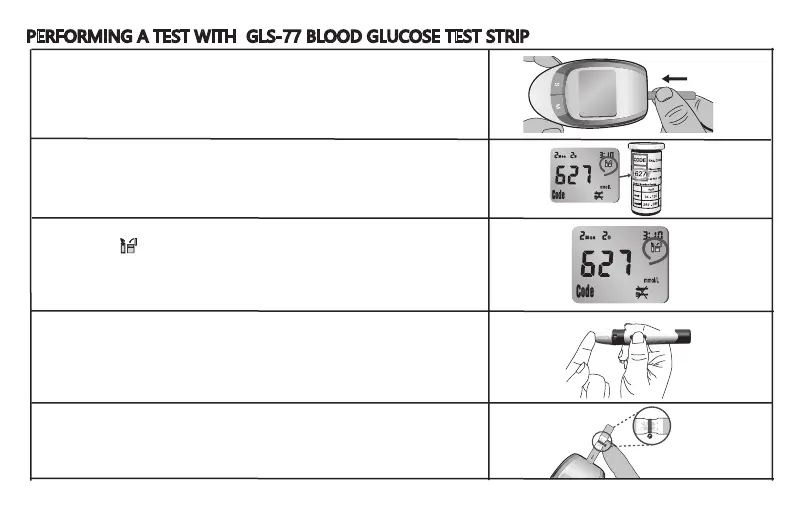
1. Wash your hands in warm, soapy water. Rinse and dry completely.
Warm your fingers to increase blood flow. Remove new test strip from
vial. Be sure to tightly re-cap the via after removing test strips. Insert
the test strip immediately into strip slot as illustrated. The meter turns
on automatically.
2. Check that the code number in the meter matches the code on the vial
of test strips you are using.
3. When the symbol flashes, you are ready to perform a test.
4. Use the lancet loaded in lancing device to obtain a drop of blood on
the side of your finger. Hold the device firmly against the side of your
finger. Press the release button. Gently massage your finger to obtain
the required blood volume. To perform the test, you need only 0.8μL
of blood sample.
5. Apply the blood sample to the right or left edge of the test strip in a
way that is comfortable for you. Make sure that the blood drop has
saturated the test confirmation window. When blood is applied to the
strip, a line moves on the display until measurement is completed.
9


 To Next Page
 Loading...