EasyManua.ls Logo

Yealink T33 - User Manual

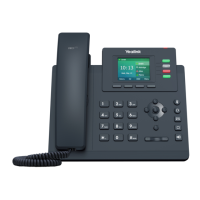
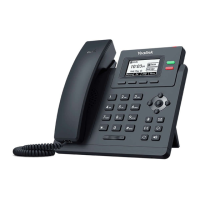
Yealink T33
2 pages
Print Icon
To Next Page IconTo Next Page
Loading...
Call Mute
Press
Press
to mute the microphone during a call.
again to un-mute the call.
Placing a Call
Using the handset:
1. Pick up the handset.
2. Enter the number and press the
Send soft key.
Using the speakerphone:
1. With the handset on-hook, press
2. Enter the number and press the Send
soft key.
Using the headset:
1. With the headset connected, press to activate
the headset mode.
2. Enter the number and press the Send
soft key.
Answering a Call
Using the handset:
Pick up the handset.
Using the speakerphone:
Press .
Using the headset:
Press .
You can reject an incoming call by pressing the Reject soft key.
Ending a Call
Using the handset:
Hang up the handset or press the EndCall soft key.
Using the speakerphone:
Press or the EndCall soft key.
Using the headset:
Press the EndCall soft key.
Press to enter the Placed Calls list, select the
desired entry, and press or the Send soft key.
Press twice when the phone is idle to dial out the
last dialed number.
Call Hold
To place a call on hold:
Press the Hold soft key during an active call.
To resume
the call, do one of the following:
If there is only one call on hold, press the Resume soft key.
If there is more than one call on hold, select the desired
call, and press the Resume soft key.
Call Transfer
You can transfer a call in the following ways:
Blind Transfer
1. Press the Trans soft key during an active call.
2. Enter the number you want to transfer to.
3. Press the B Trans soft key.
Semi-Attended Transfer
1. Press the Trans soft key during an active call.
2. Enter the number you want to transfer to, and press the
Send soft key
.
3. Press the Trans soft key when you hear the ring-
back tone.
Attended Transfer
1. Press the Trans
soft key during an active call.
2. Enter the number you want to transfer to, and press
the Send soft key.
3. Press the Trans soft key when the second party
answers.
Smart Choice Communications | (800) 217-3096 | www.smartchoiceus.com | techsupport@smartchoiceus.com
© 2021
Smart Choice Communications, LLC
YEALINK T33 - USER GUIDE
Redial

Other manuals for Yealink T33

Question and Answer IconNeed help?

Do you have a question about the Yealink T33 and is the answer not in the manual?

Summary

Call Operations

Placing a Call

Instructions for placing a call using the handset, speakerphone, or headset.

Answering a Call

Steps to answer an incoming call using the handset, speakerphone, or headset.

Ending a Call

Methods to end an active call using the handset or speakerphone.

Redial Functionality

How to redial the last dialed number or access the placed calls list.

Call Muting

Procedure to mute and unmute the microphone during a call.

Call Holding

Instructions on placing a call on hold and resuming it.

Call Transfer Methods

Details on performing blind, semi-attended, and attended call transfers.

Call Management Features

Call Forwarding Setup

Guide to enabling and configuring call forwarding types.

Initiating a Conference Call

Steps to set up and manage a conference call with multiple parties.

Speed Dial Configuration

How to set up and use speed dial keys for quick dialing.

Accessing Voice Messages

Instructions for checking and listening to voice messages.

Call History Navigation

How to view, call, delete, or manage entries in the call history.

Contact Directory Management

Steps to add, edit, and delete contacts in the directory.

Volume Adjustment

Method for adjusting the phone's volume.

Overview

The Yealink T33 is a robust and user-friendly IP phone designed for efficient communication in various professional settings. Its primary function is to facilitate voice calls, offering a comprehensive suite of features to enhance call management and user productivity.

Function Description:

The Yealink T33 serves as a primary communication endpoint, enabling users to make and receive calls with clarity and ease. It supports standard telephony functions such as placing calls, answering calls, and ending calls, adaptable for use with a handset, speakerphone, or headset. Beyond basic call handling, the device integrates advanced features like call redial, mute, hold, and transfer, providing flexibility in managing ongoing conversations. It also incorporates call forwarding capabilities, allowing users to redirect incoming calls based on their availability or preferences.

A significant aspect of its functionality is call conferencing, which enables multiple parties to participate in a single conversation, fostering collaboration and efficient group communication. The phone also includes a speed dial feature, streamlining the process of contacting frequently called numbers. For message management, the Yealink T33 provides a clear indication of new voice messages, allowing users to easily access and listen to their voicemails.

The device maintains a detailed call history, offering a record of placed, received, and missed calls, which can be reviewed and acted upon. Furthermore, it includes a contact directory, serving as a centralized repository for contact information, making it easy to store, retrieve, and manage contacts directly from the phone. Volume adjustment is also a core function, ensuring that users can customize audio levels for optimal listening and speaking experiences.

Usage Features:

The Yealink T33 is designed with user convenience in mind, offering intuitive controls and clear visual feedback.

Placing a Call:

  • Using the handset: Simply pick up the handset, dial the desired number, and press the "Send" soft key.
  • Using the speakerphone: With the handset on-hook, press the speakerphone button, dial the number, and press "Send."
  • Using the headset: With a headset connected, press the headset button to activate headset mode, dial the number, and press "Send."

Answering a Call:

  • Using the handset: Pick up the handset.
  • Using the speakerphone: Press the speakerphone button.
  • Using the headset: Press the headset button.
  • Incoming calls can be rejected by pressing the "Reject" soft key.

Ending a Call:

  • Using the handset: Hang up the handset or press the "EndCall" soft key.
  • Using the speakerphone: Press the speakerphone button or the "EndCall" soft key.
  • Using the headset: Press the "EndCall" soft key.

Redial:

  • To access the Placed Calls list, press the redial button, select an entry, and then press the redial button or "Send" soft key.
  • To redial the last dialed number, press the redial button twice when the phone is idle.

Call Mute:

  • During an active call, press the mute button to silence the microphone.
  • Press the mute button again to un-mute the call.

Call Hold:

  • To place a call on hold, press the "Hold" soft key during an active call.
  • To resume a call, press the "Resume" soft key if only one call is on hold. If multiple calls are on hold, select the desired call and then press "Resume."

Call Transfer:

  • Blind Transfer: During an active call, press "Trans," enter the transfer number, and then press "B Trans."
  • Semi-Attended Transfer: During an active call, press "Trans," enter the transfer number, press "Send," and then press "Trans" again when you hear the ring-back tone.
  • Attended Transfer: During an active call, press "Trans," enter the transfer number, press "Send," and then press "Trans" when the second party answers.

Call Forward:

  • From the idle screen, press "Menu," navigate to "Features" -> "Call Forward."
  • Select the desired forward type (e.g., Always, Busy, No Answer).
  • Enter the number to which calls should be forwarded. For "No Answer Forward," specify the "After Ring Time."
  • Press "Save" to apply the changes.

Call Conference:

  • During an active call, press "Conf." The current call is placed on hold.
  • Dial the number of the second party and press "Send."
  • Once the second party answers, press "Conf" again to join all parties in the conference.
  • Press "EndCall" to disconnect all parties.
  • The conference call can be split into two individual calls by pressing the "Split" soft key.

Speed Dial:

  • Configuration: From the idle screen, press "Menu," navigate to "Features" -> "Dsskey." Select a DSS key, press "Enter," choose "SpeedDial" as the type, select the account ID, enter a label, and the number in the "Value" field. Press "Save."
  • Usage: Press the configured speed dial key to dial the preset number.

Voice Message:

  • The message waiting indicator on the idle screen and a slowly flashing red power indicator LED signal new voice messages.
  • To listen, press the message button or the "Connect" soft key, then follow the voice prompts.

Call History:

  • From the idle screen, press "History."
  • Use the navigation buttons to scroll through the list.
  • To call an entry, select it and press "Send."
  • To delete an entry, select it and press "Delete."
  • Pressing "Option" allows viewing "Detail," adding to "Contacts" or "Blacklist," or "Delete All" entries.

Contact Directory:

  • Adding a contact: From the idle screen, press "Dir," select "All Contacts," then "Add." Enter the name and numbers in the respective fields, then press "Save."
  • Editing a contact: From the idle screen, press "Dir," select "All Contacts." Use navigation buttons to select a contact, press "Option," then "Detail." Edit the information and press "Save."
  • Deleting a contact: From the idle screen, press "Dir," select "All Contacts." Use navigation buttons to select a contact, press "Option," then "Delete." Confirm by pressing "OK."

Volume Adjustment:

  • Press the volume buttons to adjust the handset, speaker, or headset volume during a call or the ringer volume when idle.

Maintenance Features:

While the Yealink T33 is primarily a communication device, its design implicitly supports certain maintenance aspects through its software and hardware features.

  • Firmware Updates: Although not explicitly detailed in the provided manual snippet, IP phones like the Yealink T33 typically support firmware updates. These updates are crucial for maintaining device security, improving performance, adding new features, and resolving any software bugs. Regular firmware updates ensure the phone operates optimally and remains compatible with evolving network standards and communication platforms.
  • Configuration Backup and Restore: The ability to back up and restore phone configurations is a vital maintenance feature. This allows administrators to save the phone's settings (e.g., account details, speed dials, call forwarding rules) and restore them if the device needs to be reset or replaced, minimizing downtime and configuration effort.
  • Remote Management: Yealink phones are generally designed for remote management, allowing IT administrators to configure, monitor, and troubleshoot devices from a central location. This significantly reduces the need for on-site visits for routine maintenance or issue resolution, enhancing efficiency.
  • Troubleshooting Information: The device's interface and potential web interface (not shown in the snippet) often provide diagnostic information that can assist in troubleshooting network connectivity, registration issues, or call quality problems. This self-diagnostic capability helps in quickly identifying and resolving common issues.
  • Physical Cleaning: As a physical device, basic maintenance involves keeping the phone clean. Regular wiping of the handset, speaker, display, and keypad with a soft, damp cloth (and appropriate cleaning solutions if necessary) helps maintain hygiene and extends the lifespan of the physical components. Care should be taken to avoid harsh chemicals or excessive moisture.
  • Headset Port Maintenance: For users who frequently use a headset, ensuring the headset port is free of dust and debris is important for consistent audio quality and connection.
  • Power Cycle: In many electronic devices, a simple power cycle (unplugging and re-plugging the power adapter) can resolve minor software glitches or connectivity issues. This is a basic troubleshooting step that users can perform.

The Yealink T33 is built for durability and consistent performance, with its software and hardware features contributing to its overall maintainability and long-term operational efficiency.

Yealink T33 Specifications

General IconGeneral
ProtocolSIP
Headset PortRJ9
Local Phonebook1000 entries
USB PortNo
Display2.4" 320x240-pixel color display
Lines4
PoEYes
Audio FeaturesHD voice
CodecsG.722, G.711, G.729, G.726, iLBC
Buttons5 navigation keys
Ethernet Ports2
EHSYes
Power SupplyOptional 5V

Videos

How to transfer on the Yealink T33

Related product manuals