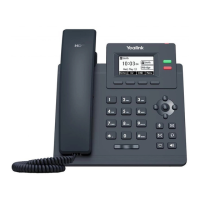
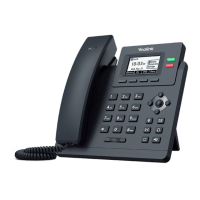
YEALINK T34W QUICK START GUIDE
Let’s get you up and running with your new phone.
65
1
2 3
4
7
8
9
10
13
11
14
12
Feature Status IconsDefault Account
Line
Keys
Page
Icons
Soft
Keys
Line
Keys
No. Item Description
1 Power LED Indicate call, message, and phone
system status.
2 Phone Screen Shows information about your
phone, such as calls, messages,
soft keys, time and date.
3 Line Keys Access your phone lines and features.
4 Soft Keys Access the function above the soft
keys on the screen. The soft keys
change depending on what you are
doing at the time.
5 Navigation
Keys
• Scroll through information or
options displayed on the screen.
• Access History and Directory
respectively.
5 OK Key Conrm actions or answer
incoming calls.
5 Cancel Key Cancel actions or reject
incoming calls.
6 Mute Key Toggle the microphone on or o.
7 Headset Key Toggle the headset mode on or o.
8 Message Key Access your voice messages.
9 Redial Key Redial a previously dialed number.
10 Speakerphone
Key
Toggle the speakerphone
(hands-free) mode or not.
11 Volume Key Adjust the handset, headset, and
speaker volume.
12 Keypad keys Allow you to enter numbers, letters,
and special characters. If a menu item
has an index number, you can use the
keypad key to select the item.
13 Speaker Provide ringer and speakerphone
audio output.
14 Reversible Tab Secure the handset in the cradle when
the phone is mounted vertically.

 Need help?

 To Next Page
 General