Need help?
Do you have a question about the Yealink UVC86 and is the answer not in the manual?
Explains the dual-eye 4K camera's function in capturing participants and room details.
Details Auto Framing, Speaker Tracking, and Presenter Tracking for a smooth video experience.
Highlights the 12x optical zoom and 90° field of view for covering medium/large meeting spaces.
Lists technical specifications for the PTZ camera, including zoom, FOV, and movement.
Details specifications for the panoramic camera, including sensor and field of view.
Lists AI functionalities such as Auto Framing, Speaker Tracking, and Presenter Tracking.
Outlines the various ports and interfaces available for connecting the UVC86.
Instructions for placing the UVC86 on a conference table.
Guidance for mounting the camera on top of a TV.
Details on how to securely mount the UVC86 camera on a wall.
Provides steps for installing the UVC86 camera on the ceiling.
Steps for attaching the UVC86 to a separate TV mount.
Information on connecting the UVC86 for Zoom specific use.
Explains the function of each port and connection on the UVC86.
Explains the meaning of different LED light statuses on the UVC86.
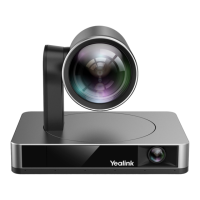
The Yealink UVC86 is a sophisticated 4K dual-eye intelligent camera designed for medium to large meeting rooms, ensuring every participant and detail is captured with exceptional clarity. Its primary function is to provide a face-to-face, intelligent, and smooth video experience by precisely reproducing every moment and detail, always presenting the best possible picture of your room.
The UVC86 integrates a dual-eye 4K camera system. This system comprises a panoramic camera that detects participants in real-time and a PTZ (Pan, Tilt, Zoom) camera that captures the optimal image of participants. This dual-eye design supports a 4K video stream, ensuring that every detail of the meeting is captured with high fidelity. The camera is equipped with a built-in PTZ camera offering a 90° field of view and a panoramic lens with a 120° field of view. This allows for easy tilting up and down, either via remote control or Yealink camera control plug-in software, facilitating more efficient collaboration.
Beyond its core video capture capabilities, the UVC86 also integrates audio features, making it a comprehensive solution for conference rooms. When paired with Yealink audio devices such as the VCM34 array microphone, VCM38 ceiling microphone, or MSpeaker II soundbar, it delivers a high-quality audio experience, complementing its superior video performance. The camera supports various transmission methods including USB, HDMI, and VCH, offering flexibility in different conferencing setups.
The UVC86 offers a range of intelligent features designed to enhance the user experience and streamline video conferencing. These include:
The dual-eye design of the UVC86 is crucial for the stability and smoothness of these tracking effects, providing a seamless and professional conferencing experience. With its 12x optical zoom and a 90° field of view, the UVC86 can easily cover medium to large meeting spaces, ensuring that everyone in the room is clearly visible to remote attendees. The mechanical Pan, Tilt, and Zoom functions can be smoothly controlled via remote control or the Yealink camera control plug-in, allowing for precise adjustments during a meeting.
For privacy and security, the UVC86 features an electric lens cap for the panoramic camera. When a video conference begins, this lens cap automatically opens, and the PTZ camera awakes and aims at the participants. Conversely, when not in a video conference, the panoramic camera's electric lens cap remains closed, and the PTZ camera automatically flips down, securing conference privacy.
The UVC86 is designed for versatile installation, accommodating various room layouts and preferences. It can be placed on a flat surface, mounted on top of a display (suitable for TV thicknesses between 0 mm and 146 mm), mounted on a wall (with a recommended height of 1.55 m to 1.85 m above the ground), or mounted on the ceiling. Additionally, it can be mounted onto a TV mount, which requires a separately purchased mount. These multiple installation options provide great flexibility to integrate the UVC86 seamlessly into any conference environment.
While the manual primarily focuses on installation and usage, it also touches upon aspects related to the camera's operational status and basic maintenance. The LED indicator provides clear visual cues regarding the camera's status:
These LED indicators are essential for quick troubleshooting and understanding the camera's current state, allowing users to identify if the device is functioning correctly or if it requires attention, such as a firmware update or connection check.
The UVC86 also includes a "Reset Slot" which allows users to reset the device to factory defaults. This is a crucial maintenance feature for resolving potential software glitches or configuration issues, ensuring the camera can be restored to a known working state. Additionally, a "Security Lock Slot" is provided, enabling users to connect a universal security cable to lock the UVC86 down, preventing theft and ensuring physical security in public or shared spaces.
For optimal performance, the manual advises ensuring the camera is placed on a flat surface with an inclination angle of no more than 5 degrees. During installation, it emphasizes tightening screws with a screwdriver to prevent the camera from falling off, highlighting the importance of secure mounting for long-term stability and safety. The usage of the UVC86 with different conferencing endpoints varies, and users are directed to refer to corresponding documentation for specific connection, pairing, and update instructions, ensuring proper integration and functionality within their existing systems.
 General
| Microphone in | Yes |
|---|---|
| USB 2.0 ports quantity | USB 2.0 ports have a data transmission speed of 480 Mbps, and are backwards compatible with USB 1.1 ports. You can connect all kinds of peripheral devices to them. |
| Cables included | USB |
| USB cable length | 7 m |
| Megapixel | 8 MP |
| Camera type | Dual camera |
| Digital zoom | 1.7 x |
| Optical zoom | 12 x |
| Vertical field of view | 78 ° |
| Horizontal field of view | 110 ° |
| Number of camera presets | 9 |
| Pan range | -100 - 100 ° |
| Mounting type | Stand |
| Product color | Black |
| Tilt angle range | -90 - 40 ° |
| Tracking modes | Presenter mode |
| Operating temperature (T-T) | 0 - 40 °C |
| Operating relative humidity (H-H) | 10 - 95 % |
| Input current | 0.7 A |
| DC input voltage | 48 V |
| Power source type | AC |
| AC input frequency | 100 - 240 Hz |
| Maximum frame rate | 30 fps |
| Maximum video resolution | 3840 x 2160 pixels |
| Harmonized System (HS) code | 85258900 |
 Weight and Dimensions
| Depth | 156 mm |
|---|---|
| Width | 210 mm |
| Weight | 3270 g |

 To Next Page