EasyManua.ls Logo

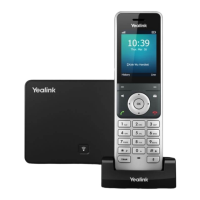
Yealink W73H DECT - User Manual

Yealink W73H DECT
70 pages
Print Icon
To Next Page IconTo Next Page
Loading...
24Q1
Yealink
User Guide
W73H DECT

Other manuals for Yealink W73H DECT

Question and Answer IconNeed help?

Do you have a question about the Yealink W73H DECT and is the answer not in the manual?

Summary

Call Handling Basics

Change the Default Outgoing Line

Select the primary line for outgoing calls.

Place Internal Calls

Make calls to other registered handsets or internal extensions.

Place External Calls

Dial numbers on the public telephone network.

Hold and Resume Calls

Place active calls on hold and retrieve them.

Transfer Calls

Move an ongoing call to another contact.

Call Management & Features

Place an Anonymous Call

Make calls while hiding caller ID information.

Answer Calls

Receive and manage incoming calls.

Silence or Reject Incoming Calls

Stop ringing or decline calls.

Mute and Unmute Audio

Control microphone input during a call.

Call Forward

Redirect incoming calls to another number.

Directories and Contacts

Place a Call from the Directory

Initiate calls using contacts from the phone directory.

Call History

View and manage past call records.

Blocklist

Manage numbers to block unwanted callers.

Advanced Phone Features

Record Using an SD Card

Record calls using an SD card for later playback.

Voice Mail

Listen to and manage voicemail messages.

Push-to-Talk (PTT)

Use handset as a two-way radio for group communication.

Multicast Paging

Broadcast audio announcements to specific groups.

Settings and Customization

Customize Your Phone

Personalize various phone settings and appearance.

Change the Base PIN

Secure the phone by changing the default base PIN.

Audio and Sound Settings

Adjust volume, ringtones, and other audio preferences.

Change the Language

Select the user interface language for the phone.

Connectivity

Bluetooth Connectivity

Connect and manage Bluetooth devices like headsets.

PC Connectivity

Connect the phone to a PC for enhanced functionality.

Phone Maintenance

Maintain Your Phone

Troubleshooting and managing phone operational issues.

Reboot the Base Station

Restart the phone's base station to refresh settings.

Reset the Handset

Restore handset settings to factory defaults.

Summary

Call Handling Basics

Change the Default Outgoing Line

Select the primary line for outgoing calls.

Place Internal Calls

Make calls to other registered handsets or internal extensions.

Place External Calls

Dial numbers on the public telephone network.

Hold and Resume Calls

Place active calls on hold and retrieve them.

Transfer Calls

Move an ongoing call to another contact.

Call Management & Features

Place an Anonymous Call

Make calls while hiding caller ID information.

Answer Calls

Receive and manage incoming calls.

Silence or Reject Incoming Calls

Stop ringing or decline calls.

Mute and Unmute Audio

Control microphone input during a call.

Call Forward

Redirect incoming calls to another number.

Directories and Contacts

Place a Call from the Directory

Initiate calls using contacts from the phone directory.

Call History

View and manage past call records.

Blocklist

Manage numbers to block unwanted callers.

Advanced Phone Features

Record Using an SD Card

Record calls using an SD card for later playback.

Voice Mail

Listen to and manage voicemail messages.

Push-to-Talk (PTT)

Use handset as a two-way radio for group communication.

Multicast Paging

Broadcast audio announcements to specific groups.

Settings and Customization

Customize Your Phone

Personalize various phone settings and appearance.

Change the Base PIN

Secure the phone by changing the default base PIN.

Audio and Sound Settings

Adjust volume, ringtones, and other audio preferences.

Change the Language

Select the user interface language for the phone.

Connectivity

Bluetooth Connectivity

Connect and manage Bluetooth devices like headsets.

PC Connectivity

Connect the phone to a PC for enhanced functionality.

Phone Maintenance

Maintain Your Phone

Troubleshooting and managing phone operational issues.

Reboot the Base Station

Restart the phone's base station to refresh settings.

Reset the Handset

Restore handset settings to factory defaults.

Yealink W73H DECT Specifications

General IconGeneral
BrandYealink
ModelW73H DECT
CategoryCordless Telephone
LanguageEnglish

Related product manuals