EasyManua.ls Logo

yeedi cube - Indicator Lights Guide

yeedi cube
31 pages
Print Icon
To Next Page IconTo Next Page
To Previous Page IconTo Previous Page
Loading...
16
EN
2.
Mapping and Cleaning/2.6 Instructions for Robot and Station
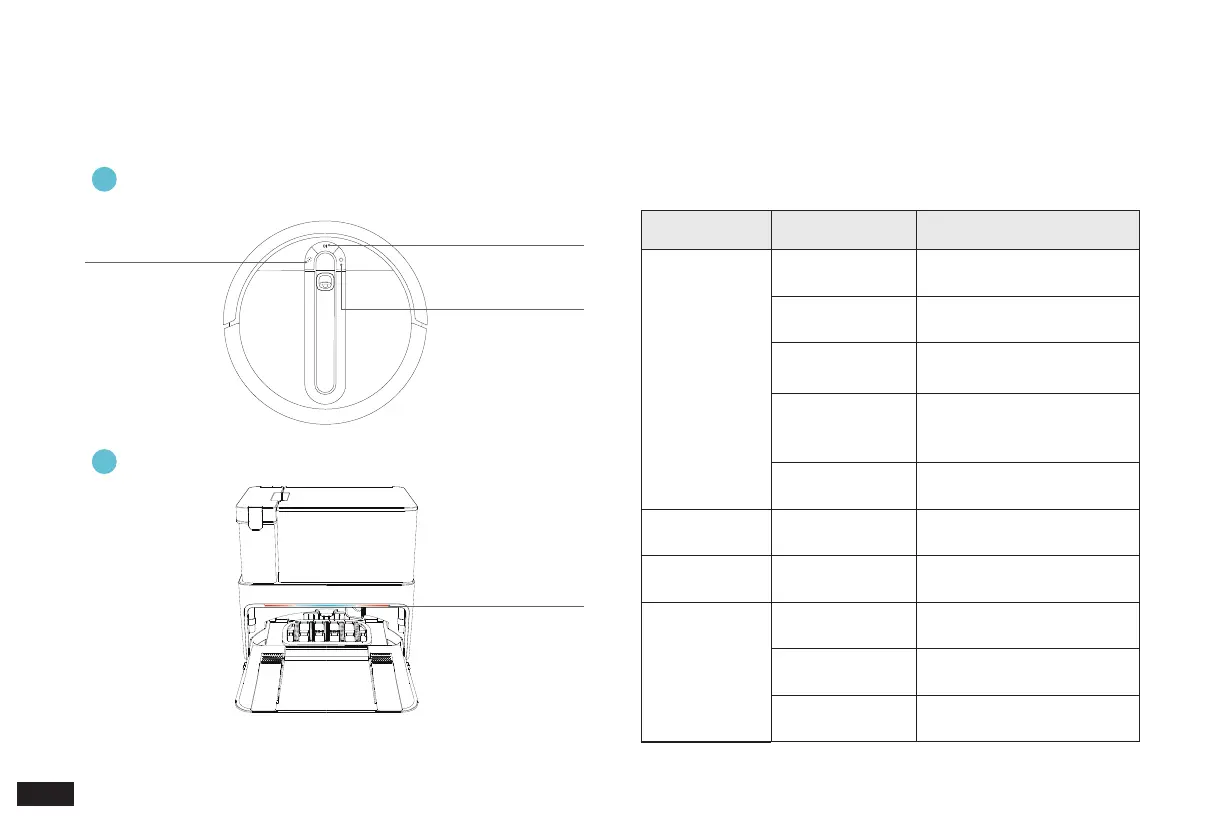
Indicator Lights
CLEAN Indicator Light
Ambient Light of the
Station
HOME Indicator Light
SPOT Indicator Light
Indicator Light Display Status Robot Status
CLEAN
Indicator Light
The light blue
light is solid on
Have a cleaning task
The red light is
solid on
Low power/power off
charging
The red light
ashes
Robot alarm status
The white light is
solid on
Standby/network setup
succeeded/Base Station
docking successful
The white light is
ashing
Charging/Start up/Robot
loading/Firmware update
HOME Indicator
Light
The white light is
solid on
Return to Station
SPOT Indicator
Light
The light blue
light is solid on
Spot Cleaning
Ambient Light
of the Station
The light blue
light is solid on
Working/Charging
The left red light
is solid on
Dirty water bucket out of
place/full of water
The right red light
is solid on
Dust Bag out of place
Robot lighting effect
1
Cube Station lighting effect
2

Related product manuals