Installation and Use
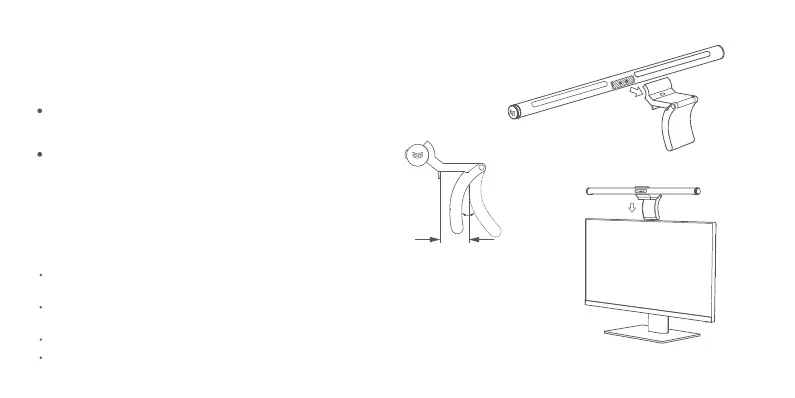
1. Install the light bar:
With the main light area facing downward, connect the power contact
point of the lamp body to that of the base;
Tips:
Place the base in the middle of the upper part of the display to
fasten the fixing buckle to the display screen, with the lower part
of the base holding up the back of the display (please remove
the protective film from the base surface when placing the base);
0-32mm
40°
This product is suitable for displays with a thickness ≤ 32mm, and adaptable to hairtail
screen, curved screen, iMac, etc.
The product can be hung stably on displays with a thickness < 10 mm, but the lower part of
the base cannot hold up the display.
The gravity shaft of the base is adjustable within 40°. Do not pull with excessive force.
This product can not be used on laptops.


 To Next Page