Light control
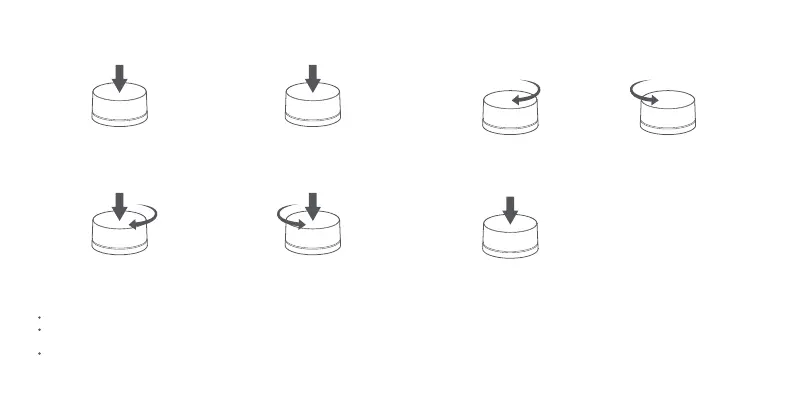
Press lightly
Front light on and off
Double click
Mode switching
Press and hold Rotate clockwise
Ambient light on and off
Front light brightness +
Rotate counterclockwise
Front light brightness -
Press and rotate
clockwise
Press and rotate
counterclockwise
Front light color
temperature +
Front light color
temperature -
Tip:
The remote control has been matched with the hanging lamp by default, and can be used directly.
If the remote control needs to be matched with other non-original accessories of the same model, please press and hold the knob of the remote control within
20 seconds after the hanging lamp is powered on, and matching is successful if the hanging lamp shows breathing effect.
Four modes are preset initially and users can customize the number and order of modes to be switched in [Device Settings] - [Knob Settings].


 To Next Page