[Type here]
ACTIVATION DURING SLEEP MODE
CAUTIONS:
During communication period (Send appears),
the sleep function is disabled.
RESETTING THE WRENCH
Press together will reset the wrench.
If the wrench does not function normally,
press together to reset the wrench.
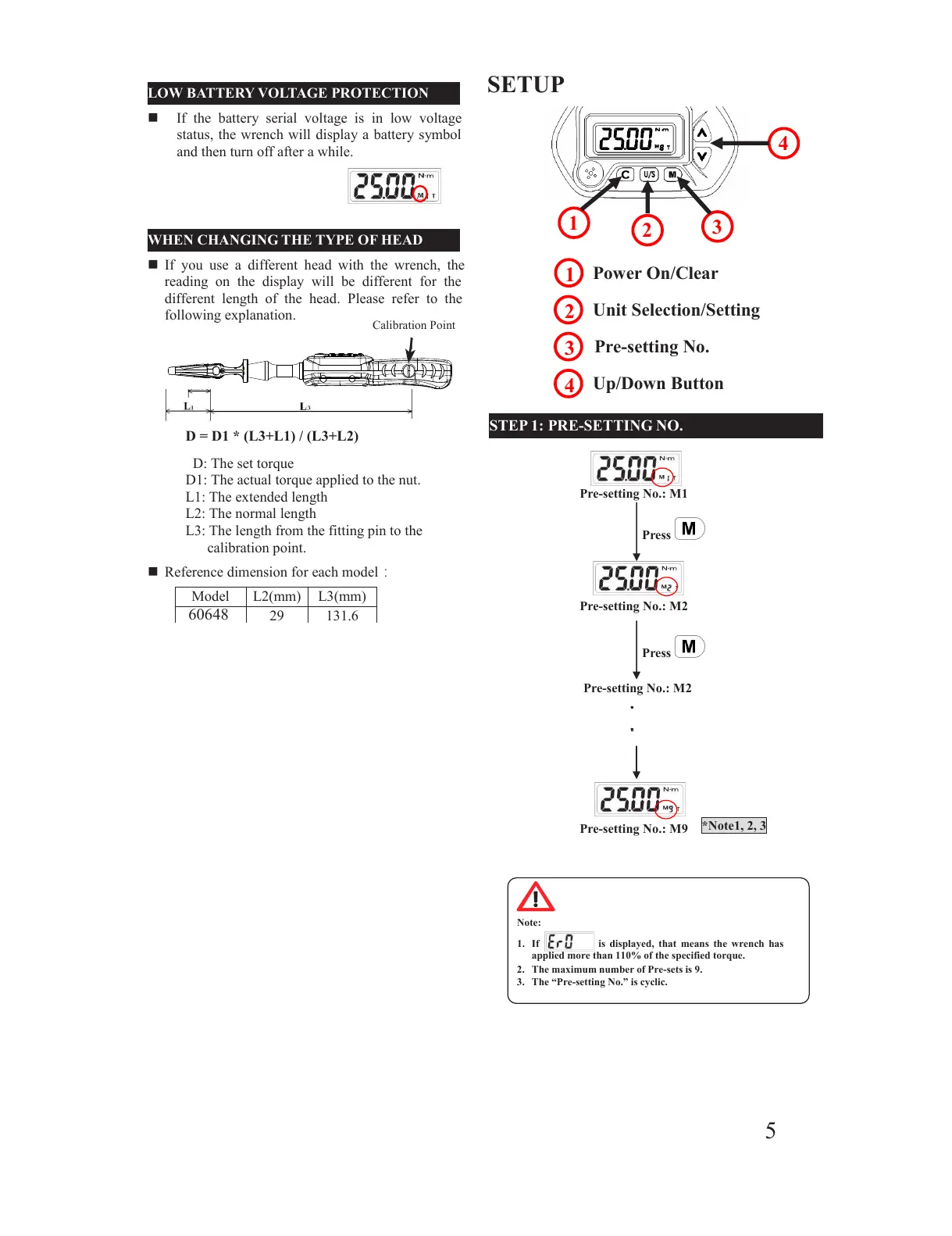
LOW BATTERY VOLTAGE PROTECTION
If the battery serial voltage is in low voltage
status, the wrench will display a battery symbol
and then turn off after a while.
WHEN CHANGING THE TYPE OF HEAD
If you use a different head with the wrench, the
reading on the display will be different for the
different length of the head. Please refer to the
following explanation.
Reference dimension for each model:
The wrench will auto sleep after about 5 minutes
of being idle for power saving. Press to
wake up the wrench from sleep mode.
D: The set torque
D1: The actual torque applied to the nut.
L1: The extended length
L2: The normal length
L3: The length from the fitting pin to the
D = D1 * (L3+L1) / (L3+L2)
1. If is displayed, that means the wrench has
applied more than 110% of the specified torque.
2. The maximum number of Pre-sets is 9.
3. The “Pre-setting No.” is cyclic.
All manuals and user guides at all-guides.com



 To Next Page