EasyManua.ls Logo

yellow jacket 60648 - Unit Selection; Set Torque Value; Peak Hold;Track Mode Selection

Default Icon
8 pages
Print Icon
To Next Page IconTo Next Page
To Previous Page IconTo Previous Page
Loading...
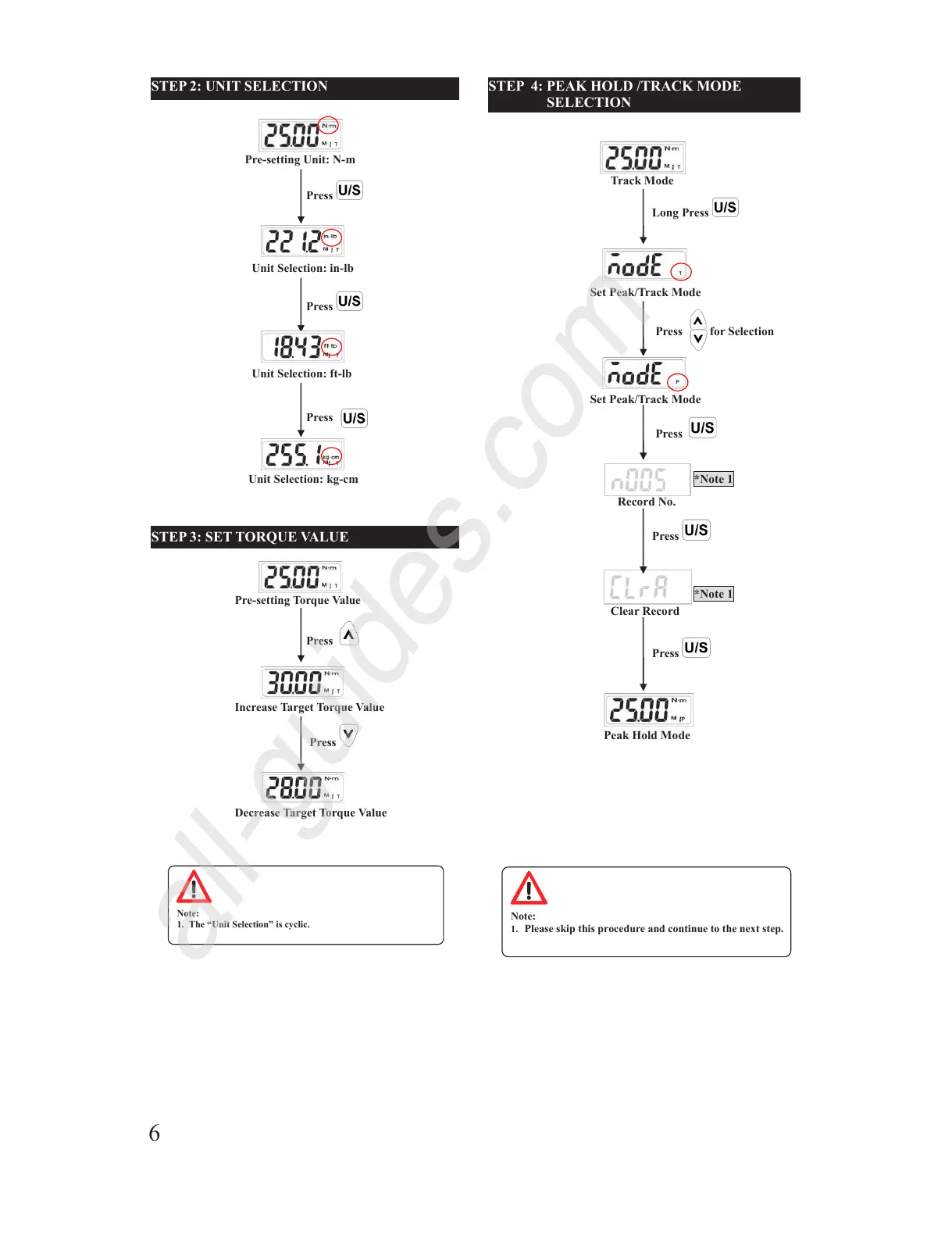
STEP 2: UNIT SELECTION
STEP 3: SET TORQUE VALUE
Note:
1. The Unit Selection is cyclic.
Pre-setting Torque Value
Decrease Target Torq u e Value
Press
Press
Increase Target Torque Value
Pre-setting Unit: N-m
Press
Unit Selection: kg-cm
Unit Selection: in-lb
Unit Selection: ft-lb
Press
Press
[Type here]
STEP 4: PEAK HOLD /TRACK MODE
SELECTION
Note:
1. Please skip this procedure and continue to the next step.
Set Peak/Track Mode
Press
Set Peak/Track Mode
Record No.
*Note 1
Track Mode
Long Press
Peak Hold Mode
Clear Record
Press
*Note 1
Press for Selection
Press
6
All manuals and user guides at all-guides.com
all-guides.com

Other manuals for yellow jacket 60648