EasyManua.ls Logo

yellow jacket 60648 - Peak Hold Mode Recorded Value Review

Default Icon
8 pages
Print Icon
To Previous Page IconTo Previous Page
Loading...
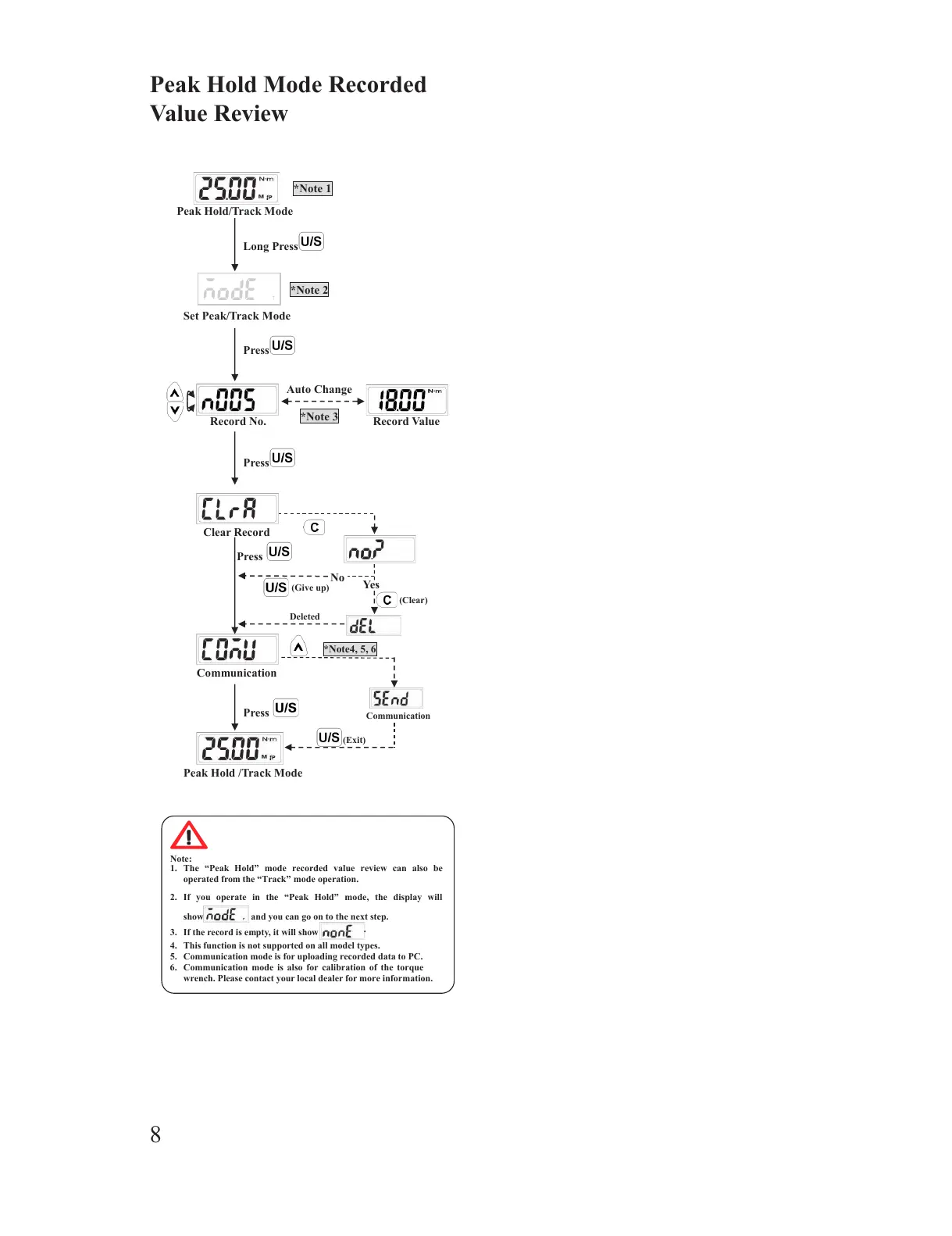
Peak Hold Mode Recorded Value Review
Note:
1. The Peak Hold mode recorded value review can also be
operated from the Track mode operation.
2. If you operate in the Peak Hold mode, the display will
show and you can go on to the next step.
3. If the record is empty, it will show
.
4. This function is not supported on all model types.
5. Communication mode is for uploading recorded data to PC.
6. Communication mode is also for calibration of the torque
wrench. Please contact your local dealer for more information.
Press

Peak Hold/Track Mode
Set Peak/Track Mode
Auto Change
Record No.
*Note 2
Record Value
Long Press
Press
Communication
*Note 3
*Note 1
Clear Record
Press
Peak Hold /Track Mode
No
(Give up)
*Note4, 5, 6
(Exit)
Communication
Deleted
(Clear)
Yes
Press
Peak Hold Mode Recorded
Value Review
8
All manuals and user guides at all-guides.com

Other manuals for yellow jacket 60648