20
Plug‘n‘Play
Ready, set up, go !
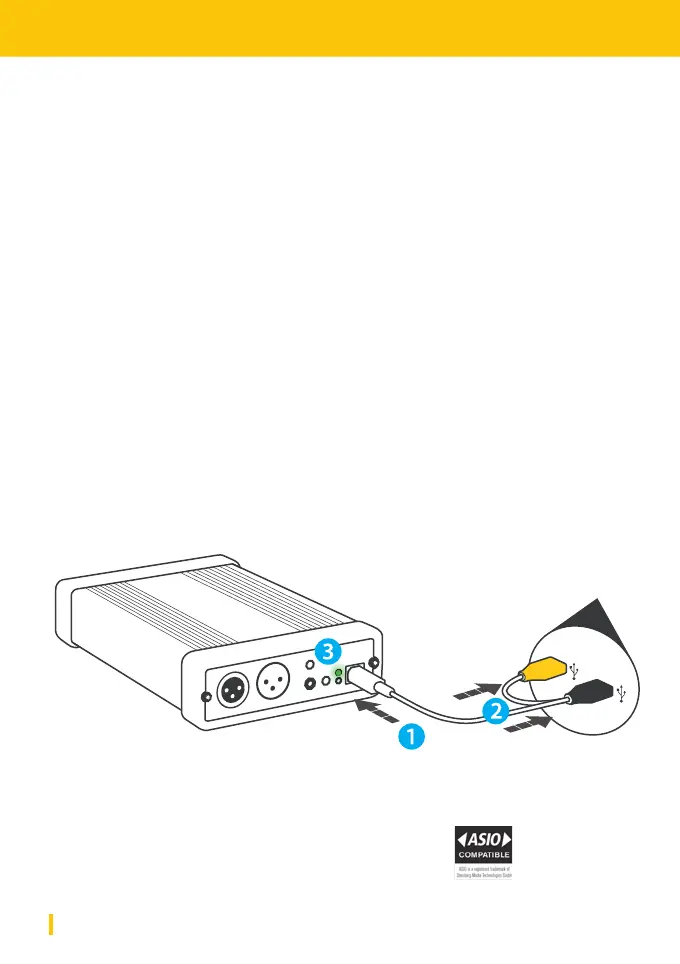
So what‘s inside the box? Your PUC2 comes with a USB Y-Cord to interconnect
with your PC or MAC. Simply connect PUC2 to your computer ( Mac / Windows /
Linux ) using the USB Y-Cord. Make sure both USB A-Plugs (yellow and black)
are connected to your PC. The yellow connector carries no data but will be
needed to secure suicient power supply.
When connecting PUC2 to your PC or Mac for the rst time, your system will
perform an automatic USB device installation. Your device will be identied as
YELLOWTEC PUC. For using PUC2 with high-res audio (192KHz) in Windows you
need to install the ASIO and WME* driver suite for Windows. To use PUC2 with
Linux you need to update your rmware to a special version. Downloads can be
found at www.yellowtec.com/puc2/downloads.
The green RDY LED will indicate a proper connection. You can now use PUC2.
Host
* The USB driver for Windows uses the Windows Media Encoder (WME) by
Microso Inc. and ASIO Driver Interface Technology by Steinberg Media
Technologies GmbH. WME is a trademark and soware by Microso Inc.
ASIO is a trademark and soware of Steinberg Media Technologies GmbH.


 To Next Page