
 Need help?
Do you have a question about the Yisutongma Network Technology ESM-9013 and is the answer not in the manual?
Controller is compatible with Xinput mode for gaming.
Utilizes 2.4 GHz hoping frequency technology for wireless connection.
Offers an operation range of up to 10 meters.
Designed for low power consumption.
Includes a mini receiver for connectivity.
Features dual vibration for enhanced gaming experience.
Equipped with a soft handgrip for comfort.
Features 2 joysticks and 2 triggers for versatile control.
Compatible with Windows XP/Vista, Windows 8, PS3, and Android.
An 8-way point of view control button.
Six keys for controlling actions; L/R triggers are analog.
Button 8 for game start/pause, Button 7 for 'BACK'.
Left and right 3D sticks set per user preference.
Serves as 'Home' button or for Converse mode.
Allows setting and clearing turbo function for keys.
Plug receiver into USB, insert batteries, and press MODE within 15s.
Two Port LEDs lighting indicates successful pairing.
Switch between Xinput, D-input, and digital modes via MODE button.
Switch to Android mode by holding MODE button for five seconds.
Controller can be used directly on a PS3 console.
Enters sleep mode after 5 mins; wake up by pressing MODE button.
LED indicator flashes when controller voltage is below 2.0V.
Device complies with FCC Rules Part 15, subject to two conditions.
Device evaluated to meet general RF exposure requirements.
This document describes the ESM-9013 2.4G Wireless Controller, a peripheral designed for personal computers and compatible with various platforms.
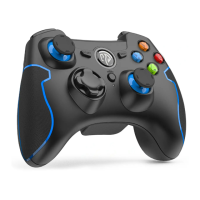
The ESM-9013 is a wireless dual vibration game controller. It offers a comprehensive set of function keys and a vibration feature to enhance the gaming experience with more realistic feedback. The controller supports Xinput mode, making it widely compatible with modern gaming titles. It operates using 2.4 GHz hopping frequency technology, ensuring a stable wireless connection.
The controller features an 8-way directional pad and six fire buttons (1, 2, 3, 4, 5, 6) for various in-game actions. The L-trigger and R-trigger utilize analog signals, allowing for nuanced control in games. Function buttons include a "Home" button (Mode button) and a "BACK" button. The left and right 3D sticks can be customized according to user preference for different games.
The controller enters sleep mode after 5 minutes of inactivity. Press the MODE button to wake it up and resume operation.
The device complies with Part 15 of the FCC Rules, ensuring it does not cause harmful interference and accepts any received interference. Users are advised against unauthorized modifications to the equipment. The device has been evaluated for general RF exposure and can be used in portable exposure conditions without restriction.
 General
| Brand | Yisutongma Network Technology |
|---|---|
| Model | ESM-9013 |
| Category | Controller |
| Language | English |

 To Next Page