This document describes the YTMC-51N2-M3 MoCA 2.5 Adapter, a coaxial-to-Ethernet conversion kit designed to extend a home network by leveraging existing coaxial cabling. The adapter provides an Ethernet Internet port wherever a coaxial connection is available and includes a TV (TV/STB Out) coaxial port for existing connections at the coaxial wall port.
Function Description:
The YTMC-51N2-M3 MoCA 2.5 Adapter converts a coaxial signal into an Ethernet signal, allowing devices to connect to the internet via the home's coaxial network. It takes the internet signal from a modem/router and delivers it to the coaxial network, while simultaneously maintaining TV/set-top box connectivity. This enables the creation of an Ethernet Internet access point in any location with an available coaxial port. The device supports MoCA 2.5, offering high-speed data transfer over coaxial cables.
Important Technical Specifications:
- Model Number: YTMC-51N2-M3
- LAN Connections:
- MoCA (v. 2.5): Up to 2.5 Gbps throughput
- Ethernet Ports: 2x 10/100/1000 Mbps (gigabit)
- MoCA Frequency Range: Extended D-band: 1125MHz~1675MHz
- TV Frequency Range: 5MHz~1002MHz
- Power: External, 5VDC, 1A, 1.3 mm diameter connector plug
- LED Indicators: Power, MoCA, System, LAN1, LAN2
- Power LED: Solid green when adapter is powered up.
- MoCA LED: Solid green with connection on the MoCA port.
- System LED: Solid green when the system is online.
- Ethernet LEDs: Green for 1000Mbps link; yellow for 10/100Mbps link; blinks when data is transferred.
- Environmental:
- Ambient Temperature: 0ºC to 40°C (32°F to 104°F)
- Storage Temperature: -20ºC to 85°C (-4°F to 185ºF)
- Operating Humidity: 10% to 85% non-condensing
- Storage Humidity: 5% to 90% non-condensing
- Regulatory: FCC, CE, IC
Usage Features:
- Package Contents: Each kit includes the YTMC-51N2-M3 MoCA 2.5 Adapter, a coaxial cable, a power adapter, a Quick Start Guide, and an Ethernet cable.
- Requirements: An available coaxial port and an available electrical wall socket in the installation areas are necessary.
- Connecting the First Adapter:
- Disconnect the coaxial cable from the TV or set-top box at the wall port.
- Connect this disconnected coaxial cable to the TV coaxial port on the adapter.
- Connect another coaxial cable from the wall port (previously used in step 1) to the MoCA coaxial port on the adapter.
- Connect one end of an Ethernet cable to the modem/router's Ethernet port.
- Connect the other end of the Ethernet cable to an Ethernet port on the adapter.
- Plug the power adapter into the adapter's Power port and then into an electrical outlet.
- Once connected, the Internet signal will be delivered across the coaxial network.
- Connecting Additional Adapters:
- Locate a coaxial wall port near the desired location. If a device is connected, unplug its coaxial cable.
- If a coaxial cable was unplugged, connect it to the TV coaxial port on the adapter.
- Connect a coaxial cable from the wall port (from step 1) to the MoCA port on the adapter.
- Connect one end of an Ethernet cable to the device requiring Internet access.
- Connect the other end of the Ethernet cable to an Ethernet port on the adapter.
- Plug the power adapter into the adapter's Power port and then into an electrical outlet.
- Verify that the Power, Ethernet, and MoCA LEDs are solid green.
- Web Management:
- Each adapter has a web interface for management, inquiry, and upgrades.
- The default IP address is 192.168.144.200.
- To access, ensure your computer's IP address is within the 192.168.144.x range (1-254, excluding 200) and connect your computer to the adapter's LAN port via Ethernet.
- Enter
http://192.168.144.200 into a web browser.
- Default login credentials:
- Login: admin
- Password: maxlinear
- The web interface allows configuration of frequency range, transmission rate, IP address, and viewing Ethernet information.
- Coaxial Cable Shielding: If applicable, the coaxial cable screen shield must be connected to Earth at the building entrance per ANSI/NFPA70, Section 820.93, or local regulations.
Maintenance Features:
- Reset and Factory Reset:
- To reset the device, press the reset button located under the YTMC-51N2-M3.
- To restore factory default settings, press and hold the reset button for 10 seconds.
- Troubleshooting - MoCA Status LED not lit:
- Confirm the MoCA port on the adapter is connected to the coax outlet on the wall.
- Try a different coax outlet in another room.
- Check for a cable or terrestrial TV signal on both cable wall outlets.
- Verify that rooms are connected on the same splitter in the cable junction box.
- Troubleshooting - Cable modem or set-top box issues after installation:
- If the adapter is incompatible with your cable device, avoid using the TV port.
- Instead, use a coax splitter: connect the wall outlet to the splitter, then run separate coax cables from the splitter to the cable modem/STB and to the adapter.
- If problems persist, consider using a "MoCA POE (Point of Entry) Filter" at the input of the cable modem/STB. This filter blocks MoCA signals from passing to the device and is available online.
- DirecTV or DISH Network Compatibility: These adapters are designed for Cable TV or Terrestrial (rabbit ears) TV. For satellite operators, contact them for compatible adapters.
- Warranty: The product includes a one-year Limited Hardware Warranty and 120-day free software updates from the date of purchase. This warranty is subject to local laws, which may modify its terms.
- Important Safety Instructions:
- Do not use near water; clean with a dry cloth.
- Do not block ventilation openings; install according to manufacturer's instructions, away from heat sources.
- Do not use a telephone to report a gas leak near the leak.
- Use only specified power cords and batteries (if applicable).
- Do not dispose of batteries in fire; check local disposal codes.
- FCC Class B Equipment: The device complies with Part 15 of FCC Rules, designed to provide reasonable protection against harmful interference in residential installations. It must accept any received interference.
- CE Compliance: Adheres to EN 55032 (Electromagnetic compatibility - Emission requirements) and EN 55035 (Electromagnetic compatibility - Immunity requirements).

 Need help?
 General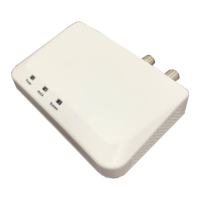

 To Next Page