Switching Devices for iOS
Users
Switching Devices –
from a YOORX to another
YOO device
(for iOS users)
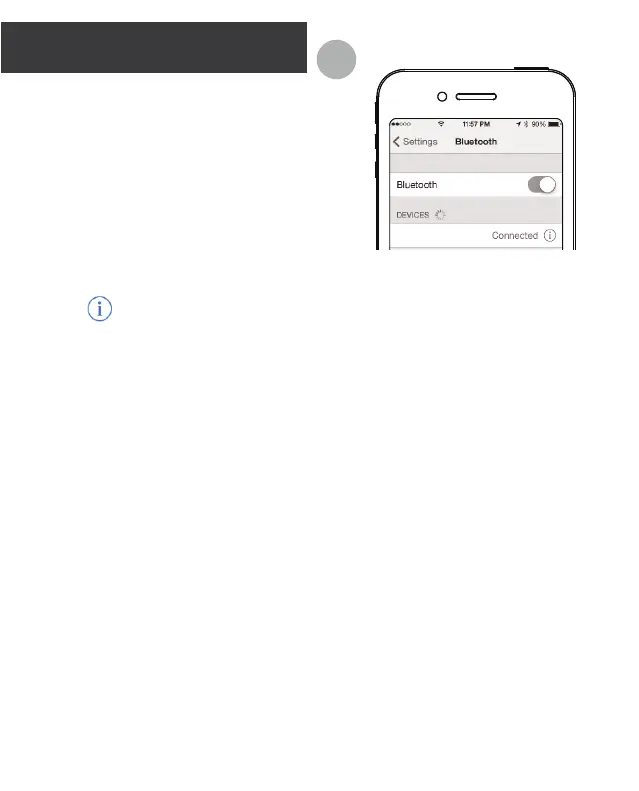
1. Forget Current Device.
Go to Seings > Bluetooth on your
iOS device. Search for your
connected YOORX and tap the info
icon.
info icon:
Tap “Forget this device” and
confirm the action when prompted.
2. Connect to your new YOO
device.
a. Launch the YOO+ app.
b. Tap the menu icon at the top
left corner of the YOO+ app.
c. Tap “Seings”.
d. Tap to select your new YOO
device.
e. Tap “Save Seings” at the
boom of the page.
f. Return to menu and tap “Sync
Device”.
Helpful Hint: Try moving to a
dierent location and away from
the YOORX you are trying to
disconnect.
Important:
It may take a minute to establish
your new Bluetooth connection so
have patience while your YOO
locates your smart device and
completes the connection process.
A
YOO RX


 To Next Page