Need help?
Do you have a question about the YOSHINO B2000 SST and is the answer not in the manual?
Read all instructions, avoid hazards like fire, electric shock, and injury.
Instructions for charging via AC wall outlet, including capacity and time.
Guide for charging using a 12V/10A car charger, with capacity and time details.
Details on charging with Yoshino solar panels, voltage limits, and charging times.
How to turn the unit on/off using the main power button and auto-off features.
Steps to connect the portable power station to the Yoshino app via Bluetooth.
How to activate and deactivate AC output, and app settings for continuous power.
Details on activating and deactivating USB-A and USB-C ports for charging devices.
How to control DC output ports and their total power capacity.
The Yoshino B2000 SST is a solid-state portable power station designed to provide reliable power for various applications. This user manual outlines its functions, usage, and maintenance to ensure safe and efficient operation.
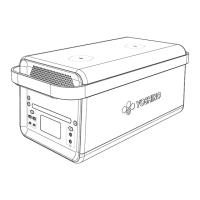
The B2000 SST serves as a versatile power source, capable of charging and powering a wide range of electronic devices and small appliances. It features multiple output ports, including AC, USB-A, USB-C, and DC, making it compatible with diverse equipment. The device incorporates solid-state technology, which contributes to its performance and durability.
A key function of the B2000 SST is its ability to be recharged through various methods: AC charging, car charging, and solar charging. This flexibility ensures that the power station can be replenished in different environments, whether at home, in a vehicle, or outdoors using solar panels. The unit is designed for fast charging via AC, allowing it to reach 80% capacity in approximately 45 minutes. For car charging, it can achieve 80% capacity in about 9 hours using a 120W car charger. When using Yoshino SP100 (100W) or SP200 (200W) solar panels, the device can be charged to 80% in around 2.5 hours with three SP200 solar panels.
The B2000 SST also supports an Uninterruptible Power Supply (UPS) function, specifically off-grid UPS. When connected to a wall outlet via the AC charging cable, it can power electrical devices through its AC Output Ports. In the event of a sudden blackout, the product automatically switches to inverter mode within 20ms, ensuring a continuous power supply. However, it's important to note that this off-grid UPS function does not support 0ms switching, and users should avoid connecting it to devices that require 0ms UPS, such as data servers or workstations. It is recommended to test compatibility and charge only one device at a time to prevent overload protection from being triggered.
The device is equipped with an LCD screen that displays critical information such as input power, output power, battery percentage, remaining time, and recharging time. It also provides warnings for low temperature, high temperature, battery failure, and overload conditions, allowing users to monitor the unit's status at a glance.
Operating the B2000 SST is straightforward. To turn the product on, users press and hold the main power button for 2 seconds. The LCD screen will illuminate, and the main power indicator will pulse white. To turn it off, the main power button is held again for 2 seconds, displaying "OFF" on the screen before the unit powers down. The LCD screen automatically turns off after 1 minute of inactivity and turns back on when the product is used again. If there is no usage within 1 hour and all output power buttons are off, the product will automatically shut down to conserve energy.
The power station offers multiple output options. The AC output ports are activated by pressing and holding the AC Power Button for 1.5 seconds. For continuous power supply to devices like refrigerators, the AC output can be set to "Always on" via the Yoshino app to prevent automatic shutdown due to power fluctuations in normal mode. USB output ports (USB-A, USB-C, and USB-C PD) are activated by pressing and holding the USB button for 1.5 seconds. Similarly, DC output ports are enabled by pressing and holding the DC power button for 1.5 seconds.
The B2000 SST can be monitored, controlled, and customized using the Yoshino app. To connect the app, users press and hold the app connection button for 3 seconds until a beep is heard and the icon flashes. The app allows for remote management of the power station.
For illumination, the device includes an LED light bar. This feature is activated by pressing and holding the LED Light Button for 1.5 seconds, and the light can be turned off by holding the button for another 1.5 seconds.
During charging, the charging indicator icon on the LCD screen flashes, and the remaining charging time is displayed, providing clear feedback on the charging status. The B2000 SST is designed to charge and discharge simultaneously, offering convenience for users who need to power devices while replenishing the unit's battery.
Proper maintenance is crucial for extending the lifespan and ensuring the safe operation of the B2000 SST. The manual provides several guidelines for storage and care.
The product should be stored in a dry and well-ventilated place, out of reach of children and pets. The recommended storage temperature is between 32–104°F (0–40°C), with a maximum humidity of 90%. For long-term storage, it is advised to charge the unit to 80% every 3-6 months to protect battery life. If the unit will not be used for an extended period, it should be powered off, and the AC adapter should be disconnected from the outlet.
Cleaning the product is simple; a clean, dry cloth should be used to gently wipe across all surfaces and ports. Users are cautioned not to get the product wet or immerse it in water. If water is found inside, the product must not be turned on or used again, and Yoshino customer service should be contacted immediately after moving the product to a safe open area.
Safety instructions emphasize the importance of using genuine Yoshino accessories to prevent damage or injury. Users are warned against disassembling the portable power station and should contact Yoshino customer service for any required servicing. It is also important not to block the fan during use, as this can lead to overheating. The product should not be exposed to fire or excessive temperatures above 130°C (265°F), which could cause an explosion.
In case of an overload protection switch activation during AC recharging, users should press the switch down to reset it. The manual also provides troubleshooting steps for various warnings displayed on the LCD screen, such as high/low temperature protection for charging and discharging, and output overload protection. For persistent issues like "Battery Failure" warnings, users are instructed to stop using the product immediately and contact Yoshino customer service.
The manual also includes grounding instructions, advising that the product must be properly grounded to reduce the risk of electric shock. Users should ensure the plug is connected to an outlet that is correctly installed and grounded according to local codes.
For disposal, users are instructed to fully discharge the battery before placing it in a designated battery recycling bin. It is strictly prohibited to dispose of the product in regular trash bins due to the chemicals contained in batteries. Users should consult local laws and regulations on battery recycling and disposal. If the battery cannot be fully discharged, a professional battery recycling company should be contacted for assistance.
 General
| Input Voltage | 100-240V AC |
|---|---|
| Input Frequency | 50/60Hz |
| Output Power | 2000W |
| Protection Features | Over Temperature, Short Circuit, Over Current, Over Voltage |
| Operating Temperature | 0°C to 40°C |


 To Next Page