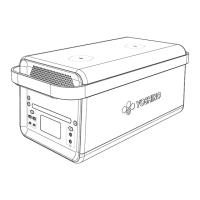
This document is the user manual for the Yoshino B330 SST Solid-State Portable Power Station, a device designed to provide portable power for various applications.
Function Description
The Yoshino B330 SST is a portable power station that utilizes solid-state Li-NCM battery technology. It is designed to provide AC, DC, and USB power outputs, making it suitable for powering a wide range of electronic devices and small appliances. The device can be recharged through multiple input methods, including AC, car charging, XT60 input (e.g., solar panels), and USB-C PD. It features an LCD screen to display important information such as input/output power, battery percentage, remaining time, and various warnings. The power station also supports app connectivity for monitoring, control, and customization.
Important Technical Specifications
General:
- Capacity: 241Wh, 14.88V, 16.2Ah
- Battery Type: Solid State Li-NCM 16.2Ah
- Cycle Life: 2500 Cycles to 80%+ Capacity
- Warranty: 5 Years
- Net Weight: 9.9 lbs (4.5 kg)
- Dimension: 10 x 6.1 x 9.5 inches (255 x 156 x 242 mm)
Input:
- DC Input: 20VDC/5A, 100W
- XT60 Input: 12-30VDC/5A Max, 100W Max
- Car Input: 12VDC/8A, 100W Max
- USB-C PD Input: 5-20VDC/3A, 60W Max
Output:
- AC Output (Rated): 330W
- AC Output (Max): 480W
- AC Outlets: 2 Outlets, 120VAC, 60Hz, 330W Total
- USB-A Output: 2 Ports, 5VDC/2.4A, 20W Each Port
- 12V DC Output: 2 Ports, 12.6VDC/10A, 126W Total
- USB-C Output: 5VDC/3A, 9VDC/2.22A, 12VDC/1.66A, 20W Max
- USB-C PD Output: 5-15VDC/3A, 20VDC/5A, 100W Max
Certifications:
Temperature/Humidity:
- Discharging Temperature: 14 to 104°F / -10 to 40°C
- Charging Temperature: 32 to 104°F / 0 to 40°C
- Working Humidity: Maximum 90%
Protection Features:
- Thermal Protection
- Short Circuit Protection
- Over Current Protection
- Over Voltage Protection
- Over Charging Protection
- Over Discharging Protection
Usage Features
Operation:
- Power On/Off: Press and hold the main power button for 2 seconds to turn the unit on or off. The LCD screen and main power indicator will illuminate/turn off accordingly.
- Automatic Shutdown: If there is no usage within 1 hour and all output power buttons are turned off, the product will automatically shut down. The LCD screen will turn off after 1 minute of inactivity.
- APP Connectivity: Press and hold the app connection button for 3 seconds to connect to the Yoshino app, allowing for monitoring, control, and customization of the power station.
- LED Light: Press and hold the LED Light Button for 1.5 seconds to turn the LED light on or off.
Recharging:
- AC Charging: Use the included AC to DC recharge adapter cable. It can charge to 80% capacity in approximately 2 hours. Ensure the wall outlet output voltage is 110-125V.
- Car Charging: Recharge using 12V/8A car chargers. Can charge to 80% capacity in approximately 3 hours. Ensure the car is started before charging.
- XT60 Input: Compatible with Yoshino SP100 (100W) solar panels (not included). Can charge to 80% in around 3 hours. Ensure the solar panel's output voltage is within 30V to avoid damage.
- USB-C PD Charging: The USB-C PD port can input up to 60W and recharge the device to 80% in approximately 3 hours. No need to press the USB power button for this input.
Output Ports:
- AC Output: Press and hold the AC Power Button for 1.5 seconds to turn on/off power to the AC outlets. An "Always on" setting is available via the app for continuous power supply to devices like refrigerators.
- USB Output: Press and hold the USB button for 1.5 seconds to turn on/off power to the USB ports (USB-A and USB-C).
- DC Output: Press and hold the DC power button for 1.5 seconds to turn on/off power to the DC ports.
- Simultaneous Charge and Discharge: The B330 SST can charge and discharge at the same time.
LCD Screen Indicators:
- Displays input/output power, battery percentage, remaining time, and warnings such as low/high temperature, battery failure, and overload.
Maintenance Features
Storage and Maintenance:
- Keep out of Reach: Store the product away from children and pets.
- Cleaning: Use a clean, dry cloth to gently wipe dirt from the product ports.
- Long-Term Storage: If not used for extended periods, power off the unit and disconnect the AC adapter. Store in a dry, well-ventilated place with a temperature of 32–104°F (0-40°C) and humidity within 90%.
- Battery Protection: Charge the unit to 80% every 3-6 months during long-term storage to protect battery life.
- Water Exposure: Do not get the product wet or immerse it in water. If water is found inside, do not turn it on or use it again. Contact customer service immediately after moving it to a safe, open area.
Disposal:
- Battery Disposal: Fully discharge the battery before disposing of it in a designated battery recycling bin. Do not dispose of it in regular trash bins due to hazardous chemicals. Consult local laws and regulations for proper battery recycling and disposal.
- Non-Dischargeable Batteries: If the battery cannot be fully discharged, contact a professional battery recycling company for assistance.
- Non-Rechargeable Batteries: Dispose of properly.
Troubleshooting:
- The manual provides a detailed troubleshooting guide for various issues indicated by the LCD screen, such as high/low temperature protection for charging and discharging, overload protection for different outputs, and battery failure. Solutions typically involve allowing the unit to cool down, removing overloaded devices, or contacting customer service for battery failure.
Safety Instructions:
- Read all instructions carefully before use.
- Close supervision is necessary when used near children.
- Avoid inserting fingers or hands into the product.
- Use only genuine Yoshino accessories.
- Pull the plug, not the cord, when disconnecting.
- Do not use if damaged or modified.
- Do not operate with a damaged cord, plug, or output cable.
- Do not disassemble; contact customer service for repairs.
- Unplug from the outlet before servicing.
- Charge in a well-ventilated area.
- Avoid exposure to fire or excessive temperatures (above 130°C/265°F).
- Servicing should be performed by qualified personnel using identical replacement parts.
- Avoid strong static electricity/magnetic fields.
- Do not drop or allow severe external impact.
- Do not place heavy objects on top.
- Do not block the fan.
- Not recommended for medical emergency equipment; consult a doctor and manufacturer.
- Maintain a safe distance from medical implants due to electromagnetic fields.
- The external AC/DC power supply must be grounded according to local codes.
Customer Support:
- Tech support is based in the USA.
- Phone: 1(800) 513-2797
- Email: customersupport@yoshinopower.com
- Operating hours: 8:00 am – 4:30 pm PST (M-F).

 Need help?
 General

 To Next Page