Need help?
Do you have a question about the YouKits HB-1B MK4 and is the answer not in the manual?
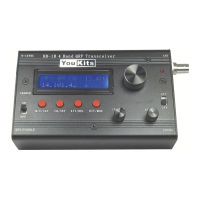
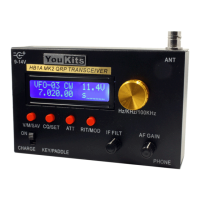
Details the HB-1B MK4's LCD display features, including frequency, mode, supply voltage, S meter, and RIT, plus 30 memory storage.
Provides technical details: size, weight, voltage, current drain, frequency ranges for receive/transmit, VFO, display type, output power, and selectivity.
Explains battery power supply setup, external power connection, antenna connection, and headphone connection for the transceiver.
Describes the automatic function to detect key type (paddle/straight key) and the sound indicator at power on.
Explains switching between Memory (MEM) and VFO modes and saving current frequency/mode to memory locations.
Details entering/exiting RIT function, frequency adjustment with the tuning knob, and changing operating modes (CW/USB/LSB).
Covers entering/exiting XIT function, QSK setup, and changing frequency tuning steps for different band types.
Describes how to adjust IF filter bandwidth using the IF FILT button and the function of the ATT switch for signal attenuation.
Explains how to transmit in specified bands, interpreting the display (TX, S meter, SWR), and handling TX errors outside ham bands.
Details automatic CQ calling, changing keyer speed using the paddle, and entering the call sign for operation.
Covers the antenna tuning function using paddle and CQ/SET button, and the reset procedure to restore factory settings.
Guides on entering DDS calibration state, testing and adjusting frequency, and adjusting VR/VC components for display and audio.
The HB-1B MK4 2018 is an upgraded 4-band CW QRP transceiver, designed to be small, lightweight, and portable, making it ideal for travel, picnics, and other outdoor activities.
The transceiver operates in both Memory (MEM) and VFO modes. In Memory Mode, the tuning knob changes memory locations (01-30), while in VFO Mode, it changes the frequency. Users can store the current frequency and mode into a selected memory location by pressing and holding the V/M/SAV button for 2 seconds.
The RIT/MOD button allows users to enter or exit the Receive Incremental Tuning (RIT) function, with a 10Hz adjustment step. When in RIT mode, turning the tuning knob clockwise increases the frequency, and counter-clockwise decreases it. To change the operating mode (CW, USB, LSB), the RIT/MOD button must be pressed and held for 2 seconds for each mode change.
The XIT/DEL button enables or disables the Transmit Incremental Tuning (XIT) function, with a 100Hz step. This button also controls the QSK (Full Break-in) setup. Pressing and holding XIT/DEL for 2 seconds allows switching between Full(QSK), 250mS, 500mS, and 800mS delays. Another 2-second press saves the selected QSK setting.
The transceiver features an IF filter with adjustable bandwidth (400Hz-3kHz), controlled by the IF FILT knob. An ATT (attenuator) switch provides approximately 20dB of RX signal attenuation.
For keying, the HB-1B MK4 automatically detects whether a paddle or a straight key is connected upon power-on. It signals this by sounding the letter "A" (for paddle) or "M" (for straight key) in CW. If no key is connected, it will sound "A".
The automatic key function includes an automatic CQ call. A light press of the CQ/SET button sends "CQ CQ CQ DE (your call sign three times) + K". This can be canceled by pressing CQ/SET for 1 second. The keyer speed can be adjusted by pressing CQ/SET for 2 seconds (hearing "S"), then using the paddle (DOT for faster, DASH for slower), and exiting with a light press (hearing "E"). Users can also enter their call sign by holding CQ/SET until "I" is heard, then sending their call sign with the paddle. A short click of CQ/SET exits this mode (hearing "E"), or it will auto-exit after 8 seconds.
An antenna tuning function is also available. By holding CQ/SET until "T" is heard, users can send a continuous carrier with the paddle's DOT side and end it with the DASH side, then exit with a light press of CQ/SET.
The HB-1B MK4 features an LCD display that shows frequency, operating mode, supply voltage, S-meter, RIT status, and forward/reflected power levels, enhancing user convenience. The frequency step can be easily changed; in Ham bands, pressing the tuning knob cycles between 10Hz, 100Hz, or 1KHz. In RIT mode, steps are 10Hz and 100Hz. In broadcast bands, steps are 10Hz, 100Hz, and 5kHz. A 2-second press of the tuning knob sets the step to 100KHz.
The device supports external power supply (9-14V DC) with polarity protection. Any tuned antenna can be connected directly via a BNC connector; non-resonant antennas require an antenna tuner. Stereo headsets (8-32 ohm impedance) connect to the PHONE port.
The device includes a reset function that restores the 30 frequency memories to their original values. This operation requires a frequency meter to calibrate the DDS frequency. To perform a reset, simultaneously press both V/M/SAV and RIT/MOD buttons while powering on, holding them until the LCD displays "HB-1B CW QRP TRX by BD4RG 2013-03". After a few seconds, the LCD will show "DDS Cal OK? 10.000.00 s". At this point, a frequency meter should be connected to the DDS testing point, and the tuning knob used to match the displayed frequency. Pressing RIT/MOD exits the calibration, and V/M/SAV saves the changes.
Adjustments for various parameters can be made:
For battery power, the device supports three rechargeable 14500 lithium batteries (not included). These must be charged using the included special lithium battery charger. Standard AA batteries are not compatible. The battery holder is accessed by removing four screws on the back of the unit.
 General
| Brand | YouKits |
|---|---|
| Model | HB-1B MK4 |
| Category | Transceiver |
| Language | English |

 To Next Page