
 Need help?
Do you have a question about the YOUPAI MAX and is the answer not in the manual?
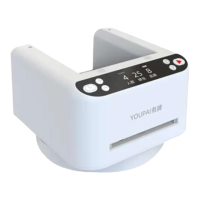
Identifies key external parts of the device, such as the playing card position, gravity balls, and display screen.
Details the buttons and controls on the device, including power, start, and function keys.
Explains how to power on/off, start, set random positions, and adjust rotation direction.
Describes how to configure settings like number of people, cards dealt, and gameplay modes.
This document describes a poker card dealing machine, referred to as the YOUPAI MAX II. It is designed to automate the process of dealing cards for various card games, offering convenience and efficiency.
The device's primary function is to automatically deal playing cards. It features a playing card position where a deck of cards is loaded, and an outlet from which the cards are dispensed. A gravity ball mechanism helps guide the cards during the dealing process. The machine includes a display screen that shows various settings and operational information.
Key controls include:
The device also supports setting the rotation direction for dealing (clockwise/counterclockwise). This is done by pressing and holding the random position key to enter the adjustment mode, then using the plus (+) or minus (-) keys to select the direction, which is indicated by a marquee rotation on the display.
The YOUPAI MAX II offers several customizable gameplay settings:
To adjust these settings, the user presses the function key to cycle through the options. The plus (+) or minus (-) keys are used to change the values, and the start or random position key confirms the selection (indicated by the value no longer flashing).
The device can switch between "2 position" and "3 position" rocking start modes when the number of digits is set to '2' or '3'. This is achieved by pressing the function key to reach the relevant display interface, then using the plus (+) or minus (-) key to select the desired mode.
A "card counting function" is available, which can be accessed by long-pressing the minus (-) button or by setting the "number of people" to '0' and pressing the start button. This allows the device to count the cards.
For dealing a single playing card, the user can short-press either the plus (+) or minus (-) key.
The device is designed for easy loading of cards, featuring an open deck storage area. It is compatible with various card types, including standard, long, wide, and plastic cards, making it suitable for poker, UNO, and other card games.
The machine incorporates a "pause sensing area," allowing users to easily pause the dealing process by touching this area.
The device emphasizes ease of maintenance to ensure optimal performance:
Users are advised to handle the device with care, avoiding strong vibrations, knocks, or hits, as these can affect its normal licensing function. The device should not be disassembled by the user, as it does not contain user-serviceable parts. It should also be kept away from extreme temperatures (above 55°C) and direct sunlight, and must not be exposed to fire or water.
 General
| Color Output | Monochrome |
|---|---|
| Resolution | 203dpi |
| Power Supply | DC 5V/2A |
| Print Technology | Thermal |
| Paper Width | 80 mm |
| Interface | USB, Bluetooth |

 To Next Page