·."dH-
@Power button
Short press to turn on, long press to turn off, and
it
will automatically
turn
off
after 30 minutes
without
operation.
® start button
Press the key ® to run immediately.
~
random position, specified position
Press the key
~
to start at a random position, and the value
of
'Number
of
People' will scroll. After the scrolling
of
the
value
stops,
one
of
the numerical positions will be run randomly according to the current
total number
of
digits. After long pressing the random start button, the
value
of
'Number
of
People' will f1ash,Press the key EB 8 to select the
position, Press
or
® to
~
confirm.
• Set clockwise/counterclockwise start
Pres~
and hold the key
~
to enter the rotation direction adjustment
mode, press the key
EBto
8 select the direction, and the display screen
will appear in the form
of
a marquee rotation to prompt the direction.
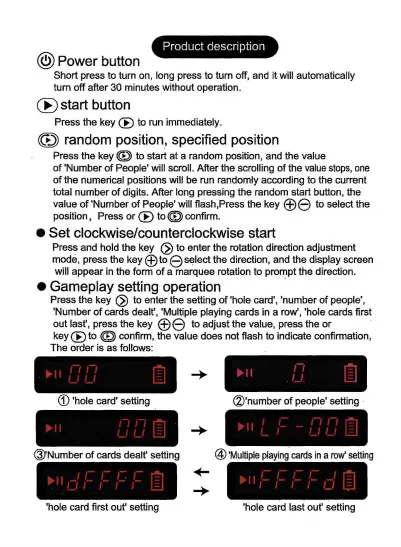
• Gameplay setting operation .
Press the key
~
to enter the setting
of
'hole card', 'number
of
people',
'Number
of
cards dealt', 'Multiple playing cards in a row', 'hole cards first
out last', press the key
EB8
to adjust the value, press the
or
key ® to
~
confirm, the value does not flash to indicate confirmation,
The order is as follows:
<D
'hole card' setting
@Number
of
cards dealt' setting
'hole card first out' setting
(2)'number
of
people' setting
@
'Multiple
playing
cards
in
a
row'
setting
'hole card last out' setting


 To Next Page
 Loading...