This document describes the YOUTHINK Bluetooth Barcode Scanner, V1.0, a versatile device designed for efficient barcode scanning in various work environments.
Function Description:
The YOUTHINK Bluetooth Barcode Scanner is a dual-mode (wired and wireless) barcode reader capable of decoding a wide range of barcode symbologies. It functions as a data collection tool, transmitting scanned barcode data to connected devices such as PCs, smartphones, or laptops. The scanner supports both real-time data transfer (Normal Mode) and offline data storage (Inventory Mode), offering flexibility for different operational needs.
Important Technical Specifications:
- Working Current: 40mA (decoding), 20mA (working), 5mA (standby)
- Charging Source: 5V 500mA
- Battery: 750mAh lithium battery
- Light Source: Visible light laser diode, wavelength 650±20 nm
- CPU: 32-bit
- Bluetooth Version: 3.0
- Print Contrast: 30% minimum
- Error Rate: 1/5 million
- Decode Accuracy: 3.3 mil
- Read Rate: 200 times/sec
- Wireless Distance: 7-10m indoor
- Memory: 16MB Flash
- Charge Time: 1.5 hours
- Use Time: 30 hours
- Prompt Manner: Buzzer & LED Indicator
- Scan Angle: ±65° (oblique), ±65° (deflecting), ±42° (rotation)
- Scan Mode: Wired and Wireless, Single scan/Continuous scan/Automatic scan
- Decode Ability: UPC-A, UPC-E, EAN-8, EAN-13, Code128, Code39, Code 39 Full ASCII, Codabar/NW7, Code 93, Code 11, MSI, Interleaved 2 of 5, Industrial 2 of 5, ISBN, ISSN, China Post.
- Anti-Vibration: Multiple drops from 1.5m height to concrete floor
- Interface: USB HID, USB Virtual Serial Port (requires driver), SPP
- Compatibility: Windows XP/7/8/10, Android, iOS, Mac
- Packing Detail: BT Scanner, USB cable, Manual, Quick card
Usage Features:
Product Diagram and LED Indicator:
The scanner features a Scan Button, LED Indicator, and Charging/Data Port. The LED indicator provides visual feedback on the scanner's status:
- Blue light flashes once: Scanned successfully
- Blue light flashes: Setting Mode
- Red and blue flash alternatively: Charging
Power On/Off:
To turn on the scanner, press the power button (trigger) and make the laser appear. The scanner automatically shuts off if no operation is detected for 30 seconds. To manually shut it off, scan the "Shut Down" barcode.
Connectivity and Pairing:
The scanner supports both wired and wireless scanning.
- Wired Mode: Simply connect the scanner to a PC via the included USB cable. The PC will automatically install the driver. Once the driver installation is complete, the scanner is ready to use.
- Wireless Mode (Bluetooth): The scanner needs to be paired with a Bluetooth host.
- Pairing with Mobile Phones/Pads: Scan the "Pair with mobile phones, pads or other mobile devices" barcode.
- Pairing with Laptops: Scan the "Pair with your laptops or use the cable to connect the Bluetooth scanner" barcode.
- Pairing with PC without Bluetooth: Scan the "Pair with PC without Bluetooth, you need add a Bluetooth receiver" barcode.
- Pairing Process: Start the scanner; the buzzer sounds "di, di, di." The red light begins flashing, waiting for pairing for about 30 seconds. Search for "barcode scanner" on your device and connect it.
- Bluetooth HID/SPP Mode: The scanner supports both Bluetooth HID Mode and Bluetooth SPP Mode. Scan the respective barcodes to switch between modes.
- Disconnecting/Connecting Host: Barcodes are provided to "Disconnect all BT HOST," "Disconnect the existing connection," "Shut down (turn off the scanner)," and "Connect the last host." The "Connect the last host" setting requires the last BT host to be open.
Working Modes:
- Normal Mode (*): Scans barcodes directly, and decoded data is transferred to the receiver and displayed on your devices. If transmission fails (e.g., out of range or receiver not open), the scanner will emit a "di, di, di" sound.
- Inventory Mode: Allows scanning without an active connection (wired or wireless). Scanned barcodes are stored in the built-in memory until cleared. To transfer data, scan the "Transfer data" barcode. You can also check the "Total number of data" stored or "Clear data." Transfer speed can be set to Fast, Medium, or Slow.
- Wired Mode: When using the USB cable, the scanner automatically switches to wired mode.
Settings and Customization:
- Bluetooth Restore Default Settings: Scan the "Default" barcode to restore Bluetooth settings.
- Sleep Time Setting: Configure sleep time to 10 secs, 20 secs, 5 mins, or 30 mins.
- Power Off Time Setting: Set power off time to 10 secs, 15 mins, or "Shut down."
- Buzzer Setting: Adjust buzzer tone (Tone 0, Tone 1), turn "Beeper Sound Off," or set "Low Beeper Volume," "Medium Beeper Volume," or "High Beeper Volume."
- Same Code Delay Time: Set the minimum time delay between decoding the same code (0 sec*, 1 sec, 2 sec, infinite).
- Reading Mode: Choose between "Continuous scan," "Single scan," "Automatic off," or "Automatic on." Note: If "Automatic on" is selected, the sleep time is 15 minutes.
- Other Suffix Setting: Add suffixes like CR, LF, CR+LF, or Disable them.
- Prefix/Suffix: Add "Prefix-STX" or "Suffix-ETX."
- Code ID as Prefix: Enable or disable adding Code ID as a prefix.
- USB Cable Setting (Wired Mode): Select "USB cable Virtual Serial" (requires driver) or "USB cable HID*."
- Languages: Supports United States, France, Serbia/Yugoslavia, Germany, Portugal, Spain, Switzerland (German), Italy, and Universal keyboard layouts.
- Code Symbol On/Off: Enable or disable various barcode symbologies including CODE11, CODE128, CODE 39, CODE 39 FULL ASCII, CODE 93, Interleaved 2 of 5, Industrial 2 of 5, UPC-A, UPC-E, EAN-13, EAN-8, MSI/Plessey.
- Barcode Expansion/Conversion: Expand UPC-E to UPC-A, UPC-A to EAN-13, EAN-13 to ISBN.
- All Barcode Add TAB as Suffix: Add a TAB character as a suffix to all barcodes.
- Supplement Digits: Configure UPC/EAN Supplements-2 only, UPC/EAN Supplements-5 only, or UPC/EAN Supplements-2&5.
- CODABAR Send Chars: Enable or Disable.
- CODE39 Send Chars: Enable or Disable.
Maintenance Features:
Battery Status:
Scan the provided barcode to display the battery status percentage on your PC.
Warranty:
The unit comes with a 12-month warranty from the purchase date, valid through authorized retailers and distributors. For any defects during operation, users are advised to contact for further instructions.

 Need help?
 General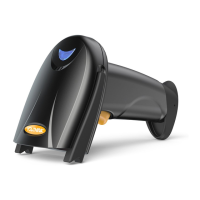

 To Next Page