Need help?
Do you have a question about the YoYoFit Edge and is the answer not in the manual?
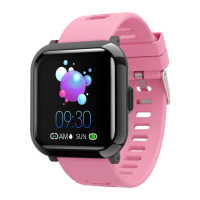
Details the contents of the Edge smart watch box.
Specifies the mobile operating systems compatible with the Edge watch.
Instructions on how to download the required companion app for the Edge watch.
Guidance on how to wear the Edge watch for comfort and optimal sensor performance.
Step-by-step instructions for detaching the wristband from the Edge watch.
Instructions on how to securely attach a wristband to the Edge watch.
Procedures for charging the Edge smart watch, including initial charging recommendations.
Guides users through the process of connecting the Edge watch to a smartphone via the app.
Steps to disconnect the Edge watch from a paired phone using the companion app.
Instructions on how to remove or forget a previously paired Edge watch from the phone's settings.
Explains how to customize the appearance of the Edge watch by changing its watch face.
How to verify the current connection status between the Edge watch and the paired phone.
Instructions on how to adjust the display brightness on the Edge watch.
How to locate a misplaced Edge watch using the companion app.
Using the Edge watch as a remote control for the phone's camera shutter.
Setting up and using the sedentary reminder feature on the Edge watch.
Configuring the Edge watch to display incoming call, text, and app notifications.
How notifications appear and are indicated on the Edge watch.
Options to mute or hang up incoming phone calls directly from the Edge watch.
Instructions for setting and managing alarms on the Edge watch.
How to use the stopwatch functionality on the Edge watch.
Monitoring daily activities like steps, calories, and distance with the Edge watch.
How the Edge watch automatically tracks sleep duration and quality.
Instructions for measuring and viewing heart rate data on the Edge watch.
How to measure and view blood pressure readings on the Edge watch.
Enabling and using the feature for continuous or automatic heart rate monitoring.
Overview of the sports modes available for tracking activities on the Edge watch.
Using the app to track and analyze detailed exercise data and routes.
Steps for initiating and managing exercise tracking directly on the watch.
Procedure for restarting the Edge watch to resolve issues.
Common problems and troubleshooting steps for the Edge watch.
Information regarding the return policy and warranty for the Edge watch.
 General
| System requirements | IOS system 9.0 or above; Android system 4.4 or above; Support bluetooth with 4.0 verson |
|---|---|
| Screen Size | 1.3 IPS 240*240 |
| Bluetooth version | BLE 4.0 |
| Battery capacity | 200mAh |
| Working Time | 5-7 days |
| Stand-by time | 15 days |
| Waterproof Level | IP67 |
| Sensor | G-sensor |
| Motor | Build in, vibrating reminde |
| RAM | 512K (Flash 64M) |
 Weight and Dimensions
| Product Size | 474212mm |
|---|---|
| Package Size | 15076.536mm |
| Package Weight | 188g |

 To Next Page