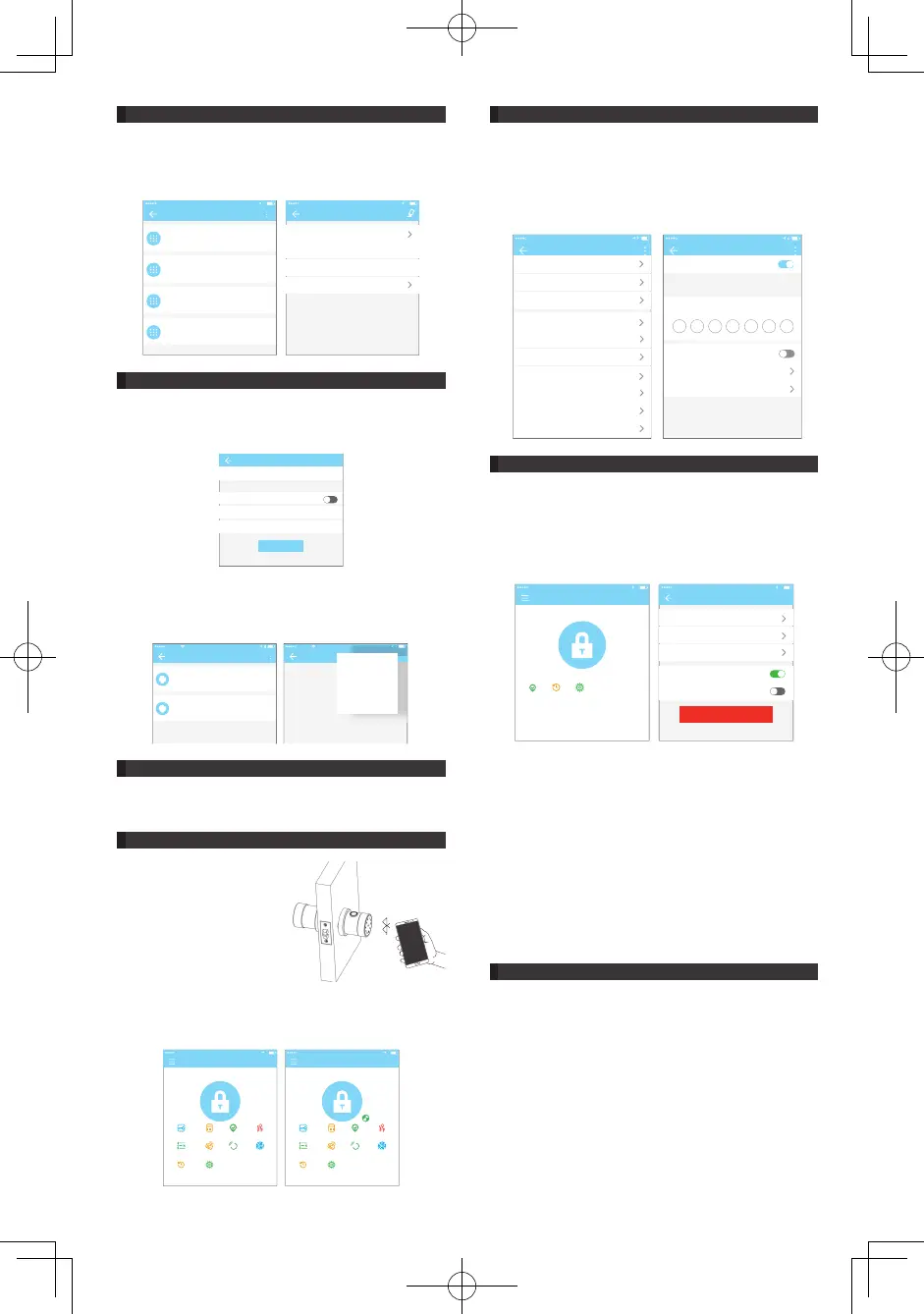
5. Card management
4.8 Passcode management
6. Fingerprint management
<RXQHHGWRDGGWKH,&FDUGÀUVW7KHZKROHSURFHVVQHHGV WR
be done via the app beside the lock. The validity period of the IC
card can be set, either permanent or time-limited.
All IC cards can be queried and managed through the IC card
management module. The remote card issuance function is
displayed in the case of a gateway. If there is no gateway, the
item is hidden.
All generated passcodes can be viewed and managed in the
password management module. This includes the right of
changing the password, deleting the password, resetting the
password, and unlocking the password.
Fingerprint management is similar to IC card management. After
DGGLQJDÀQJHUSULQW\RXFDQXVHWKHÀQJHUSULQWWRXQORFNWKHGRRU
IC card adding
permanent
settings
input the name
name
2017.08.14 15:49
2017.08.14 15:49
Effective time
End Time
next step
Password
60792956
2017.08.14 07:00 permanent
50631846
2017.08.11 16:00 permanent
41627512
2017.08.03 10:00 permanent
111222
2017.07.28 09:00 permanent
Tony
receiver Tony
sender Michael
time
record
2017.08.11 16:30
IC card
A&AT 16:59
Paul 1655453906
2017.07.26 18:11 permanent
Mary
2017.07.28 09:29 permanent
2334807796
ᕐй
A&AT 16:59
remove the car d
add the car d
Send card remotel y
•Unlock by APP
Click the round button at the top of the page to unlock the door.
Since the Bluetooth signal has a certain coverage, please use the
APP within the certain area.
9. Attendance management
9.1 Attendance setting
8. Passage mode
The APP is access control, which can be used for company
attendance management. The app contains functions of
employee management, attendance statistics and so on.
All 3.0 door locks have attendance functions. The normal door
lock attendance function is turned off by default. The user can
turn it on or off in the lock settings.
Working Hours Setting:
Set the time of on or off duty. Judging late and leave early is
based on these two data.
Workdays Setting:
Set which days of the week are workdays. There are two
ways to set it up: customization and one-two-day weekend.
Customization means that you can optionally set which days of
the week are workdays. One-two-day weekend means that one-
day weekend and two-day weekend rotate weekly.
Holidays Setting:
Set which days in the year are holidays. For example, one
workday was set to be a holiday, if you do not clock in that day,
it will not be treated as no clock in.
Attendance Statistics:
You can check the daily attendance of all staff. And the records
can be sorted according to the time clocked. Late, leave early and
QRFORFNLQFDQEHLGHQWLÀHGLQWKUHHGLIIHUHQWFRORUV
Check Attendance:
Select an employee to check the attendance of the employee for
each month. Slide left and right to switch months. At the bottom
of the page, there is the statistics of the number of late, leave
early, and no clock in this month.
Set Attribute:
The attendance function has a number of attributes that can
be set, including company name, department, working hours,
workdays, and holidays.
In the main interface of the app, select the passage mode in the
settings, and the date of the passage mode can be set, and the
start time and end time of the passage mode can also be set.
After the passage mode is activated, everyone can directly unlock
the door without any access permission. The passage mode can
be turned off by clicking again.
7. Unlock via Bluetooth
App User can lock the door via
Bluetooth and can also send the
Bluetooth ekey to anyone.
lock management
A&AT 16:59
XXX apartment
send ekey send passcode attendance ekey
management
passcode
management
card
manangement
Bracelet
management
fingerprint
management
settingsrecord
lock management
A&AT 16:59
XXX apartment
send ekey send passcode attendance ekey
management
passcode
management
card
manangement
Bracelet
management
fingerprint
management
settingsrecord
Settings
A&AT 16:59
Lock Namer oom 08
Lock Group
Ungrouped
Admin passcode
Lock Clock
Auto Lock
Unknown
Passage mode
off
Lock Sound
Unlock Remotely
On
Diagnosis
Read Operation Records
Passage mode
A&AT 16:59
Passage Mode
During the specific time period, the lock will
remain open until it is manually closed
At These Days
All Hours
Start Time
End Time
Sun Mon Tue Wed Thu Fri Sat
A&AT 16:59
xxx apartment
attendances ettingsrecord
key key settings
A&AT 16:59
clock
Troubleshooting
sender
attendance
unlock warning
delete
6


 To Next Page
 Loading...