
 Need help?
Do you have a question about the yte EP2 and is the answer not in the manual?
Tap the button to select one of three white noise sounds: White Noise, Pink Noise, or Brown Noise.
Tap the button to select one of three fan sounds: Fan Noise, Laundry, or Clothes Dryer.
Tap the button to select from six natural sounds and two lullabies.
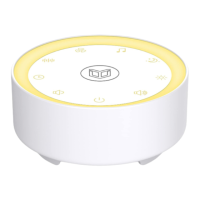
The EP2 Sleep Sound Machine is a versatile device designed to enhance sleep and relaxation through a variety of sound and light features. This user-friendly machine offers a comprehensive solution for creating a calming environment, whether for sleeping, studying, or simply unwinding.
The primary function of the EP2 Sleep Sound Machine is to provide a selection of soothing sounds and ambient lighting to help users relax and fall asleep. It features a range of sound categories, including white noise, fan sounds, natural sounds, and lullabies, allowing users to choose the audio most conducive to their needs. In addition to sound, the device incorporates a night light and a colorful ambient light, offering visual comfort and mood enhancement. The machine is designed for indoor use and is powered by an included adapter.
The EP2 Sleep Sound Machine is equipped with an intuitive control panel located on its top surface, making it easy to operate.
To power on the device, first connect it to a power source using the provided adapter. Once connected, a simple tap on the power switch button will turn the machine on or off.
The machine offers a diverse array of sounds, categorized for easy selection:
Adjusting the volume is straightforward. Users can tap the decrease volume or increase volume buttons to change the volume by one level. For continuous adjustment, holding down either button will smoothly increase or decrease the volume until the desired level is reached.
The EP2 Sleep Sound Machine includes an auto-off timer feature, perfect for users who prefer the machine to turn off automatically after a set period. While music is playing, tapping the timer button allows users to set the timer for 15, 30, 60, 90, or 120 minutes. Tapping the button again will cycle through these options or turn the timer off. Additionally, holding down the timer button will directly turn off the timer. It's important to note that if continuous sound or light is desired, the timer should be turned off.
The device offers two types of lighting to enhance the user experience:
In case users wish to reset the machine to its original settings, a factory reset option is available. This can be done by tapping and holding the power switch button for approximately five seconds. The machine will then provide a voice prompt "Factory Recovery" and turn off, indicating that the settings have been restored.
Proper maintenance ensures the longevity and optimal performance of the EP2 Sleep Sound Machine.
By following these guidelines, users can ensure a safe, effective, and enjoyable experience with their EP2 Sleep Sound Machine.
 General
| Type | Smartphone |
|---|---|
| Resolution | 720 x 1280 pixels |
| Processor | Quad-core 1.3 GHz |
| Operating System | Android |
| SIM | Dual SIM |

 To Next Page