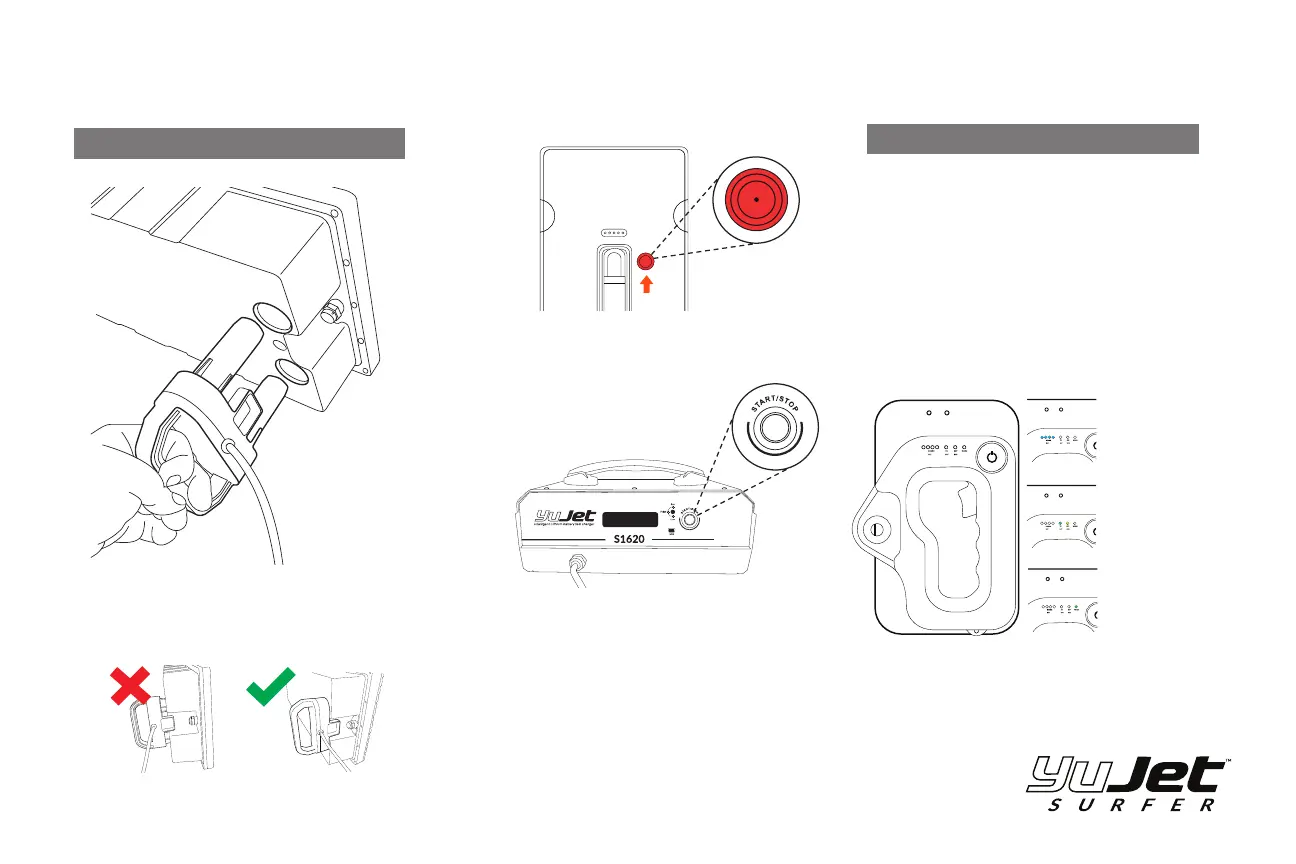
1: The charger is installed with a special YuJet connecng
plug. This connecon can only be installed one way. Make
sure the charging plug is fully seated into the baery.
3: Press and hold the start/stop buon unl the
charger emits a tone. The display will show “Pre” while
checking the status of the baery, and then will switch
to CHG when charging.
*When the baery has completed the charge, the
charger will display Complete and emit a tone.
2: Install the Baery safety magnet onto the baery.
1: Plug in the Wireless Charger into the wall adapter
and charging base using the supplied micro USB cable.
3: Place the remote onto the dock. The charger will then
glow green and the TX Ba light on the remote will
illuminate.
2: The charger will glow blue waing for the remote to
be placed on the dock..
MAIN BATTERY
REMOTE CONTROL
CHARGING
Press and hold
Start/Stop button
for 3-4 sec.
4: When the charge has finished the charger will
illuminate blue and green, and the TX Ba light will show
a steady white light.
Board Baery Level
Remote Baery Level
/ Charge Indicator
Speed Mode:
Beginner / Expert
Connecon Status / Warning Light:
Green Solid: Connected to the board
Flashing: No Connecon to the Board
Sequenced Flashing: Error



 To Next Page