16 17
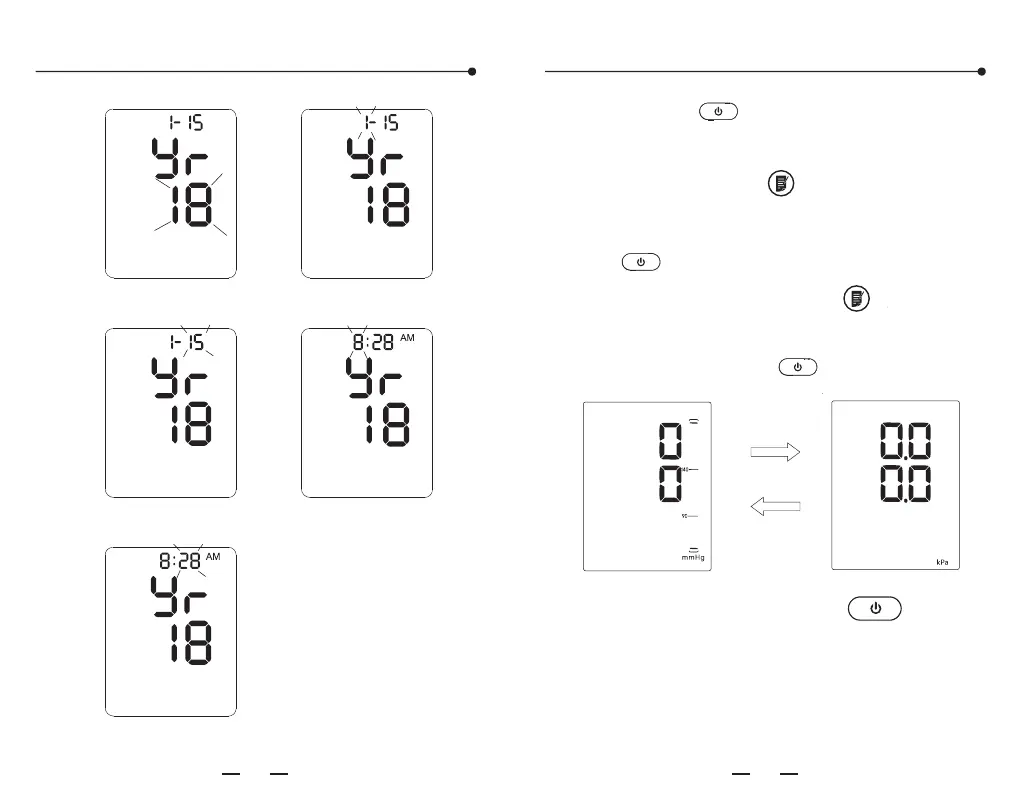
Time and date setting
mmHg/kPa setting
Year character blink Month character blink
Date character Hour character blink
Minute character blink
M
D
M
D
the " " button to enter the mmHg/kPa
unit setting. Press the " " button to
switch between these two pressure units.
Finish by pressing the " " button.
After finishing the volume setting, pressing
After unit setting, press the " "button
to shut down.
Pressing the " " button to enter the voice
setting. The size of the sound ranges from 01
to 05 and OFF. Press " "choose the volume.
Attention:
In the condition of kPa unit, measurement
without voice prompt.
YE660 ( )
尺寸:180X142.5mm 色彩:准确、单色,层次分明
纸张:80克双胶纸 印后加工:对折装订
E CE认证 电子血压计说明书印刷要求


 To Next Page