
 To Next Page
C
Cynthia LewisNov 7, 2025
How to change the KPA to MMHG reading

How to change the KPA to MMHG reading
Capability of the monitor to store measurement data.
Illuminated screen for improved visibility in various lighting conditions.
Includes body movement, cuff wrapping, and IHB detection for accuracy.
Steps for connecting the power source or installing batteries to turn on the device.
Guidance on cuff usage, posture, and initiating the measurement process.
Instructions on how to access and review previously stored measurement data.
Identification of the monitor's display, buttons, and ports.
Information regarding the blood pressure cuff and AC adapter specifications.
Meaning of symbols and icons displayed on the monitor's screen.
Explanation of symbols used for safety and proper operation.
Intended use, user suitability, and general measurement advice.
Warnings on measurement frequency, patient conditions, and adapter cable safety.
Guidelines for storing, cleaning, and maintaining the monitor's accuracy.
Recommendations for calibration and contacting customer support.
Steps for inserting batteries and understanding battery status icons.
Procedure to set the device's current time and date accurately.
Adjusting voice prompts and selecting pressure units (mmHg/kPa).
Instructions for connecting the cuff and wearing it correctly on the arm.
Guidelines for sitting posture and arm positioning for accurate readings.
Steps to start measurement, zero testing, and inflation phases.
Process of removing the cuff and shutting down the device.
How the device visually indicates high blood pressure levels.
Tips on optimal measurement intervals and consulting healthcare professionals.
How to view, average, and navigate recorded measurements.
Procedures for halting measurements and clearing all stored data.
Explains indicators for cuff wrapping and body movement.
Instructions for entering and restoring the static mode for testing.
Answers to common questions about blood pressure and measurement practices.
Addresses device malfunctions, error codes, and troubleshooting steps.
Details device parameters, materials, and compliance standards.
Information on electromagnetic emissions and immunity test levels.
Specific test parameters for RF wireless communication ports immunity.
Blank pages provided for users to log their health data and measurements.
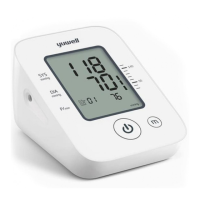
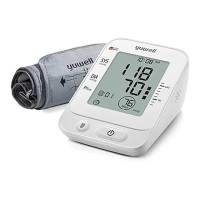
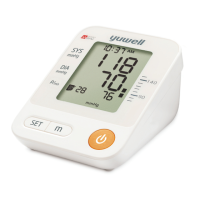
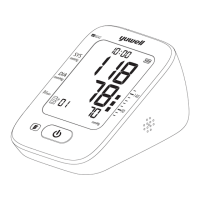
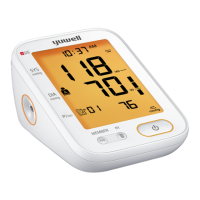
The Yuwell YE680B is an electronic blood pressure monitor designed for home and medical center use, providing an oscillometric method for measuring blood pressure and pulse rate in adults. This device is not suitable for neonates, pregnant individuals, or those with pre-eclampsia. Its primary function is to offer accurate and intuitive blood pressure readings, supported by a range of user-friendly features.
The core function of the YE680B is to measure systolic (SYS) and diastolic (DIA) blood pressure, along with pulse rate. It employs an oscillometric method, which detects blood flow oscillations in the brachial artery. The device automatically inflates the cuff and then gradually deflates it, recording the pressure at which oscillations begin (systolic) and end (diastolic). The pulse rate is also determined from these oscillations.
A key feature of the YE680B is its data storage capability. The monitor can automatically store up to 99 measurement records, including the time, date, blood pressure, and pulse. This allows users to track their blood pressure trends over time, providing a comprehensive history that can be shared with healthcare professionals. The device also offers an average value display for the latest three measurements, giving users a quick overview of their recent blood pressure status.
The YE680B includes several auxiliary measuring functions to enhance accuracy and user experience. The Cuff Wrapping Detection feature indicates whether the cuff is worn correctly, helping to prevent inaccurate readings due to improper cuff placement. If the cuff is not wrapped properly, an icon will appear, prompting the user to adjust it. Body Movement Detection is another crucial function; if the user moves during measurement, a specific icon will be displayed, indicating that the reading might be inaccurate and suggesting a re-measurement. This helps ensure that readings are taken in a stable and quiet state, which is essential for reliable results.
For users who prefer audible guidance, the device offers a Voice Broadcast Function. This feature announces the measurement results, making it accessible for individuals with visual impairments or those who prefer auditory feedback. The voice volume can be adjusted or turned off according to user preference.
The Irregular Heartbeat (IHB) Prompt is an important health monitoring feature. If the device detects an irregular heartbeat during measurement, an IHB icon will be displayed. While this is not a diagnostic tool, it alerts users to potential cardiac irregularities, prompting them to consult a doctor for further evaluation.
The Blood Pressure Range Indicator provides an intuitive visual representation of the blood pressure level. If the systolic pressure is higher than 139mmHg or the diastolic pressure is higher than 89mmHg, the indicator will highlight this, suggesting that the user may have high blood pressure and should seek medical advice. This feature helps users quickly understand their readings in the context of established blood pressure classifications.
The YE680B is designed for ease of use, from power-on to measurement and record-keeping.
Power-on and Setup: The device can be powered either by connecting it to a power source using the provided AC adapter or by installing four AA batteries. Users are advised to align the positive and negative poles correctly when installing batteries. The monitor includes a low battery indicator and a "battery running out" twinkle icon, prompting users to replace batteries when necessary. If using the DC external power, it's recommended to remove the batteries for long-term use.
Time and Date Setting: After installing new batteries or connecting to DC power, users need to set the time and date. This is crucial for accurate record-keeping, as the monitor automatically stores measurement results with timestamps. The setting process involves pressing specific buttons to adjust the year, month, date, hour, and minute.
Voice/Unit Setting: The device allows users to customize the voice broadcast volume, with options ranging from 01 to 05 or off. Additionally, users can switch between mmHg and kPa as the preferred pressure unit. It's noted that in kPa unit mode, measurements will be taken without voice prompts.
Cuff Application: The YE680B comes with a cuff suitable for upper-arm circumferences between 22cm and 45cm. The cuff should be worn 2-3cm above the elbow joint, with the air tube positioned on the inner side of the arm. It's important to ensure the cuff is wrapped snugly but comfortably, avoiding excessive tightness or looseness, and that the air tube is not twisted. The device's cuff wrapping detection feature helps confirm correct placement.
Measuring Posture: For accurate readings, users should sit straight, keeping the center of the cuff at the same level as the heart. It's recommended to sit still for 5 minutes before measurement to ensure a quiet and stable state. Avoid taking measurements within one hour of eating, smoking, drinking alcohol or coffee, after sport or bath, while standing, walking, or having the body pressed. Users should also refrain from speaking, moving, shaking their arm, or bending fingers during measurement.
Starting Measurement: Once the cuff is correctly applied and the user is in the recommended posture, pressing the "Start/Pulse" button initiates the measurement. The device will first perform a zeroing test, followed by inflation. During inflation, the "cuff wear" icon will flicker, and the pressure value will gradually decrease as the air is released. After the measurement is complete, the SYS, DIA, and pulse rate will be displayed, and the air will automatically deflate.
Checking Records: Users can access stored measurement records by pressing the "Member" button. This allows them to view the average of the latest three measurements or scroll through individual records (from 1 to 99).
Emergency Stop: In case of discomfort or other reasons requiring an immediate stop during measurement, pressing the "Start/Pulse" button will quickly release the air. If the button is unresponsive, the cuff can be manually removed.
Static Mode (for professional use): The device includes a static mode for professional personnel to test the monitor with a standard pressure gauge. Normal users are warned not to operate this function, as it is not intended for general use and improper operation could cause damage or inaccurate results. Before entering static mode, the system must be restored.
Proper maintenance of the Yuwell YE680B is crucial for ensuring its longevity and the accuracy of its measurements.
Cleaning: For daily use by a single patient, the monitor should be cleaned with a soft, dry cloth. If necessary, a soft cloth wiped with water can be used, followed by cleaning with 75% alcohol. When the device is used by multiple patients, cleaning with 75% alcohol is mandatory after each use. It is important to prevent alcohol from flowing into the monitor or the arm cuff. For disinfection, absorbent cotton gently wiped with rubbing alcohol can be used. Detergents should not be used.
Storage: The monitor and its accessories should be stored properly after use, away from high temperatures, moisture, dust, or direct sunlight. The cuff, which contains an airbag, should be handled with care, avoiding folding, pulling, or twisting.
Battery Management: If the monitor will not be used for a long time (over three months), the batteries should be removed to prevent leakage and damage. If using the DC external power for an extended period (more than one month), the batteries should also be taken out.
Calibration: Yuwell recommends calibrating the monitor at least once a year, in accordance with local laws and regulations, to maintain measurement accuracy. Users are advised to contact the manufacturer or agent if calibration is needed.
General Precautions: Users should not modify the device or replace its parts without authorization. Water should not be allowed to seep into the device. The AC adapter cable should be handled carefully to avoid accidental strangulation, especially around infants. Small parts should not be swallowed due to choking hazards. The device should not be used with high-frequency surgical equipment. If the arm circumference is outside the specified range (22cm-45cm), measurement accuracy may be affected. The cuff should not be used over a wound or on an arm with an intravenous drip. Consultation with a doctor is advised if using the device on an arm with an arterio-venous (A-V) shunt or on the side of a mastectomy. Frequent measurements that restrict blood flow should be avoided to prevent injury. The use of alkaline batteries is recommended; rechargeable batteries should not be used. Disposal of the device and batteries should follow local laws and regulations. The patient operator should not touch the battery and DC socket simultaneously, nor should they touch the patient and the battery/DC socket at the same time. Different battery types may lead to measurement errors, so users should adhere to the manufacturer's battery requirements. Any unexpected operation or events should be reported.
 General
| Model | YE680B |
|---|---|
| Type | Upper Arm Blood Pressure Monitor |
| Measurement Method | Oscillometric |
| Measurement Range (Pressure) | 0-280 mmHg |
| Accuracy (Pressure) | ±3 mmHg |
| Accuracy (Pulse Rate) | ±5% of reading |
| Display | LCD |
| Automatic Shut-off | Yes |
| User Capacity | 2 users |
| Memory Function | Yes |
| Power Supply | 4 x AA batteries or AC adapter |
| Measurement Range (Pulse Rate) | 40-199 beats/min |
| Cuff Size | 22-45 cm |