ADJUST A LOOSE RUNNING BELT
With use, the running belt will become loose. A simple way to check if the running belt is loose it is will
bunch up in the middle of the belt. If you are running on the belt and it feels unstable (wobbly) or your
feet are sticking to the belt, STOP the treadmill immediately and tighten the belt to avoid injury.
1.
2. To adjust the tightness of the belt, STOP the
treadmill.
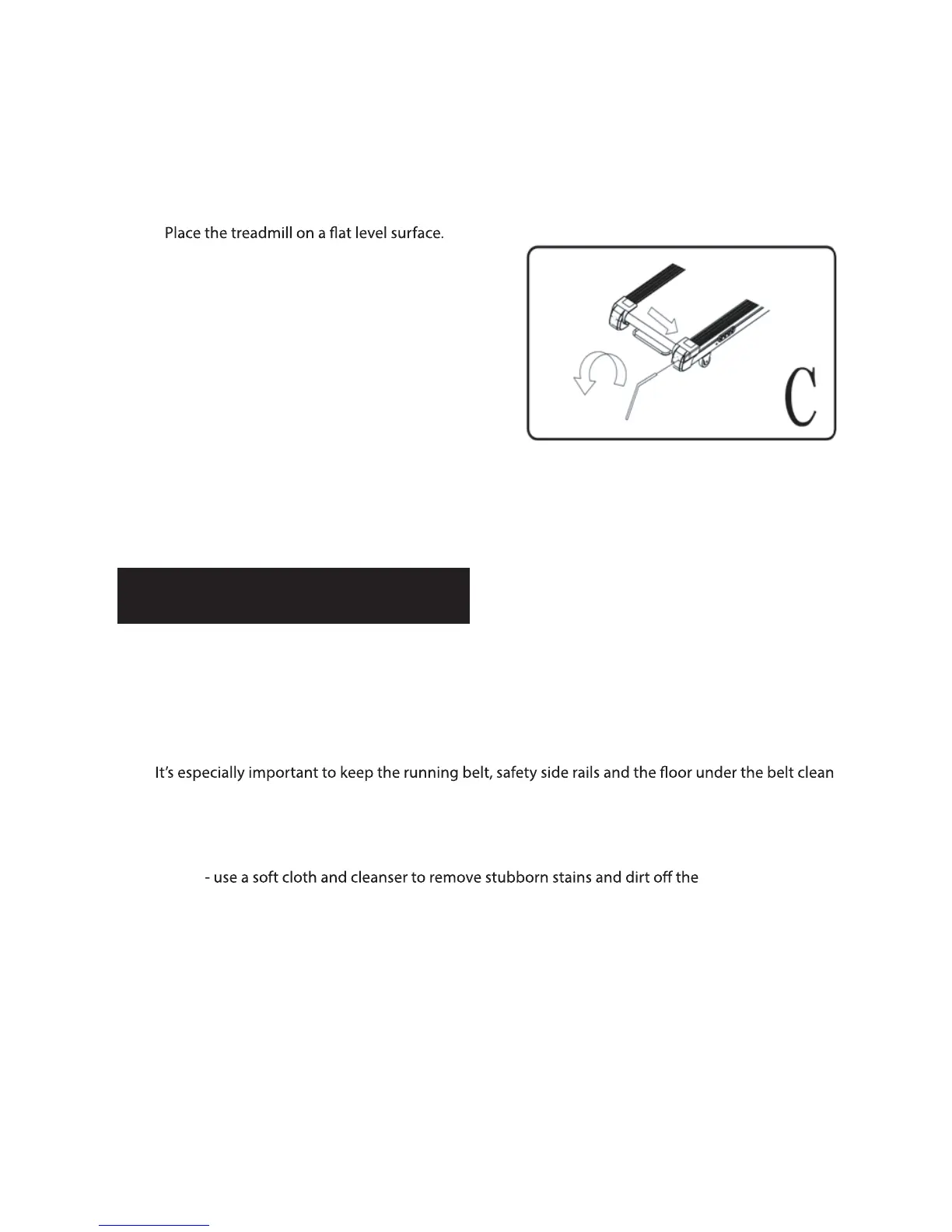
3. Use the Allen key provided and turn the end cap
screw a ¼ turn clockwise – see illustration C.
4. START the treadmill on a medium speed - check
the belt is centered, if not keep turning the screw
a ¼ turn clockwise at a time until the belt is
centered.
MAINTENANCE
Regular maintenance will prolong the life of your treadmill and prevent injury. We strongly recommend
that you do the following on a regular basis –
1. Remove the power cord from the wall after use, especially if children are around.
2.
and free of dust and dirt to avoid increased wear and tear and possible damage to the treadmill.
3. Clean the treadmill after use with a dry cloth to clean the Control Pad and areas around the Power
Switch
Running Belt.
4. Check the running belt alignment each time you use the treadmill (it will move with use) - refer to
the Adjusting the Running Belt section above.
5. Keep the running belt lubricated – refer to the Running Belt Maintenance section above.
6. Keep the treadmill in a safe dry place away from heat and water.


 To Next Page