OPERATING INSTRUCTIONS
Safety key
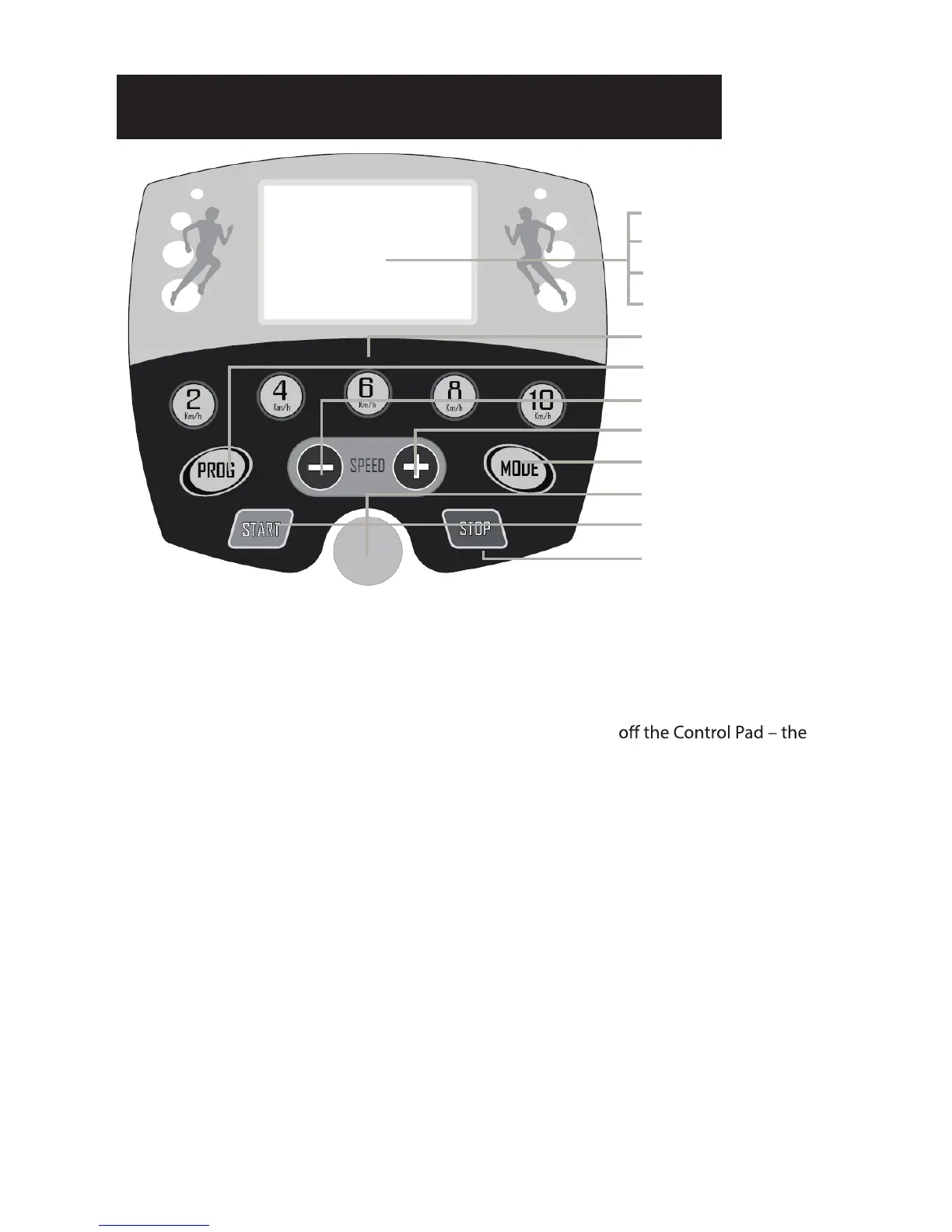
To start the treadmill, the Safety Key must be attached to the Control Pad (yellow circle) and
your clothing. Note, the treadmill will not start unless you do this.
You can STOP the treadmill at any time by pulling the Safety Key
treadmill will STOP immediately.
Starting the treadmill
Turn the power on at the wall and turn the red power switch on at the back of the treadmill
and place the Safety Key on the Control Pad.
Now press the START key - the Control Pad will beep and the LCD display will light up – the
treadmill is now in Standby Mode.
Now select the Manual Mode or a Pre-set Program by referring to the instructions below.
Selecting the PRE-SET programs
There are 12 pre-set programs for you to choose – refer to table below and the Charts on the
SPEED
TIME
DISTANCE
CALORIES
QUICK START SPEEDS
PRE-SET PROGRAMS
SPEED (-)
SPEED (+)
MANUAL MODE
PLACE SAFETY KEY HERE
START
STOP


 To Next Page