EasyManua.ls Logo

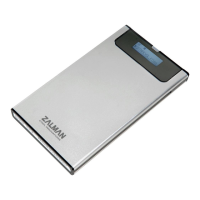
ZALMAN ZM-VE200SE - User Manual

ZALMAN ZM-VE200SE
6 pages
Print Icon
To Next Page IconTo Next Page
Loading...
Quick Guide
ZM-VE200SE
www.ZALMAN.com
Ver. 1.2
Please read this Manual before use
All manuals and user guides at all-guides.com
all-guides.com
Question and Answer IconNeed help?

Do you have a question about the ZALMAN ZM-VE200SE and is the answer not in the manual?

Summary

Precautions

Specifications

System Requirements

Components

Mounting a 2.5 HDD

Names of Parts

Appearances

Identifies external components like ports, switches, and displays.

Connecting to PC

Connect; Disconnect with USB cable

Instructions for connecting and disconnecting the device via USB.

Connect; Disconnect with e-SATA cable (Optional)

Instructions for optional connection and disconnection via e-SATA.

Introduction

Using Jog Switch

Explains how to use the jog switch for navigation and file selection.

Menu Navigation

Details the menu structure and mode selection process.

Summary

Precautions

Specifications

System Requirements

Components

Mounting a 2.5 HDD

Names of Parts

Appearances

Identifies external components like ports, switches, and displays.

Connecting to PC

Connect; Disconnect with USB cable

Instructions for connecting and disconnecting the device via USB.

Connect; Disconnect with e-SATA cable (Optional)

Instructions for optional connection and disconnection via e-SATA.

Introduction

Using Jog Switch

Explains how to use the jog switch for navigation and file selection.

Menu Navigation

Details the menu structure and mode selection process.

ZALMAN ZM-VE200SE Specifications

General IconGeneral
ModelZM-VE200SE
TypeExternal Enclosure
InterfaceUSB 3.0
Max Support Capacity2TB
MaterialAluminum
Virtual CD FunctionYes
Password ProtectionYes
LED IndicatorYes
Enclosure Size2.5-inch
CompatibilityWindows, Mac, Linux
Supported DrivesHDD, SSD
FeaturesVirtual CD, Password Protection

Related product manuals