15
Use & Operation (continued)
IMPORTANT: Insert batteries and set
up thermometer base station rst
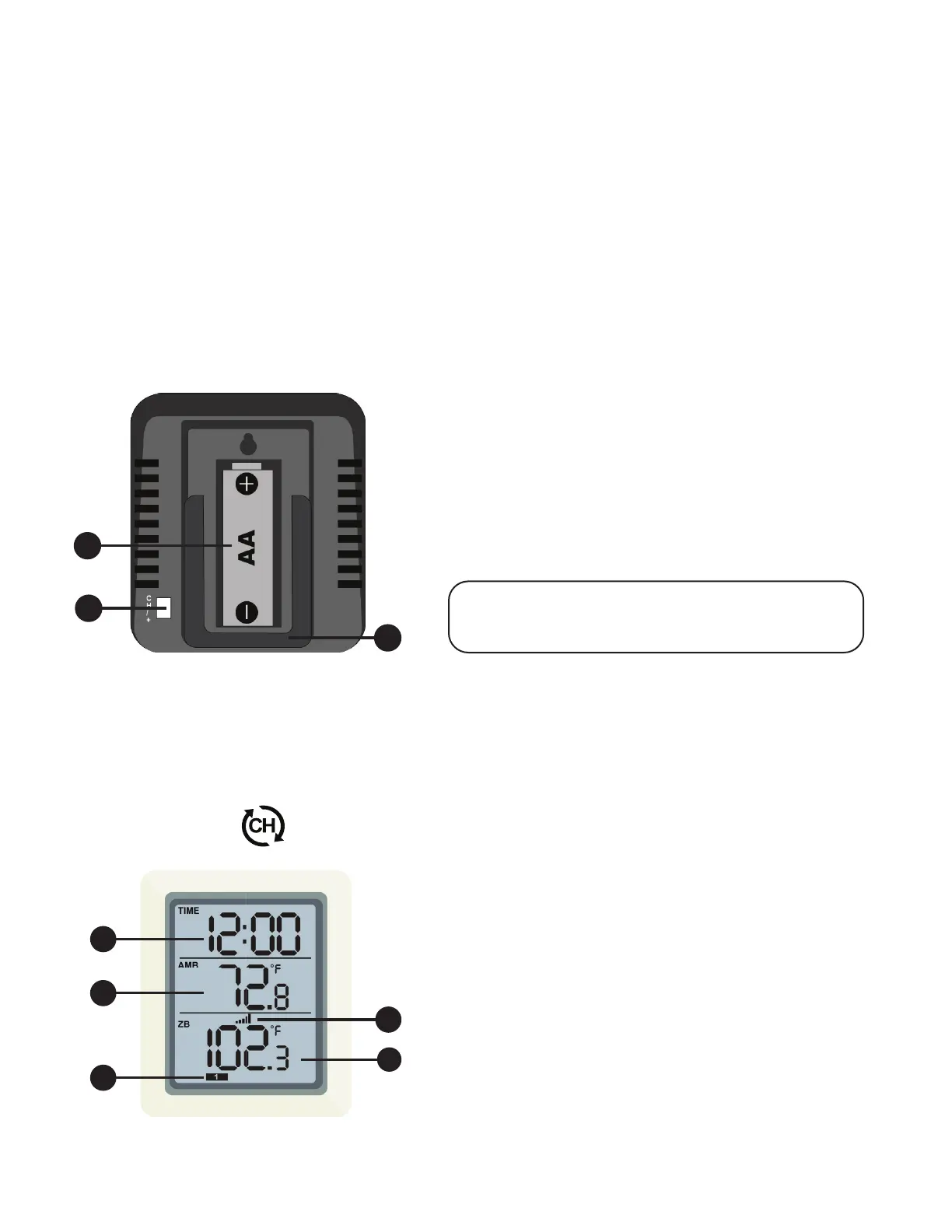
1. Time
2. Ambient Room Temperature
3. Reception Icon
4. Probe Sensor Temperature
5. Current Probe Sensor Channel
1. Battery Compartment
2. CH/+ Button
3. Stand Mount
3
2
1
Figure 2
Figure 2
Figure 1
Figure 1
Switch Channels
1. Press [CH/+] button on the back of the thermometer base station to view the
different thermometer probe temperatures. See Figure 1.
They will display in the following sequence:
CH1- CH2 - CH3 -
Thermometer Base Station Set Up
1. Remove the battery door on the back of the base station as, shown in
Figure 1 below.
2. Insert one AA battery. All of the LCD segments will light up for a few seconds
to verify that all segments are operating properly.
3. The thermometer base station will instantly display the ambient temperature.
The probe temperatures will update on the display within a few minutes after
you place batteries in the thermometer probes.
3
1
2
5
4


 To Next Page