4
Zappiti Player 4K Quick Start Guide
Introduction
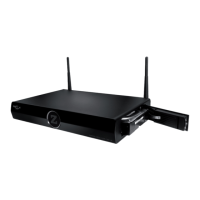
Zappiti Player 4k is an all-in-one solution for video playback with upscaling (up to 4K) and 3D video playback.
Key Features
Android: Android Apps friendly. Easy access with streaming contents providers, VOD/SVOD, catch up TV, musical
playback, social networks, news, weather info, trailers, games, internet radio and more…
Up-Scaling 4K: Display your videos with an ultra high quality upscaling Ultra HD 4K (3840x2160 and 4096x2160).
3D video friendly: Supports most of the 3D video formats such as BD ISO 3D, MVC, SBS, and Top/Bottom.
Network Player: Connect your player on a local network and enjoy your content from a PC, a MAC or a NAS via SMB.
MKV Player: Playback HD and SD video in MKV containers and other modern video file formats, including top quality
HD video with very high bit-rates > 120 Mbp/s.
HDD Rack Option with Hot Swap Function: Easily and quickly insert and exchange internal 3.5'' SATA HDDs
(up to 8 TB pre formated HDDs).
USB Ports: Conveniently connect HDDs, USB flash drives, USB card readers and other USB storage devices.
USB Port 3.0: Read or copy your files in high speed.
Full Range of A/V Connectors: S/PDIF Optical Audio outputs, AV analogue output via an adaptor, HDMI CEC output.
Multichannel home cinema audio: Bitstream, downmix stereo.
High-Quality Music Playback: Plays very high-quality (up to 192 kHz / 24-bit) music files in various formats.
Video Output Flexibility: Output video in any resolution and format from SD to 1080p (1920x1080, 24p/PAL/NTSC),
Ultra HD (3840x2160, 24p/25p/30p) and 4K (4096x2160, 24p). True 24p (23.976 Hz outpout).
Playback memory: Resume playback from the last position.
Computer Mouse Friendly: Connect a computer mouse (air or not) to control the player and Android Apps.
Advanced File Browser: Convenient file browser with powerful file management (copy, move, delete, rename).
Open GUI: Add your own Android Apps, customize the Home Page of the player, add any widgets (weather, news...).
●
●
●
●
●
●
●
●
●
●
●
●
●
●
●
●


 To Next Page