8
Zappiti Player 4K Quick Start Guide
Remote Control
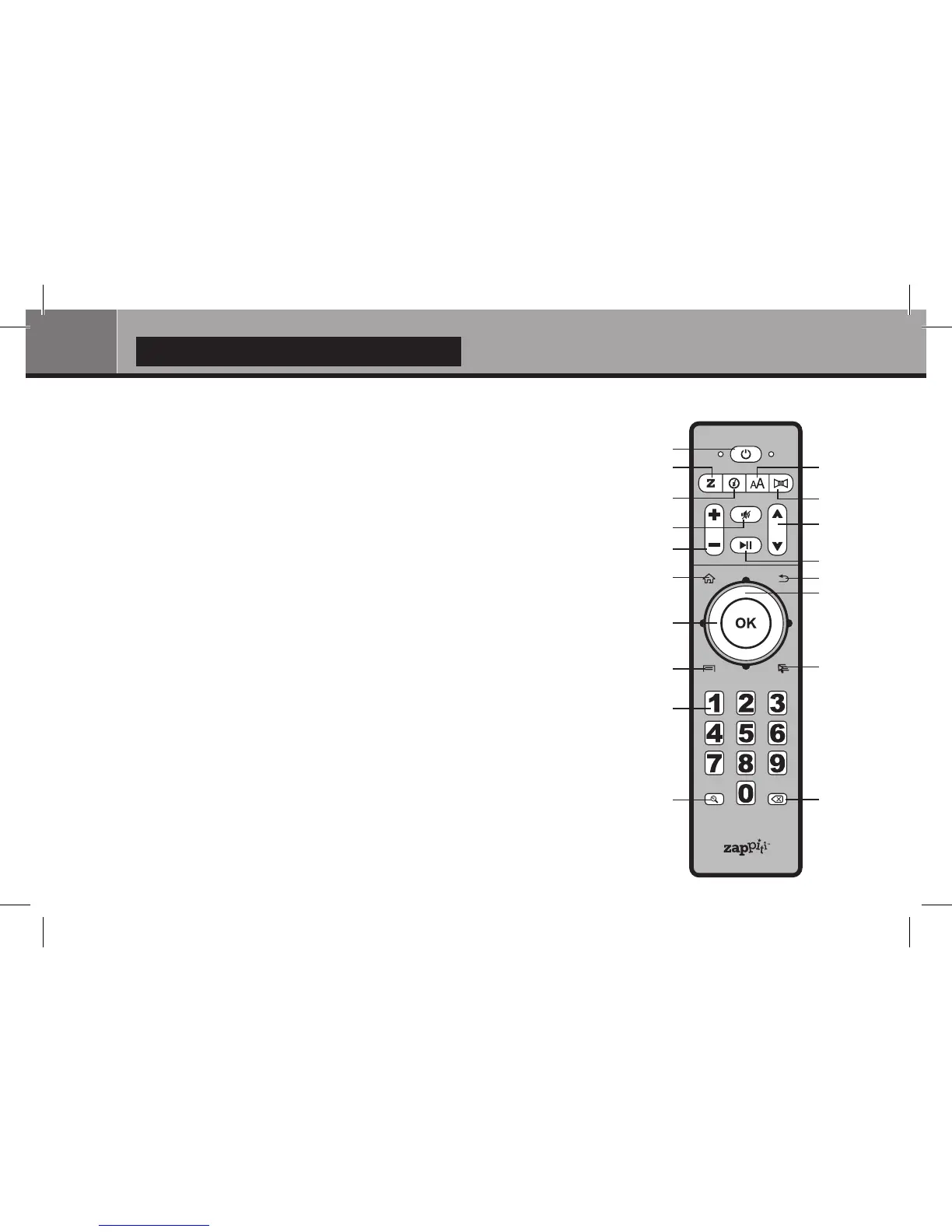
1. POWER — Toggle power OFF and ON.
2. Z — Toggle Front LED OFF and ON.
3. SUBTITLE — Change subtitle language.
4. INFO — Show / Hide the pop-up info.
5. AUDIO — Change audio language or channel.
6. MUTE — Mute audio.
7. PAGE UP/PAGE DOWN — Scroll up and down
in various lists — Next / Previous chapter.
8. VOLUME +/- — Increase / Decrease volume.
9. PLAY/PAUSE — Start playback / Pause playback.
10. HOME — Go to Home Menu to select application.
11. RETURN — Stop Playback / Return to the previous menu or mode.
12. DOWN/UP — Fast reverse / Fast forward play.
13. LEFT/RIGHT — Jump to 1 min backward/forward.
ARROW and OK Buttons — Navigate menu selection.
14. MENU — Show/hide the pop-up menu.
15. MOUSE — Switch to the virtual mouse mode.
16. NUMBER Buttons — Enter numeric values ;
1-9 : direct access from 10 to 90% of the timeline or total pages.
0 : reset the playback position to the beginning.
17. ZOOM — Zoom in / Zoom out.
18. DELETE — Delete the previous character/item.
1
8
10
13
14
16
17
2
4
6
3
5
9
7
11
12
15
18


 To Next Page