13
under the standby mode, press the key to choose
the DUPLEX of the main band mode; hold the key
to start or close the monitor mode of the main band
mode
14
under the standby mode, press the key to choose
the power level of the main band mode; hold the
key to start the double waiting and monitoring
function
15
right
under the standby mode, press the key to choose
VFO mode; hold the key to start the frequency scan
16
right
under the standby mode, press the key to choose
the channel mode /CALL channel mode; hold the
key to enter the store/delete channel mode
■
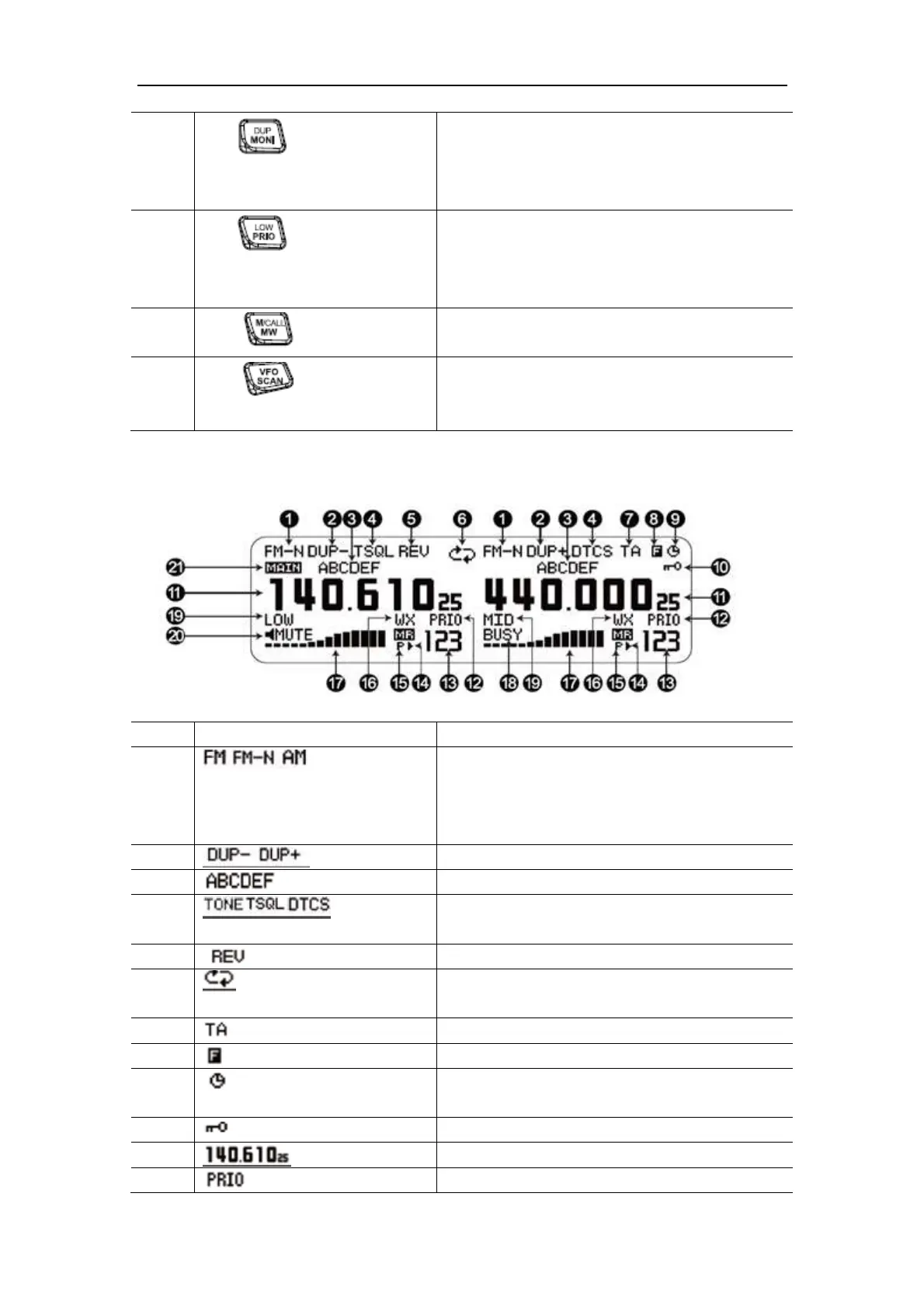
LCD Screen Display
No. Icons Functions
1
indication for the wideband frequency modulation,
indication for the narrow-band frequency
modulation, indication for the amplitude
modulation
2
indications for – DUPLEX and + DUPLEX
3
indication for the channel name
4
indication for the trunk signaling, indication for the
CTCSS signaling, indication for the DCS signaling
5
indication for the frequency reverse
6
indications for starting the same frequency repeater
or cross repeater
7
indication for the talk around function
8
indication for the shortcut operations
9
indication for starting up the function of the
automatic power on
10
indication for the clock key of the panel
11
indication for the present channel frequency
12
indication for the function of double waiting


 To Next Page
 Loading...