ZMCBR-H65
5
4.2.1 TP Search
Main Menu-> Satellite -> TP Search
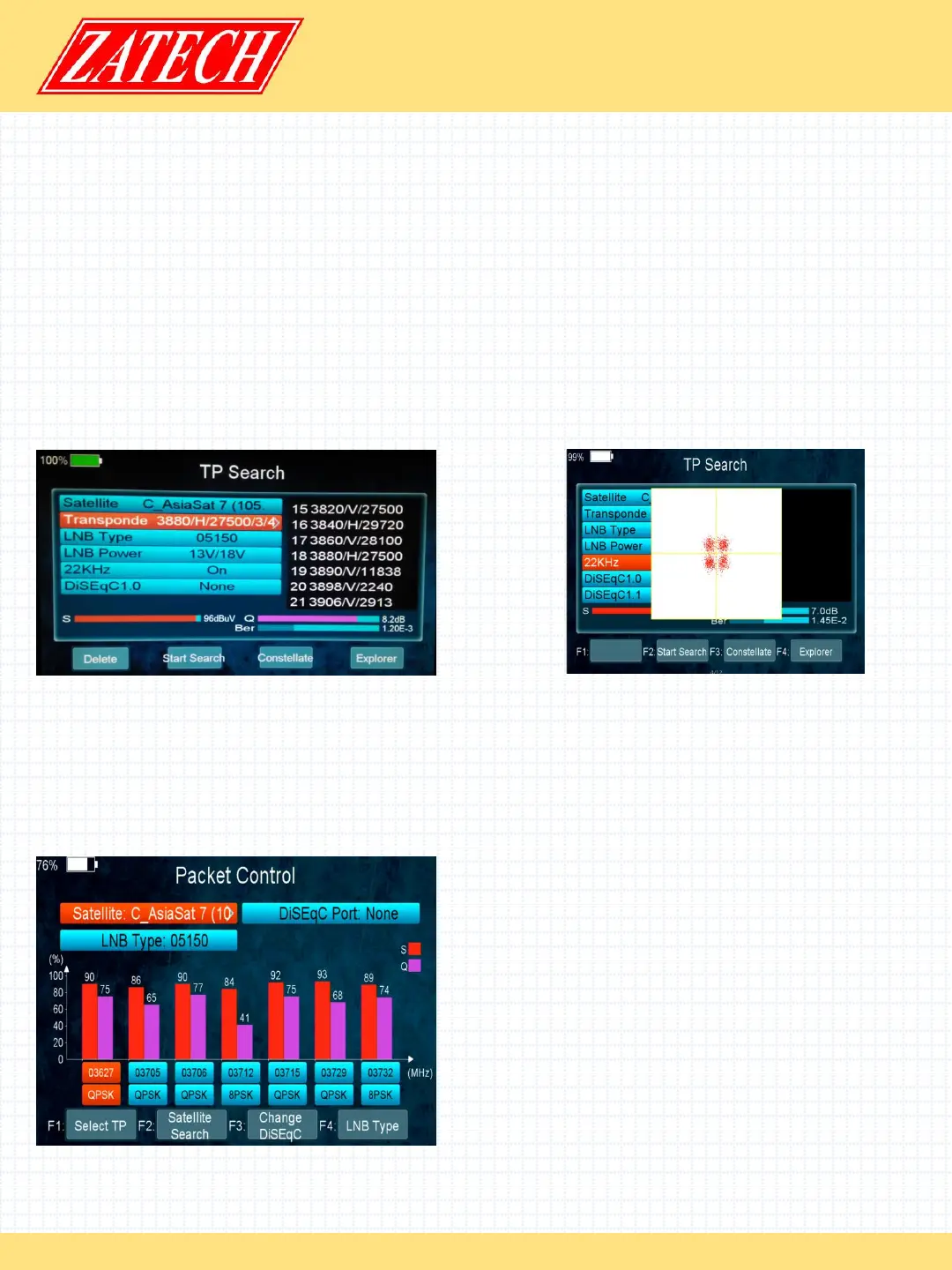
Press OK enter the TP search, first, you should select satellite, in this picture, you also
can delete, move, and rename the satellite.
When you fixed on a satellite, then press OK the following window will appear. Use
[p/q] button to move cursor, it’ll show the satellite name, transponder, LNB, 22 KHz,
DiSEqC port. When all parameters confirm, press F2 button search the channels. You
also can press F1 to delete the sat, or press F3 to view the constellation, or press F4 to
explorer the signal information.
You can display constellation by F3 button.
4.2.2 Satellite IDE.
Main Menu-> Satellite ->Satellite IDE.
If you don’t know the signal information of some usual sat, in this menu, please wait a
moment, it will find the satellite identify.
4.2.3 Packet Control
Main Menu-> Satellite -> Packet Control
In this menu, you can know the strength and
quality of each transponder under the
satellite.


 To Next Page
 Loading...