10
Network
TCP/IP
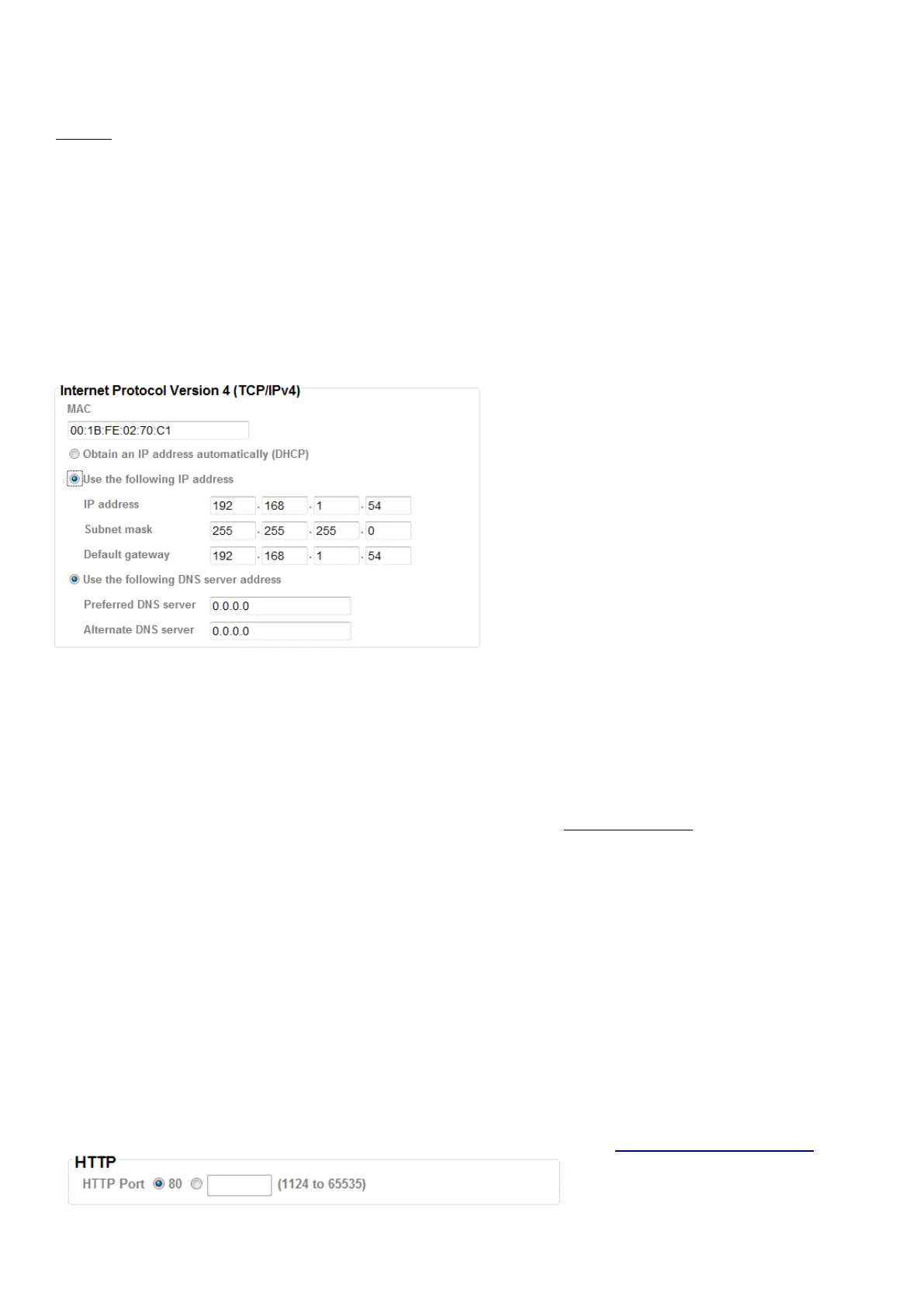
Internet Protocol Version 4 (TCP/IPv4)
Obtain an IP address automatically (DHCP): If a DHCP server is installed on the network, to select this
while the IP address is assigned by the DHCP server.
Obtain DNS server address automatically: Select this to obtain the address of DNS server
automatically.
Use the following IP address: Select this option when the fixed IP address is set.
IP address: Enter the IP address of the device.
Subnet mask: Enter the subnet mask.
Default gateway: Enter the default gateway.
Use the following DNS server address: Select this when you set the fixed address as the IP address of
DNS server.
Primary DNS server: Enter the IP address of the primary DNS server.
Secondary DNS server: Enter the IP address of the secondary DNS server, if necessary.
HTTP
HTTP port number: Select 80 in general situations. If you want to use a port number other than 80,
select the text box and enter a port number between 1024 and 65535.
When you have set the HTTP port number to a number other than 80 on the Network Setting
screen in the Setup Program, access the device by typing the IP address of the device on the web
browser as follows: Example: when HTTP port number is set to 2000 http://192.168.1.100:2000/



 To Next Page