Need help?
Do you have a question about the Zebronics ZEB-PLUTO 2 and is the answer not in the manual?
Branding and model identification for the Zebronics PLUTO 2 speaker system.
Key usage guidelines and warranty voiding conditions for the speaker.
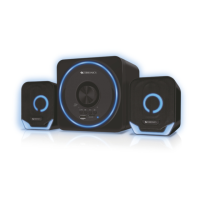
Highlights the main functionalities and components of the 2.1 speaker system.
Details the audio output, drivers, impedance, and dimensions of the speaker.
Lists the items included in the speaker package.
Identifies and describes the buttons, ports, and indicators on the speaker's control panel.
Steps to connect the speaker to a Bluetooth-enabled device.
Instructions for using USB, mSD, FM Radio, and AUX-IN audio input modes.
Guide to operating and changing the speaker's LED lighting modes.
This document serves as the user manual for the ZEB-PLUTO 2, a 2.1 channel speaker system from Zebronics, a company that is ISO 9001:2015 certified. The manual provides instructions for operation, features, and maintenance guidelines to ensure optimal performance and longevity of the device.
The ZEB-PLUTO 2 is designed to deliver a comprehensive audio experience, functioning as a versatile speaker system suitable for various audio sources. Its primary function is to amplify and reproduce sound, offering multiple connectivity options to cater to different user preferences and device compatibilities. The speaker system is characterized by its 2.1 channel configuration, which typically includes a subwoofer for low-frequency sounds and two satellite speakers for mid-range and high-frequency sounds, creating a more immersive audio environment.
One of the key usage features of the ZEB-PLUTO 2 is its multi-connectivity support. It comes equipped with Bluetooth v5.0, allowing for wireless audio streaming from compatible devices such as smartphones and tablets. This eliminates the need for physical cables, providing greater flexibility and convenience in placement and usage. To connect via Bluetooth, users need to turn on the speaker, press the "LED/M" button to switch to BT Mode, and then enable Bluetooth on their phone or tablet. The device will appear as "ZEB PLUTO 2" in the list of available devices, and tapping on it will establish the connection.
In addition to Bluetooth, the speaker supports traditional wired connections through its AUX-IN feature. This allows users to connect the speaker to audio sources that do not have Bluetooth capabilities, using an inbuilt USB 3.5mm cable. The USB connector should be plugged into a rated 5V power source, and the 3.5mm Aux connector should be connected to the audio source. This ensures compatibility with a wide range of devices, from older MP3 players to computers and televisions.
For standalone audio playback, the ZEB-PLUTO 2 includes integrated USB and mSD card slots. When a USB flash drive or a microSD card is inserted, the speaker automatically switches to the respective input mode. This feature allows users to play audio files directly from their storage devices without the need for an external player. The speaker supports MP3 file format for playback from both USB and mSD sources. Navigation between tracks is straightforward: a single press of the PREV button switches to the previous audio track, and a single press of the NEXT button advances to the next track.
The speaker also incorporates an FM Radio function, enabling users to tune into their favorite radio stations. To access FM mode, users need to press the "LED/M" button. A long press of the Play/Pause button initiates the FM scanning process, which automatically searches and stores available radio channels. Once scanning is complete, the speaker will automatically play the first detected channel. Users can switch between channels using the Prev and Next buttons.
A distinctive aesthetic feature of the ZEB-PLUTO 2 is its RGB LED Lights. These lights enhance the visual appeal of the speaker system, adding a dynamic element to the listening experience. The LED lights can be controlled using the integrated LED/Mode button. By pressing and holding this button, users can cycle through six different LED modes, as well as an option to turn the lights off, allowing for customization to suit different moods or environments.
The speaker system is equipped with a volume controller, typically a knob, which also doubles as the power on/off switch. This integrated control simplifies operation, allowing users to easily adjust the audio output level and power the device on or off. The control panel also includes dedicated buttons for mode selection (Mode/LED Button), previous track/volume down (Previous button / Volume -), play/pause (Play/Pause button), and next track/volume up (Next/Volume + button). An LED indicator is also present to provide visual feedback on the speaker's status.
Regarding maintenance, the manual provides crucial advice to ensure the longevity and proper functioning of the ZEB-PLUTO 2. Users are advised to avoid using the speaker in environments with high temperatures and high humidity. Such conditions can potentially damage the internal components and affect the speaker's performance. It is also strongly recommended to avoid self-disassembly of the product. Attempting to open or repair the speaker by oneself will void the product's warranty, and professional assistance should be sought if any issues arise. Furthermore, to conserve power and extend the lifespan of the device, users should turn off the speaker when it is not in use. For detailed information on the warranty policy, users are directed to visit the Zebronics website at https://zebronics.com/pages/warranty-policy. Adhering to these simple maintenance guidelines will help preserve the speaker's functionality and ensure a consistent audio experience over time.
 General
| Type | Portable Bluetooth Speaker |
|---|---|
| Output Power | 5W |
| Battery Capacity | 1200mAh |
| Impedance | 4Ω |
| Input Power | DC 5V |
| Input Voltage | 5V |
| Color | Black |
| Warranty | 1 year |
| Playback Time | 10 hours |
| Bluetooth Version | 5.0 |
| Connectivity | Bluetooth, AUX |

 To Next Page