10
6.6.1 BASIC USER INTERFACE
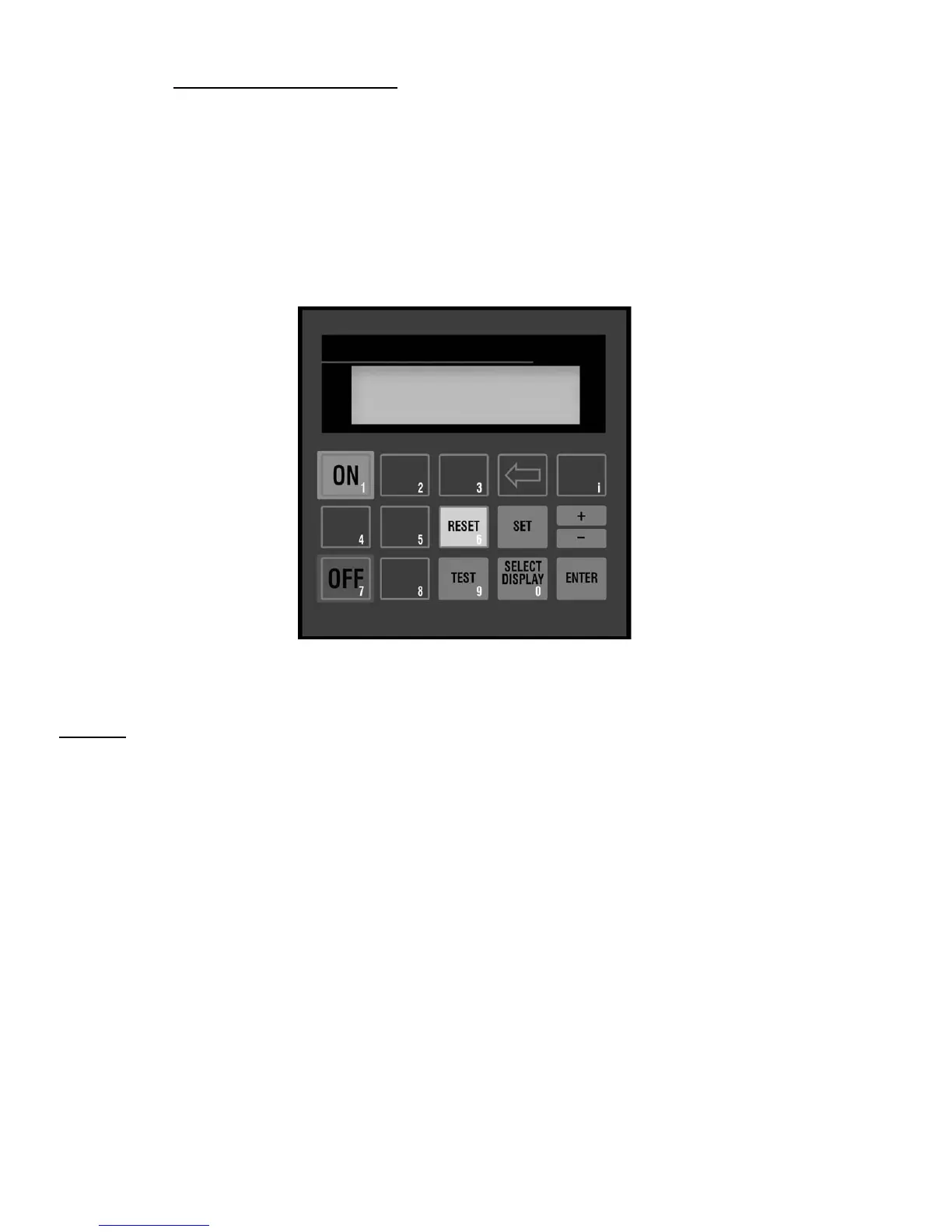
The DPC™ display provides the user with the operating parameters and their
corresponding values. The following illustration summarizes the keypad functions.
BUTTONS
• ON
Places the dryer "On Line"; Energizes glycol pump on
HeatSink™ dryers. For HeatSink™ models, the
compressor will operate based on temperature;
• OFF
Places the dryer "Off Line"; Stops all automatic functions,
including circulating pump operation on HeatSink™ dryers.
• SELECT DISPLAY
Allows the user to cycle through the available displays.
The last display selected will remain displayed as the
default display.
• + / -
Allows user to increase set point values. Set point values
cycle through a fixed range. Also allows entering negative
numbers in FACTORY MODE.
• TEST
Allows user to manually activate the drain solenoid valve.
• RESET
Pressing once clears the local alarm indication and de-
energizes the remote alarm contact. Should the alarm
condition persist, the alarm will return after the alarm
inhibit time has expired.
• SET
Permits the adjustment of parameters in TECHNICAN
and FACTORY MODES. In CUSTOMER MODE, allows
user to back through displays,
• ENTER
Used to accept changed parameters and set point
values.
• i
Restricted Level access for factory use only. Not used
for basic dryer functions. Not to be used by customer or
service technician.
CHLLR TEMP: 37


 To Next Page