4 5
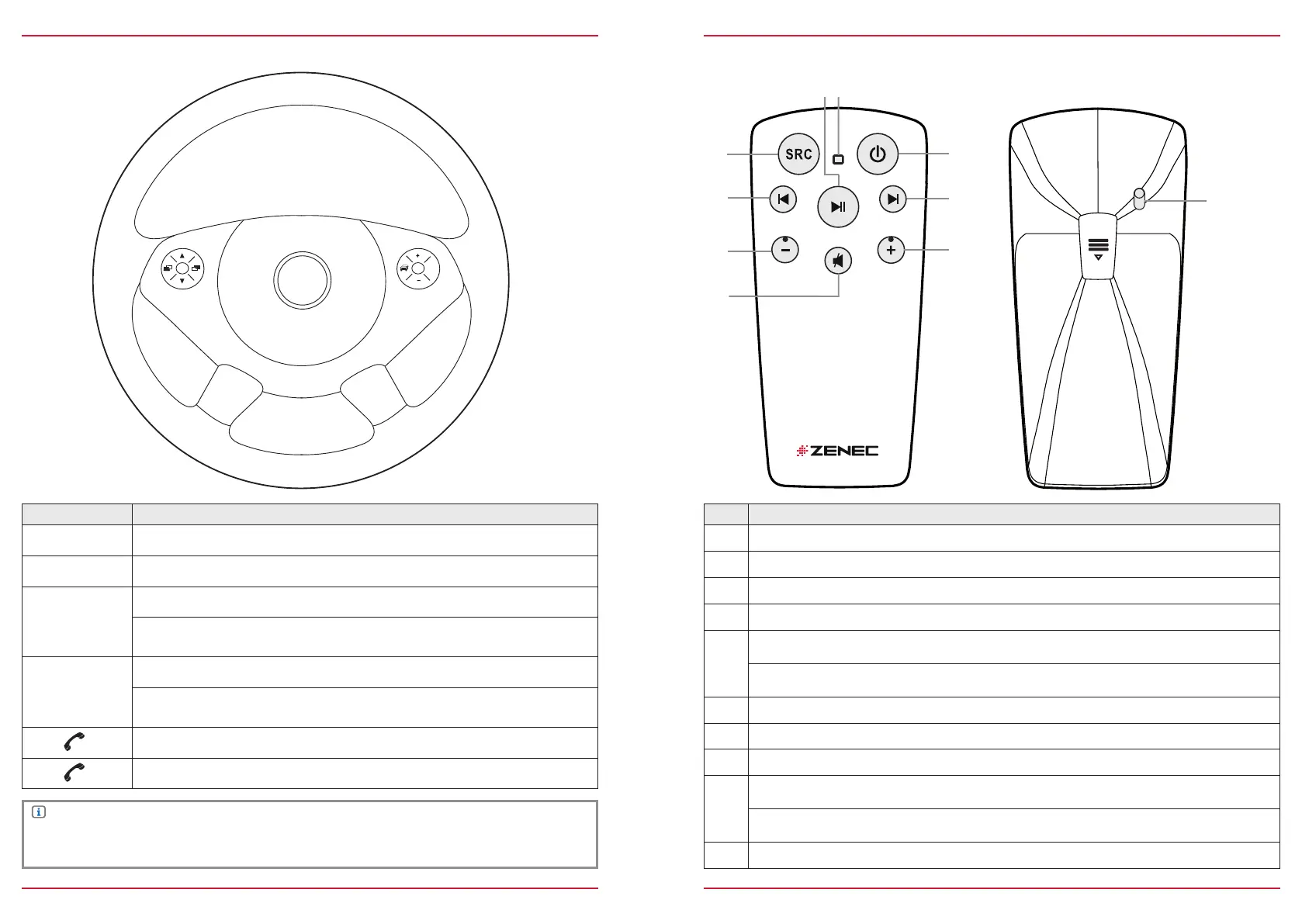
MULTIFUNCTION STEERING WHEEL
Item Function
‒
Reduce volume
+
Increase volume
▲
Radio source Press to choose the next radio station.
Media source
Press to choose the next track/title.
Press and hold to fast forward.
▼
Radio source Press to choose the previous radio station.
Media source
Press to choose the previous track/title.
Press and hold to fast rewind.
Accept call
Reject/End call
Fig. S/02
NOTE
Use of the multifunction steering wheel and other vehicle functions will require a vehicle-specific
CAN/Stalk interface. Further information may be obtained from an authorized ZENEC dealer.
REMOTE CONTROL
Item Function
Change playback source
Play/Pause
LED
Turn on/off ZENEC system
Radio source Press to choose the next radio station.
Media source
Press to choose the next track/title.
Press and hold to fast forward.
Increase volume
Mute
Reduce volume
Radio source Press to choose the previous radio station.
Media source
Press to choose the previous next track/title.
Press and hold to fast rewind.
Turn on/off remote control
Fig. S/03


 To Next Page