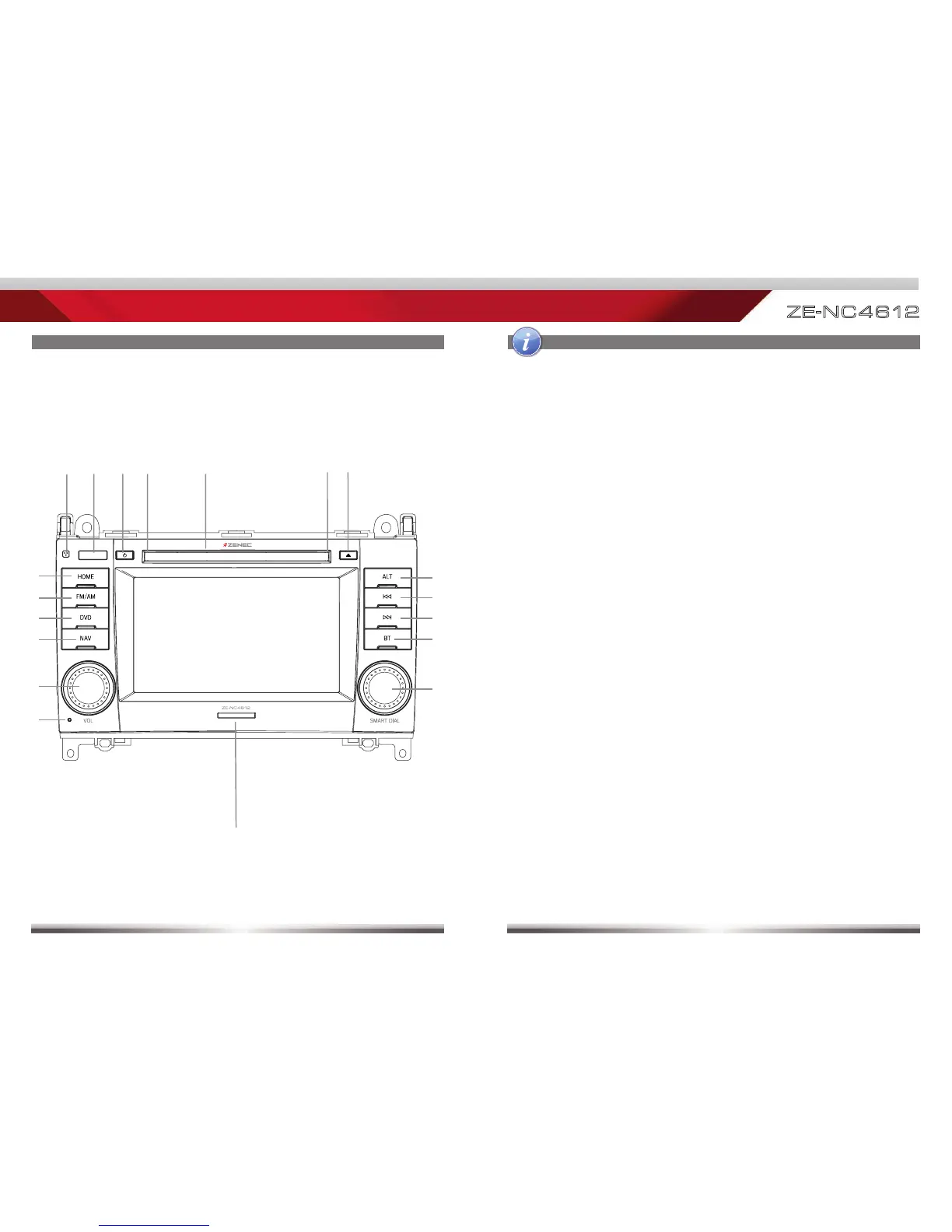
4 5
ZE
-
N C 4 612
1. INTERNAL MICROPHONE
2. IR RECEIVER
3. POWER ON/OFF
Press to power on/off device
Press to mute/unmute audio output
4. DISC INDICATOR
5. DISC SLOT
6. EJECT
Eject disc
7. HOME
Press to open Main Menu,
hold to open EQ page
8. FM/AM
Press to switch to FM/AM source
Press and hold to de- and activate
TA function
9. DVD
Press to switch to DVD source
10. NAV
Press to switch between Navigation
and playback page
Press and hold to fade in/out the
infobars manually
11. VOL
Rotate to increase/decrease volume
Press to mute/unmute audio output
12. RESET
Press to initiate a hardware reset
13. SD CARD SLOT
14. SMART DIAL
Rotate to move a cursor up and
down
Press to confirm a selection
15. BT
Press to switch to BT source
16. NEXT
Press to choose next
Track|Chapter|Station
Press and hold to fast forward
17. PREVIOUS
Press to choose previous
Track|Chapter|Station
Press and hold to fast rewind
18. ALT
Function can be set in Setup
Press and hold to open the Video
setup
FRONT PANEL BUTTONS



 To Next Page